

How to Add a Recent or Favorite Items Stack to Your Mac's Dock - MacRumorsOpen MenuShow RoundupsShow Forums menuVisit ForumsOpen Sidebar
Skip to Content

How to Add a Recent or Favorite Items Stack to Your Mac's Dock

by

Continuing our recent how-to focus on customizing the macOS Dock, in this article we're going to share with you a method for adding a recent or favorite items stack to the right of the Dock divider.
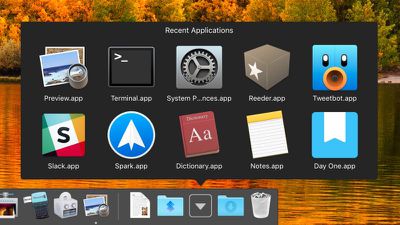
macos dock recent apps stack
Most users are aware that you can drag any folder into the right-hand side of the Dock to turn it into a stack, but the following lesser-known trick creates a unique stack type containing your most recently opened applications, documents, or servers.

Alternatively, you can also set this unique type of stack to show the Favorite folder locations and Device links that appear in your Finder's sidebar.
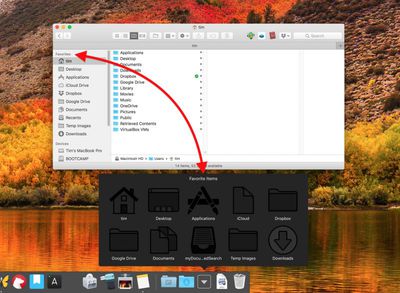
favorite finder locations dock stack
Unfortunately, you can't use stacks if you have the Dock set up to show only actively running apps. With that caveat in mind, simply follow the steps below to create the stack type that best suits your workflow. Just bear in mind that Terminal is a powerful app, so make sure you enter the commands properly, especially if you're not familiar with it.

How to Create a Recent or Favorite Items Stack

  1. Launch the Terminal app found in Applications/Utilities. (To quickly open the Utilities folder in Finder, select Go -> Utilities from the menu bar, or use the key shortcut Shift-Command-U.)

  2. Copy the following command text and paste it into Terminal at the prompt, then press Enter: defaults write com.apple.dock persistent-others -array-add '{"tile-data" = {"list-type" = 1;}; "tile-type" = "recents-tile";}'; killall Dock
    recent apps stack dock terminal command

  3. Repeat the command (hit the up arrow and press Enter) to create additional recent or favorite stacks in the Dock as required.

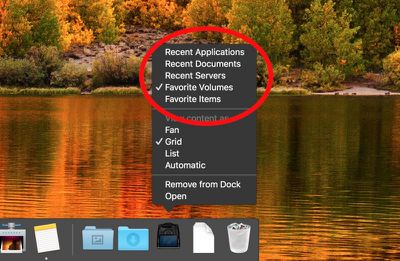
  4. To choose whether a new stack contains certain types of favorite items or recent items, right-click (or Ctrl-click) the stack and select one of the options in the pop-up menu.
    select recent or favorite item dock stack

  5. To change the default Grid view, right-click (or Ctrl-click) the stack and select one of the other options under View content as in the pop-up menu.

Note that you can change the number of items shown in a recent items stack in the following way: Click the Apple () logo in the menu bar, select System Preferences..., open the General preference pane, and choose another number from the Recent items dropdown menu.
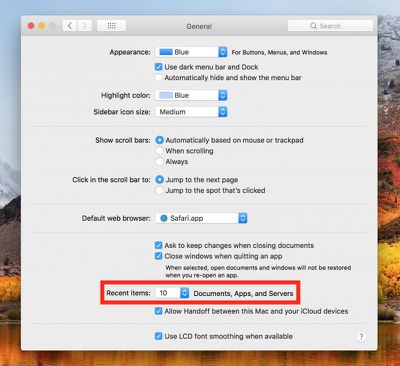
recent items shown system preference
To remove a Recent or Favorite Items stack from your Dock, simply right-click (or Ctrl-click) it and select Remove from Dock. Alternatively, click and drag the stack out of the Dock then let go of the mouse button to delete it.


Top Rated Comments

87 months ago
I upgraded my iMac to macOS 10.15 Catalina, and my recently used apps Stacks on the Dock was removed. Failed to add it back using the terminal command.
Score: 2 Votes (Like | Disagree)
87 months ago

I upgraded my iMac to macOS 10.15 Catalina, and my recently used apps Stacks on the Dock was removed. Failed to add it back using the terminal command.
Same with my MBP. Sadly.

Anyone have a work around? Over the years I've really become used to having a stack with my recent docs. Would love a way to get it back.
Score: 1 Votes (Like | Disagree)
CJM Avatar
107 months ago
[doublepost=1522662568][/doublepost]Alternately, especially if your not a geek, you can download the 'Onyx', a free app from such sites as MacUpdate and just click a box that is listed under the 'Parameters' heading and the sub-heading 'Dock. It also allows you to put the folder on the left side. I also believe 'Tinker Tool' which is a free subset APP of 'Onyx' and just contains the 'Parameters' tool.
Best to use as few apps as possible.

Thanks for the tip, Macrumors. I find that choosing 'recent servers' shows duplicates. I wonder if there's a way to prevent that.
Score: 1 Votes (Like | Disagree)

Popular Stories

HomePod mini and Apple TV Sage

New Apple TV and HomePod Mini Are 'Nearly Ready' to Launch, New Siri Remote Also Rumored

Sunday May 31, 2026 8:47 am PDT by
New models of the Apple TV 4K and HomePod mini are "nearly ready to go," according to the latest word from Bloomberg's Mark Gurman. Subscribe to the MacRumors YouTube channel for more videos. Both devices have been ready "for months," but Apple is holding off on launching them until the more personalized version of Siri is available, he said. "I am told the hardware for the next Apple TV...
Apple Foldable Thumb

First 'Confirmed' iPhone Ultra Color Allegedly Revealed in Leaked Image

Monday June 1, 2026 4:39 am PDT by
Apple is expected to launch its first foldable iPhone later this year. Rumors suggest the "iPhone Ultra" will come in two color options, and a leaker shared an image today that allegedly shows one of them. Posted on Weibo by the Chinese leaker known as Ice Universe, the image purportedly offers a first glimpse of Apple's foldable in white. The device is believed to have entered early mass...
Meta Ray Ban Glasses

Apple Glasses Reportedly Launching in 'Late 2027' With These Features

Sunday May 31, 2026 9:21 am PDT by
Apple is now aiming to release its first smart glasses in "late 2027," according to the latest word from Bloomberg's Mark Gurman. Meta Ray-Bans He previously said that Apple planned to begin shipping the glasses by early 2027, but he said the product has faced development delays. The glasses will feature "oval-shaped cameras, unique colors, and multiple frame styles," according to Gurman....

🔗 Related Apple News & Rumors

Stay updated with the latest Apple ecosystem news and verified rumors















