How to Rebuild the Spotlight Index on Your Mac - MacRumorsOpen MenuShow RoundupsShow Forums menuVisit ForumsOpen Sidebar
Skip to Content

How to Rebuild the Spotlight Index on Your Mac

by

macos spotlight icon e1542458658324Apple has enhanced Spotlight search in macOS in recent years, with the addition of Spotlight Suggestions allowing it to tap into a variety of online data sources like weather and sports. Nevertheless, helping you find apps, documents and other files stored on your Mac is still what Spotlight does best.

That's not to say its core function is infallible, however. If Spotlight can't find files that you know exist on your Mac, or if it stops prioritizing results based on your earlier searches, then it's probably a sign that your system's search index is damaged somehow.

If you're experiencing odd behavior when using Spotlight, you should try rebuilding its search database index. There are Terminal commands that will do the job, but you can achieve the same result via the regular macOS user interface in just a few quick steps. Here's how.

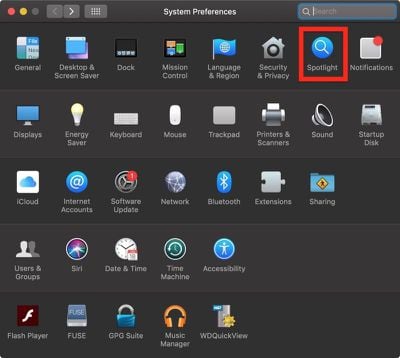
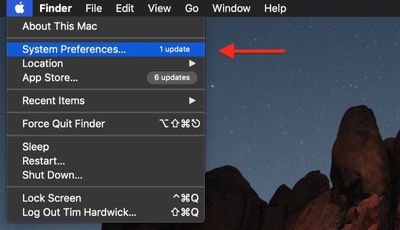
  1. Select System Preferences... from the Apple () menu at the top left of your screen.
    how to reindex spotlight00

  2. Click the Spotlight pane.
    how to reindex spotlight01

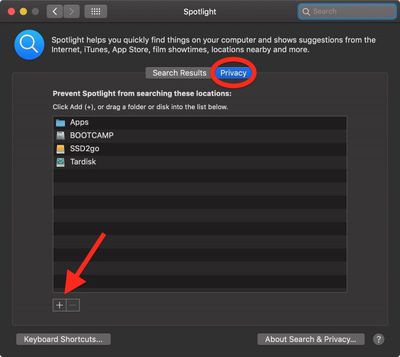
  3. Click the Privacy tab.
  4. Click the Add (+) button.
    how to reindex spotlight02

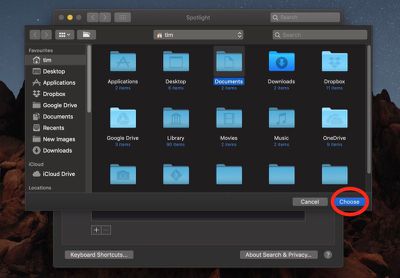
  5. Select the folder or disk whose index you wish to re-build, then click Choose. Alternatively, drag the folder or disk into the list. We've chosen Documents in our example.
    how to reindex spotlight03

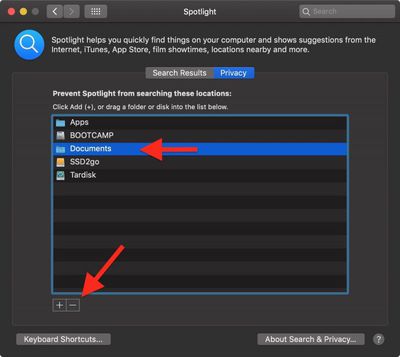
  6. In the same list, click the folder or disk that you just added and then click the Remove (-) button.
    how to reindex spotlight04

  7. Click the red traffic light button to close System Preferences.
Once you've completed these steps, Spotlight will begin reindexing the contents of the folder(s) or disk(s) you chose, which may take some time and a few processor cycles. Depending on which version of macOS you're running, you may see a rebuild progress indicator in Spotlight's menu bar item. With a bit of luck, your Spotlight problems will have been resolved once indexing is complete.

You can also perform a system-wide re-index of the Spotlight database, among many other optimizations, using Titanium Software's free Onyx utility, which is available for all recent versions of macOS.


Top Rated Comments

Weaselboy Avatar
102 months ago
You can also perform a system-wide re-index of the Spotlight database, among many other optimizations, using Titanium Software's free Onyx utility ('https://www.titanium-software.fr/en/onyx.html'), which is available for all recent versions of macOS.

You can also just run this command in Terminal and it will do a system-wide Spotlight reindex.

sudo mdutil -E /

I've tried this rebuild previously and found it did not change anything.
Anyone with different experience?
One issue I have noticed a Spotlight reindex will often fix is if you are getting an incorrect readout for Storage in System Report. If the Spotlight index is corrupted it will make that storage readout all wrong and a reindex can fix it.


Attachment Image
Score: 14 Votes (Like | Disagree)
102 months ago
It seems that Apple assumes Mac users only need to search Mac formatted drives that are connected directly to Mac computers running Mac OS. Forget about shared folders on Windows servers or read-only volumes such as NTFS drives or DVD media. Even with simple filename based searches, Mac OS 9 from 20 years ago or even Unix find seems to find filenames better than Spotlight when searching "non Apple approved" volumes.


Also, what search engine does Apple use on their own Support website? Trying to search for a simple phrase returns hundreds of pages of irrelevant results. It also seems like their website search uses implicit "OR" instead of "AND" for searches containing multiple words. It's pathetic that I have to use an external Google search to find stuff inside Apple's own website.
Score: 6 Votes (Like | Disagree)
macdaddy44 Avatar
102 months ago
This is a more extensive rebuild as it removes a possibly corrupt index database -

• mdutil -i off /
• sudo rm -rf /.Spotlight-V100
• sudo rm -rf /.Spotlight-V200
• mdutil -i on /
• mdutil -E /
Score: 6 Votes (Like | Disagree)
102 months ago
Onyx is a great utility, been using it for years. It also gives you access to enable a bunch of other hidden settings and options. For example, One option I like to enable is turning launchpad's background to greyscale. I find this makes it easier and faster to locate items on the launchpad that I don't frequently access.
Score: 5 Votes (Like | Disagree)
djlythium Avatar
102 months ago
I never knew this was possible.

I love these tutorials!
Score: 3 Votes (Like | Disagree)
102 months ago
when you combine spotlights PDF indexing with the Fujitsu Snapscan with OCR and coverflow, the results are amazeballs.

Apple should advertise this functionality. It’s an amazing paperless workflow. If apple added AI bill, business card, and receipt recognition to spotlight that would be even better.

That’s all I got to say about spotlight! Long live coverflow!
Score: 2 Votes (Like | Disagree)

Popular Stories

iOS 27 Next to iPhone

Here's When iOS 27 Rolls Out Today in Every Time Zone [Update: It's Out]

Sunday September 13, 2026 3:00 am PDT by
Update 10:04 a.m.: iOS 27 is rolling out now, though it may take a bit for all users to see it, so keep checking! Apple is about to release iOS 27, which will finally deliver more advanced Siri AI capabilities as well as a variety of other refinements, improvements, and new features to iPhones. It's Apple's biggest software update of the year, and Apple announced at Wednesday's iPhone event...
iOS 27 Icon iPhone

iOS 27 Available Now With These 8 New Features

Monday September 14, 2026 9:00 am PDT by
Update — 10 a.m. Pacific Time: Apple has released iOS 27. During its iPhone 18 Pro and iPhone Duo event last week, Apple announced that iOS 27 will be released widely on Monday, September 14. iOS 27 should be available around 10 a.m. Pacific Time / 1 p.m. Eastern Time today via the Settings app, under General → Software Update. Below, we have highlighted eight new features and...
Apple iCloud Plus expansion hero

iCloud+ Now Includes Apple TV, Apple Arcade, and Curated Apple Music Stations in Over 100 Countries

Tuesday September 15, 2026 1:43 am PDT by
Apple today announced a new subscription initiative that turns paid iCloud+ subscriptions into a broader services bundle in more than 100 countries. In select countries, Apple says every paid iCloud+ plan, including the cheapest 50GB tier, now includes Apple TV and Apple Arcade "at no additional cost," while family sharing extends the storage, TV and Arcade access to up to five people....

🔗 Related Apple News & Rumors

Stay updated with the latest Apple ecosystem news and verified rumors