

How to Use Split View in OS X El Capitan - MacRumorsOpen MenuShow RoundupsShow Forums menuVisit ForumsOpen Sidebar
Skip to Content

How to Use Split View in OS X El Capitan

by

With the recent release of OS X El Capitan, Mac users can now take advantage of full-screen apps in a split screen view. That is, a compatible app will zoom to take up an entire half of the screen and you can do the same with a second one, giving you two apps side-by-side in full-screen mode.

While the basics of Split View are simple, there are a few aspects you might want to get familiar with to make the most productive use of the feature.
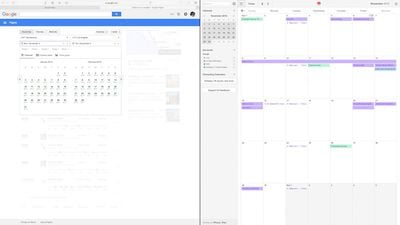
How to Split Screen Main
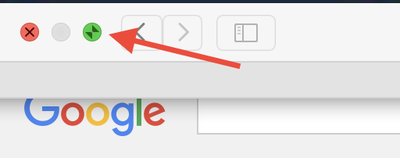
To activate Split View, click and hold on the green expand button in the upper left corner of a compatible app's window.
How to Split Screen 001
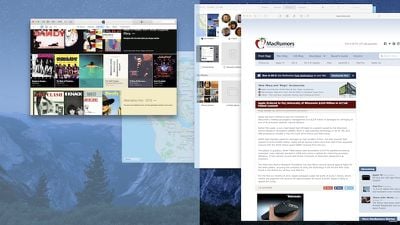
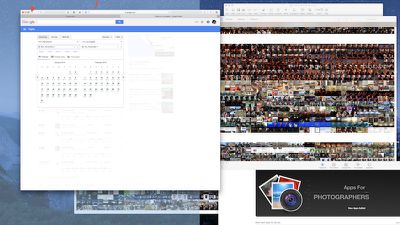
While you are holding down the button, one side of the screen will be shaded in blue. Release the button and the app will automatically format to fit half of the screen.

At the same time, any compatible apps that are open will automatically shift to the opposite side of the screen. Any apps that are not compatible will shrink down into the lower right corner of the screen. If you try to access them, you will receive a notification that the app isn't available in Split View mode.

How can you tell which apps are compatible with Split Screen and which aren't?
How to Split Screen Green Button
That green button in the upper left corner of every app window is the indicator. If the app is compatible, you'll see two opposing arrows when you hover over the button. If not, you'll see the familiar plus (+) symbol instead.

If Split View doesn't work for you, you may need to enable it in System Preferences. Click on the Apple icon in the upper left corner of the screen and select System Preferences. Click on Mission Control and then select "Displays have separate Spaces." You may have to restart your computer to update the changes.
How to Split Screen Mission Control 1
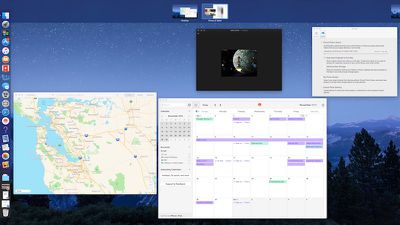
You can also enable Split View using Mission Control. When one app is in Full Screen, activate Mission Control by pressing F3 on a MacBook or Apple keyboard or swiping up with four fingers on a trackpad that has gestures enabled. When all open apps appear on the screen, select the one you wish to add to Split View and drag it to the multitasking tray at the top of the screen next to app that was previously full screen. Mission Control also works for replacing one app with another in the same way.

You can switch focus from one app to the other without using a mouse by pressing command + tab on your keyboard.

Split View doesn't mean that you have to have both apps taking up 50% of the screen. You can adjust the width by dragging the vertical line between the windows to the left or right. You can also swap apps. If you prefer working in Pages on the left side of the screen with Safari open on the right, simply drag one app to the other side and the two will switch automatically.

To find the menu bar for each app while in Split View mode, select a side and then hover the pointer over the top of the screen. The menu bar will drop down.
How to Split Screen 1
When you are ready to leave Split Screen mode, click on the green button again and the app you closed will reduce to its previous size and the remaining app will increase to full screen. You can also press the ESC key.

With Split View mode in El Capitan, you may discover your productivity will increase while you make better use of the screen space on your Mac.


Related Forum: OS X El Capitan

Top Rated Comments

144 months ago
As much as I hate saying this, its so much easier in Windows where you drag the window to the side of the screen and it snaps into place or you press windows and the arrow key where you want to go.
Its so much easier and I don't actually use this features as its a little longer to do
Score: 12 Votes (Like | Disagree)
Spink10 Avatar
144 months ago
Better Snap Tool - completely destroys this lame El Capitan feature.
Score: 5 Votes (Like | Disagree)
btrach144 Avatar
144 months ago
Microsoft did a better job of implementing this. Still a neat feature to have/use though.
Score: 5 Votes (Like | Disagree)
nezr Avatar
144 months ago
I'd rather slide through multiple desktop screens than to do split screen.
Score: 4 Votes (Like | Disagree)
4ndrw Avatar
144 months ago
BetterSnapTool. Have been using that for years (well before El Capitan was released). Way better then split view as I have the benefit of expanding any app to half the screen and still having multiple apps in the other half. I can also expand windows to just a quarter of the screen and it can all be done by dragging to the edge.
Yup. I've been using BetterSnapTool for years also.

It's fantastic.

Score: 2 Votes (Like | Disagree)
shareef777 Avatar
144 months ago
As much as I hate saying this, its so much easier in Windows where you drag the window to the side of the screen and it snaps into place or you press windows and the arrow key where you want to go.

Its so much easier and I don't actually use this features as its a little longer to do
BetterSnapTool. Have been using that for years (well before El Capitan was released). Way better then split view as I have the benefit of expanding any app to half the screen and still having multiple apps in the other half. I can also expand windows to just a quarter of the screen and it can all be done by dragging to the edge.
Score: 2 Votes (Like | Disagree)

Popular Stories

iPhone Duo Display Cracking

Apple Alerts Stores to iPhone Duo's Display Cracking Issue

Friday October 30, 2026 3:20 pm PDT by
In a memo shared with Apple Stores and Apple Authorized Service Providers this week, and later obtained by MacRumors, Apple provided technicians with guidance on how to diagnose and address the iPhone Duo's inner display cracking issue. If a customer reports the issue, Apple advised technicians to inspect the iPhone Duo and repair or replace it in accordance with their standard procedures....
iPad mini OLED feature 1

Apple Executive Comments on New iPad Mini Lacking 120Hz Display

Thursday October 29, 2026 1:47 pm PDT by
While the new iPad mini has an OLED display, the device does not support ProMotion, meaning the display's refresh rate is limited to 60Hz instead of 120Hz. ProMotion support would have allowed for the iPad mini's refresh rate to automatically adjust from 10Hz to 120Hz depending on the content being displayed, but evidently Apple has kept the feature exclusive to the iPad Pro among iPad...
Pinched iPad Mini

Apple Avoids Showing Pinched Fingers on iPad Mini Page in South Korea

Thursday October 29, 2026 11:52 am PDT by
In the U.S. and most other countries, Apple's website shows the new iPad mini being held by pinched fingers, but this is not the case in South Korea. The new iPad mini shown with pinched fingers on Apple's website in the U.S. On its South Korean website, Apple simply shows an image of the iPad mini on its own. The new iPad mini shown without pinched fingers on Apple's website in South Korea ...
Latest Stories
Apple Offers Steps to Fix Daylight Saving Time Bug on Apple Watch
1 hour ago
Apple Watch Ultra 4 Hits All-Time Low Price With Amazon's $99 Discount
20 hours ago
Reminder: Apple's Big Discount on Beats 360 Ear Cushions Ends Today
20 hours ago
Here's a New Tour of Apple's HomeView Software
20 hours ago
Apple Reveals New iPad Mini's Battery Capacity
21 hours ago
Top Stories: Apple's Big MacBook Pro, iPad mini and iMac Updates
23 hours ago
'Pluribus' Season 2 Reportedly Starts Production Today
1 day ago
iPhone 18 Pro Sales Surge in China, Offsetting Decline in U.S. and Japan
1 day ago
HomeView Software 27.2: Wallpapers, Control Center, and More
2 days ago
Apple Alerts Stores to iPhone Duo's Display Cracking Issue
2 days ago
iOS 27.3 Will Enable These Apple Intelligence Features in China
2 days ago
Apple Says iOS 27.3 Beta Coming Next Week
2 days ago
Apple's Flash Storage Suppliers Are Finally 'Getting Their Revenge'
2 days ago
14 New Things Your iPhone Can Do in iOS 27.2
2 days ago
iPhone Duo Review: One Week Later
2 days ago
Samsung Mocks iPhone Duo Display Cracks in New Ad Campaign
2 days ago
The MacRumors Show: OLED MacBook Pro, iPad Mini 8, and More
2 days ago
MacBook Pro With Touch Display: 15 More Details Revealed
2 days ago
Russia Places Apple on State Surveillance Registry
2 days ago
Halloween Weekend Brings Discounts on Apple Accessories and Pre-Orders
2 days ago
Apple Has Released More Than 25 New Products in the Past Two Months
2 days ago
Local Code Launches as Free, Private AI Assistant Tool for Mac
2 days ago
Apple Acquires Ascend.io
2 days ago
HomePod Mini 2 Launches Today: All the New Features
2 days ago
AirTag 2 4-Pack Drops to New Low Price of $69.99
2 days ago
Rian Johnson's iPhone Camera App Goes Viral
2 days ago
Where Did All the iPhone Duos Go? Mostly to Apple's Stores
2 days ago
Apple's Touchscreen MacBook Pro Could Ship 1.5M Units in 2027
2 days ago
New Apple TV 4K and iPad Mini: RAM Amounts Revealed
2 days ago
Apple Executive Comments on New iPad Mini Lacking 120Hz Display
3 days ago

🔗 Related Apple News & Rumors

Stay updated with the latest Apple ecosystem news and verified rumors










































