Night Shift, the feature first introduced in iOS devices with iOS 9.3, has expanded to the Mac with the release of 10.12.4. Night Shift is compatible with 2012 and newer Macs, so it won't work on older machines.
For those unfamiliar with Night Shift, it's designed to cut down on the amount of blue light you're exposed to during the evening by shifting the display of a Mac to a more yellow tone. Blue light is said to have a harmful effect on your circadian rhythm, making it harder to fall asleep and stay asleep.
Studies suggest that eliminating blue light exposure at night might help you sleep just a bit better, but it does significantly change the look of your display. Many Mac users have been using blue light reduction software f.lux for years now, but with Night Shift, there's no need to install an additional app because it's an operating system feature.
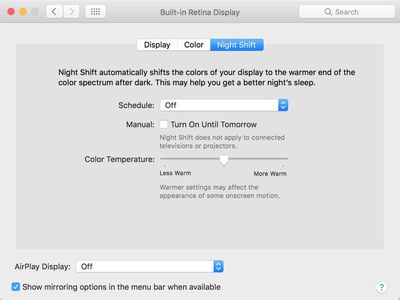
Night Shift's controls can be a little bit difficult to find when you go to use the feature for the first time. The Night Shift options are located in the display section of System Preferences.
Click on the Apple icon in the menu bar and select System Preferences.
Choose the "Displays" icon.
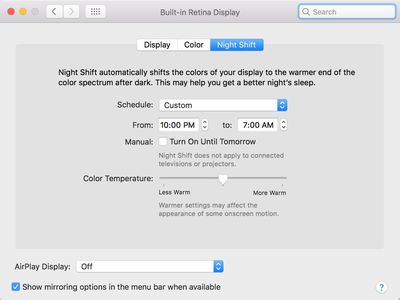
There are three tabs in this menu: Display, Color, and Night Shift. Choose Night Shift.
From the "Schedule" option, choose either "Sunset to Sunrise" or "Custom."
As the name suggests, the "Sunset to Sunrise" option causes Night Shift to turn on automatically each night when the sun sets and turn off when the sun rises. It's based on your local sunset and sunrise times. This option requires your location to be enabled in Security & Privacy Preferences so your Mac knows where you are in the world.
The "Custom" option lets you choose a specific start and end time for Night Shift to turn on. With a custom setting, it will turn on and off at the same time each night based on the time that you choose.
Adjusting Color Temperature
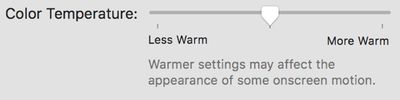
In the same section System Preferences that's used to turn Night Shift on, there's also an option to adjust the color temperature of the feature to your liking.
By default, the temperature is set to the middle, but if you drag the slider to the left, you'll get more blue light, and if you drag it to the right, you'll get a deeper yellow shade with less blue light.
Apple warns that using the warmer end of the spectrum could affect the appearance of some onscreen motion.
Night Shift Quick Toggle
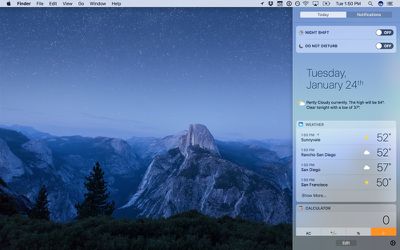
If you want to manually enable or disable Night Shift, there are two ways to do it. You can use the "Manual" setting in System Preferences to force Night Shift to turn on, or you can use the Notification Center, which is quicker. For the Notification Center:
Click on the Notification Center menu bar icon, which is denoted by three lines. It'll open to the Today view.
Scroll up to the top of the Notification Center.
Click on the "Night Shift" toggle to turn the feature on or turn it off.
Choosing one of the manual toggle options when Night Shift is off will toggle it on until sunrise (or a custom set time) no matter what time it is. Toggling it off will turn it off completely.
Siri
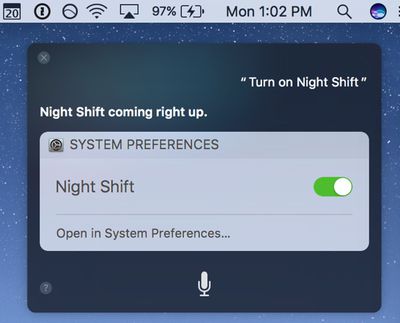
Siri, introduced in macOS Sierra, can be used to turn Night Shift on or off. Click the Siri button in the menu bar or the dock and say "Turn on Night Shift" or "Turn off Night Shift" to control the Night Shift feature.
External Monitors
Night Shift extends to external displays that are connected to your Mac, shifting the temperature to a warmer tone to match the Mac's display. It is not an individual option that can be applied to a display, but rather mirrors the Mac setting.
Night Shift does not extend to connected televisions or projectors, however, nor does it always work reliably with an external display.
Compatibility
Night Shift works with Macs manufactured in 2012 and later and it is not available on older machines. A full list of devices that support Night Shift is below:
MacBook (Early 2015 or newer)
MacBook Air (Mid 2012 or newer)
MacBook Pro (Mid 2012 or newer)
Mac mini (Late 2012 or newer)
iMac (Late 2012 or newer)
Mac Pro (Late 2013 or newer)
Apple LED Cinema Display
Apple Thunderbolt Display
LG UltraFine 5K Display
LG UltraFine 4K Display
Limitations
There is no option to toggle Night Shift on and off for specific apps, so if you wanted to be able to do something like turn Night Shift off when you use Photoshop or watch videos, there's no way to do it. It's all or nothing.
Correct me if I'm wrong but it doesn't seem to work on older MacBook Pros, I can't find the Night Shift tab on my late 2011 13" MacBook Pro.
Not wrong ... Apple are intentionally devaluing older hardware ... no actual reason for this missing feature ... flux has been working fine on my 2010 MBP a long time ... the hardware can handle it ... unless Apple are saying that their engineers cannot do what flux clearly can!!!
It used to be that hardware was not intentionally made obsolete in terms of features ... unless there was no choice.
I was able to turn on Night Shift on my late 2010 Air using instructions I found on https://pikeralpha.wordpress.com/2017/01/30/4398/
So far it works.
Thanks for the link! Used the instructions to enable Night Shift on my 15" MacBook Pro (Early 2011). It works perfectly! I created a step-by-step guide to make things a bit clearer.
I can understand features that require more up to date versions of bluetooth, etc, not working on older Macs, but this is about people's sleep and therefore their health. So to disable it on on older Macs is grotesquely cynical. Seriously disappointed with Apple over this.
I see an opportunity for an app. You could cobble this up for pre-2012 Macs. You could do it in Applescript... if the time is x or later then change the hue of the monitor so that it's the same pink as nightshift. SURELY somebody has already done this?
Friday October 30, 2026 3:20 pm PDT by Joe Rossignol
In a memo shared with Apple Stores and Apple Authorized Service Providers this week, and later obtained by MacRumors, Apple provided technicians with guidance on how to diagnose and address the iPhone Duo's inner display cracking issue.
If a customer reports the issue, Apple advised technicians to inspect the iPhone Duo and repair or replace it in accordance with their standard procedures....
Thursday October 29, 2026 1:47 pm PDT by Joe Rossignol
While the new iPad mini has an OLED display, the device does not support ProMotion, meaning the display's refresh rate is limited to 60Hz instead of 120Hz.
ProMotion support would have allowed for the iPad mini's refresh rate to automatically adjust from 10Hz to 120Hz depending on the content being displayed, but evidently Apple has kept the feature exclusive to the iPad Pro among iPad...
Thursday October 29, 2026 11:52 am PDT by Joe Rossignol
In the U.S. and most other countries, Apple's website shows the new iPad mini being held by pinched fingers, but this is not the case in South Korea.
The new iPad mini shown with pinched fingers on Apple's website in the U.S.
On its South Korean website, Apple simply shows an image of the iPad mini on its own.
The new iPad mini shown without pinched fingers on Apple's website in South Korea ...




















































Top Rated Comments
It used to be that hardware was not intentionally made obsolete in terms of features ... unless there was no choice.
View the steps here:
https://pikeralpha.wordpress.com/2017/01/30/4398/#comment-9146
So far it works.
Seriously disappointed with Apple over this.