How to Use Night Mode When Taking Portrait Shots on iPhone - MacRumorsOpen MenuShow RoundupsShow Forums menuVisit ForumsOpen Sidebar
Skip to Content

How to Use Night Mode When Taking Portrait Shots on iPhone

by

Apple's newer iPhones, beginning with the iPhone 12 mini, ‌iPhone 12‌, ‌iPhone 12 Pro, and ‌iPhone 12 Pro‌ Max, are equipped with a photography feature called Night Mode, which is designed to take crisp, clear photos even when lighting conditions are poor, such as at night.

‌Night Mode‌‌ originally debuted in the iPhone 11 series, but its use was limited to the rear-facing wide-angle camera. With ‌iPhone 12‌, however, Apple has extended ‌‌Night Mode‌‌ functionality to all the lenses, and if you have an iPhone 12 Pro and iPhone 12 Pro Max, you can take advantage of the LiDAR Scanner's advanced photography smarts to unlock ‌Night Mode‌ Portraits, too.

Apple nightmode demo photography 10132020
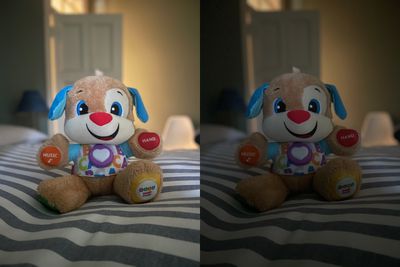
Apple's Portrait Mode has become a popular way of taking impressive shots using a depth-of-field effect known as bokeh, allowing iPhone users to shoot a photo that keeps the subject sharp with a blurred background. With the addition of ‌Night Mode‌, iPhone 12 Pro can automatically brighten Portrait shots while preserving the night time feeling, balancing the light and dark elements of an image.

Here's how to take a Portrait shot using ‌‌Night Mode‌ on iPhone 12 Pro and ‌iPhone 12 Pro Max‌‌.

  1. Launch the Camera app on your iPhone 12 Pro or ‌iPhone 12 Pro Max‌.
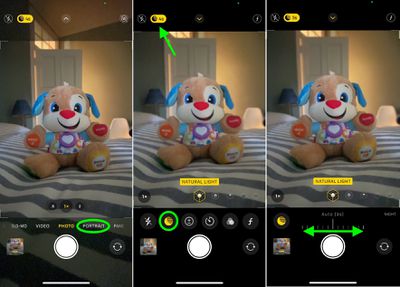
  2. Select Portrait below the viewfinder.
  3. If the flash icon is yellow in the top-left corner of the screen, tap it to turn it off.
  4. Look for the ‌Night Mode‌ icon at the top of the viewfinder – it looks like a crescent moon. If the ambient light is low, ‌‌Night Mode‌‌ will automatically engage and the icon will be yellow. If it's not engaged but you think your portrait would still benefit from ‌‌Night Mode‌‌, simply tap the button. If you don't see the ‌Night Mode‌ icon at all, there's too much light and you won't be able to use it.
    camera

  5. If you manually engaged ‌Night Mode‌, you can adjust the exposure time with the slider just above the shutter button. If ‌Night Mode‌ automatically engaged then the exposure time is already selected, but you can adjust it yourself by tapping the yellow moon icon and moving the horizontal dial.
  6. Tap the shutter button and hold your iPhone still while the exposure time runs and your Portrait picture is taken.

By recruiting the help of the gyroscope in your ‌iPhone 12 Pro‌, ‌‌Night Mode‌‌ can detect when the device is attached to a tripod and will present longer exposure times than normally offered, enabling you to take more detailed shots in very low light.

portrait night mode vs non night mode

‌Night Mode‌ portrait (left) vs regular portrait

When taking ‌‌Night Mode‌‌ shots during handheld use, you'll usually see 1-3 second delay and you can manually select up to a 10-second delay, but with a tripod you may see up to 30 seconds available in the Night mode dial.

Top Rated Comments

synergize Avatar
74 months ago
Took some Night Mode photos last night. The bright light in the sky is the moon and it was dark outside. The light casting shadows in the picture is from 2 street lamps about a 1/4 mile away. The camera works great and that was only my 3rd photo...I am impressed. How dark was it outside by the car? If you dropped a coin on the ground you would not be able to find it!


Attachment Image
Score: 8 Votes (Like | Disagree)
74 months ago
Once you know what the icons mean it is pretty easy to use. But i feel like Apple doesn't really tell you in the App. (Or i missed it)
Score: 6 Votes (Like | Disagree)
74 months ago
Night mode is great. Got this shot last night in Marblehead, OH (Lake Erie) with the Blue Moon as well.

Attachment Image
Score: 4 Votes (Like | Disagree)
74 months ago
Nice article! I was wondering how the various camera controls worked. Needed this info last night for Halloween photos. :)
Score: 2 Votes (Like | Disagree)
74 months ago

Err, correct me if I’m wrong, but the regular iPhone 12 also supports night mode on the front camera....
They stated that in the article in the second paragraph...


Night Mode‌ originally debuted in the iPhone 11 series, but its use was limited to the rear-facing wide-angle camera. With ‌iPhone 12‌, however, Apple has extended ‌Night Mode‌ functionality to all the lenses, and if you have an iPhone 12 Pro and iPhone 12 Pro Max, you can take advantage of the LiDAR Scanner's advanced photography smarts to unlock Night Mode Portraits, too.

Score: 2 Votes (Like | Disagree)
TheYayAreaLiving 🎗️ Avatar
74 months ago
Great article. Thank you. Will def check it out.

Score: 2 Votes (Like | Disagree)

Popular Stories

Apple Acquires Award Winning App Play Feature

Apple Acquires Award-Winning App 'Play'

Monday June 29, 2026 7:39 am PDT by
In February, Apple notified the European Commission that it would be acquiring certain assets from and have the right to hire certain employees from Rabbit 3 Times, the company behind the award-winning app design tool Play. The notification was published on the European Commission's website this week, following a four-month waiting period. Play was a Mac and iPhone app that allowed designers ...
American Express Gold Apple Pay Feature

American Express Announces New Apple Pay Feature

Tuesday June 30, 2026 10:27 am PDT by
American Express today announced that you can now redeem Membership Rewards points when checking out with Apple Pay on the web and in apps on the iPhone and iPad. When checking out with Apple Pay on iOS 18 or iPadOS 18 or later, tap on your eligible American Express card (Platinum, Gold, Green, and others) and select the Membership Rewards points option. You can use points to cover all or...
series 10 apple watch titanium digital crown

Report: Apple Watch Redesign Coming Next Year With New Band System

Tuesday June 30, 2026 8:45 am PDT by
A "major overhaul" of the Apple Watch's design is due to arrive next year with a new system for connecting bands, according to a known Weibo leaker. In a set of recent posts, the leaker known as "Instant Digital" linked the new claim to older rumors about an "Apple Watch X" model, which was said to introduce a fresh design and break compatibility with the existing watch band system. Citing...

🔗 Related Apple News & Rumors

Stay updated with the latest Apple ecosystem news and verified rumors