

In just a couple of weeks, Apple is going to make it ridiculously easy for Android users to switch to iOS with an upcoming app alongside iOS 9 called "Move to iOS." It will give Android users the ability to wirelessly migrate contacts, message history, photos and videos, web browser saves, mail, calendars, and more. Until then, we have to do these things manually.
Luckily, it isn't difficult to switch from Android to iOS. It just takes a few extra steps to get all of the data you want from one device to the other. We've got a guide for helping you transition from Android to iOS as simply as possible.
Before following any of the instructions below, be sure to back up your Android device to ensure that you don't lose any important data in the event that something goes wrong during the migration process.
Transferring Contacts, Mail, and Calendars
Luckily, Google makes it incredibly simple for you to sync your email, calendar, and contact information across practically any device. So, if you've been on Android for long enough, chances are most of your data is easily available to sync on iOS.
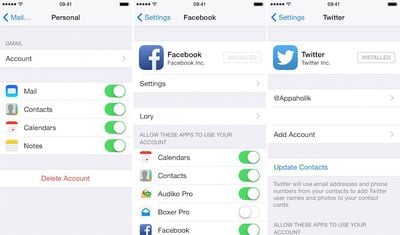
- Open the Settings app and tap Mail, Contacts, Calendar from the list of available options.
- Tap "Add Account." Then select Google from the list of available options.
- Enter the required information, including your email address, password, and description.
- When prompted, toggle the Contacts and Calendars switch to the on position.
You can also include contacts and calendar information from Twitter and Facebook, which will sync with your native apps.
- Download Facebook and Twitter from the App Store.
- Open the Settings app on your iPhone and tap Facebook or Twitter from the list of available options.
- Sign into the account to allow iOS to have access to those social media features throughout your device.
- With Facebook, allow the app to use your Calendars and Contacts app and your events and Facebook friends will be synced with those apps.
- With Twitter, tap "Update Contacts" to sync user names and photos to your current contact cards.
Transferring Photos and Videos
Once you make the switch to iOS, you will need an iTunes account to purchase and download content, as well as sync your device (even if you only sync over Wi-Fi). You should download iTunes on your PC or Mac to start so you can easily use it with your iPhone. Once downloaded, you can use iTunes to transfer photos and videos from your Android device to your iOS device.
- Connect your Android device to your computer and find the photos and videos you wish to move. Drag the files to a folder on your computer designated for this purpose.
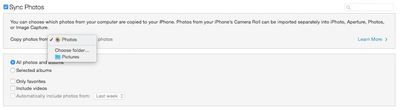
- Connect your iOS device to your computer and open iTunes (it usually opens automatically). Then, select Photos from the Settings menu for your device.
- Check the "Sync Photos" box. Then select the dropdown menu under "Copy photos from" and choose the folder where you saved your Android photos. If you are moving videos, be sure to select "Include Videos.
- Click Apply to sync your device.
Transferring Music
Transferring music works similarly to transferring photos and video. You can export your music files from Android and then import them to your iOS device via iTunes. Be sure you have the most recent version of iTunes downloaded onto your computer.
- Connect your Android device to your computer and find your music. Drag the files to a folder on your computer designated for this purpose.
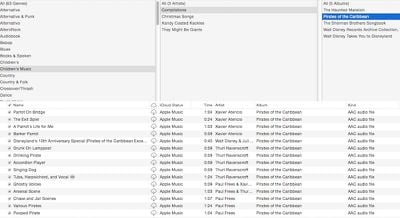
- Open iTunes and select the Music section. Then, open the folder where you saved your music filed from your Android Device.
- Drag the files to the Music view in iTunes.
- Connect your iOS device to your computer and select it in iTunes. Then, click on the Music tab.
- Check the Sync Music box. Then, choose to sync your entire library, or select specific songs to add. If you turn on iCloud Music Library, the new songs will be available to stream or download right on your device.
Transferring Books and PDFs
If you have any ePub books or PDFs stored on your Android device, you can also move them to your iOS device similar to moving photos and music.
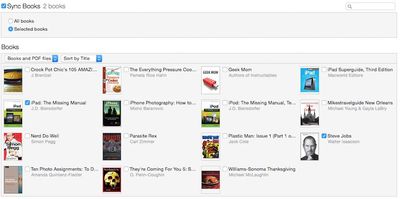
- Connect your Android device to your computer and find your ePub and PDF files. Drag the files to a folder on your computer designated for this purpose.
- Open iTunes and select the iBooks section. Then, open the folder where you saved your music filed from your Android Device.
- Drag the files to the Book view in iTunes.
- Connect your iOS device to your computer and select it in iTunes. Then, click on the Books tab.
- Check the Sync Books box. Then choose to sync all of your books, or select the ones you wish to add to your iOS device.
Transferring Microsoft Documents (Word, Excel, PowerPoint)
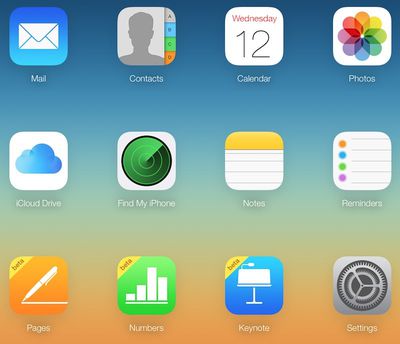
You can move documents from Word, Excel, and PowerPoint from your Android device to your iOS device via iCloud.com. First, you will need to install Pages, Keynote, and Numbers for iOS on your new device. Then sign in to iCloud on your device.
- Open the Settings app on your iPhone. Then, select iCloud and tap "Account. Then, sign in using your Apple ID.
- Go back to the main page of the Settings app and select the app you wish to upload files to (Pages, Numbers, or Keynote). Then toggle the "Use iCloud" switch to the on position.
- Connect your Android device to your computer and find your Microsoft documents (Word, Excel, or PowerPoint). Drag the files you wish to transfer to a folder on your computer designated for this purpose.
- On your computer, go to iCloud.com and sign in with your Apple ID.
- Click the app you wish to upload the files to (Pages, Numbers, or Keynote). Then, drag the Microsoft files from your computer to the Apple counterpart app.
- In iCloud, documents sync automatically and will be available on your iOS device immediately.
Transferring Apps
Unfortunately, the biggest loss you will probably experience when switching from Android to iOS is that you cannot transfer those purchased apps from one platform to another.
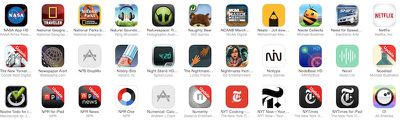
In iOS 9, Apple will in the case of free apps automatically suggest downloading corresponding iOS versions of the Android apps found on your phone. Paid apps will automatically be added to your App Store wish list where you can browse and purchase them as you like.
But for now, the only way to get apps from the App Store that you downloaded from Google Play is to search for them and add them manually. If it is cost prohibitive to purchase all of your apps at one time, add them to your wish list and buy them later.
Even though it takes a little time, you can switch from Android to iOS relatively easy, as long as you are willing to go through the steps. With the upcoming Move to iOS app, it's about to get even easier, and we'll have more on that when it becomes available.


















































Top Rated Comments
Ask Google to give it back.
Don't get me wrong, I'm not faulting Apple here, it would just be nice to be able to download one App across devices, including my desktop ones.