How to Merge and Remove Duplicate Contacts in macOS and iCloud - MacRumorsOpen MenuShow RoundupsShow Forums menuVisit ForumsOpen Sidebar
Skip to Content

How to Merge and Remove Duplicate Contacts in macOS and iCloud

by

contacts iconIf you've been maintaining and migrating the same Contacts list across Macs over the years then you've probably come across your fair share of duplicate contact cards. They can also appear seemingly out of nowhere after setting up iCloud Contacts on your Mac for the first time.

Unless you intentionally keep certain information for the same contact separated out for whatever reason, duplicate cards will add nothing but irritation to your day, so here we're going to show you how to merge and/or remove them, whether you're sat at your Mac or not.

How to Merge and Remove Duplicate Contacts on your Mac

As with any computer procedure that involves deleting data, make sure you have a backup of your system before following these steps.

  1. Launch the Contacts app on your Mac (found in Applications/Contacts).
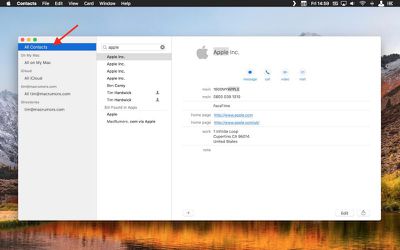
    mac duplicates 1

  2. In the Groups pane on the left, make sure All Contacts is selected at the top of the list. (If the Groups view is hidden, select the menu bar option View -> Show Groups to reveal it.)

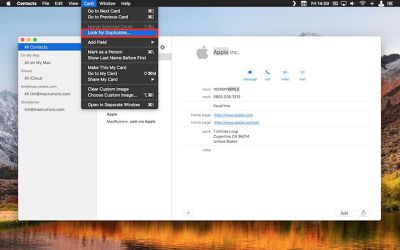
  3. From the menu bar, select Card -> Look for Duplicates....
    mac duplicates 2

  4. A dropdown dialog will appear telling you how many duplicate cards were found that either have the same name but contain different information, or have both the same name and the same information. To merge the duplicate cards and information, click the Merge button.
How to Remove Duplicate iCloud Contacts on PC and Mac

If you don't have access to your Mac you can remotely delete duplicate entries in your Contacts list in the following way. Oddly, there's no way to select multiple contacts on an iPhone or iPad running iOS 11, so this manual method is the best workaround, although bear in mind it only applies to contacts synced to ‌iCloud‌.

  1. Launch a web browser on your device or computer.

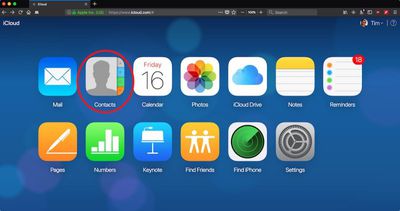
  2. Navigate to icloud.com.

  3. Sign in using your ‌iCloud‌ credentials.

  4. Click Contacts.
    Screen Shot 2 1

  5. Select All Contacts in the upper left corner of the screen.

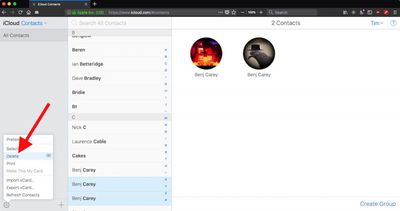
  6. Hold down the Command (⌘) key and manually click the duplicate cards you want to delete.
    icloud

  7. Click the cog icon in the lower left corner and select Delete from the popup menu.

  8. Confirm you want to remove the selected contacts by clicking the Delete option in the dialog pane.
Tag: iCloud

Top Rated Comments

NightFox Avatar
108 months ago
So is there no way to check the duplicates before you allow them to be merged, or select which ones you want to be merged?
Score: 9 Votes (Like | Disagree)
garrick2007 Avatar
108 months ago
The last time I did that, I ended up losing some of my contacts permanently.
File>Export>Contacts Archive
Score: 6 Votes (Like | Disagree)
102 months ago
...back in the day I used to have 2 giant Rolodex's - and it was quite a job keeping those updated - or even figuring out where I put the contact info - company or contact name? - lol
:)

Back in the day, Apple used to allow us to connect and manually sync...accurately. Nowadays, their "support" can't even do anything other than tell you they are a "senior advisor" over and over. :rolleyes::mad:
Score: 4 Votes (Like | Disagree)
Kaaarl Avatar
108 months ago
FullContact ('http://FullContact') is a nice service to get rid of duplicates and get all your address books in sync. I use it daily and don't have any duplicates in my contacts anymore.
Score: 3 Votes (Like | Disagree)
Abazigal Avatar
108 months ago
The last time I did that, I ended up losing some of my contacts permanently.
Score: 3 Votes (Like | Disagree)
108 months ago
This should be automatic. It’s a bug.
Score: 3 Votes (Like | Disagree)

Popular Stories

iCloud General Feature Redux

Apple Faces £3 Billion UK Trial Over iCloud Lock-In Claims

Thursday May 7, 2026 1:56 pm PDT by
Apple was not able to narrow the scope of a UK lawsuit accusing it of locking 40 million UK consumers into iCloud, to the detriment of third-party cloud storage providers. British consumer group Which? first filed the lawsuit in late 2024, and is asking for £3 billion for UK Apple customers. Apple wanted to exclude non-paying iCloud users from the lawsuit, but the tribunal denied Apple's...
iphone 17 pro black feature

iPhone 18 Pro's Camera Upgrade Will Cost Apple 50% More

Friday May 29, 2026 3:44 am PDT by
The iPhone 18 Pro and iPhone 18 Pro Max's all-new variable aperture lens will cost Apple 50% more than the camera unit used in current models, according to supply chain analyst Ming-Chi Kuo. Variable aperture has been one of the most persistent iPhone camera rumors of the past few years. Kuo first flagged the feature in late 2024, and it has since been corroborated by multiple reports and...
HomePod mini and Apple TV Sage

New Apple TV and HomePod Mini Are 'Nearly Ready' to Launch, New Siri Remote Also Rumored

Sunday May 31, 2026 8:47 am PDT by
New models of the Apple TV 4K and HomePod mini are "nearly ready to go," according to the latest word from Bloomberg's Mark Gurman. Subscribe to the MacRumors YouTube channel for more videos. Both devices have been ready "for months," but Apple is holding off on launching them until the more personalized version of Siri is available, he said. "I am told the hardware for the next Apple TV...

🔗 Related Apple News & Rumors

Stay updated with the latest Apple ecosystem news and verified rumors