

Make Live Photos Loop, Bounce, and More on iPhone - MacRumorsOpen MenuShow RoundupsShow Forums menuVisit ForumsOpen Sidebar
Skip to Content

Make Live Photos Loop, Bounce, and More on iPhone

by

Apple's Live Photos, introduced in 2015, are photos that capture 1.5 seconds of video before and after you take a picture, with the aim of adding a little bit of life and movement to still images.
iphone 16 camera
Since introducing Live Photos, Apple has added some effects to its Photos app that let you turn them into fun animated clips, which you can then share with family, friends, or the wider world.

There are three effects in total that you can try on your own Live Photos. Loop repeats the action in a continuous looping video, Bounce rewinds the action backward and forward, and Long Exposure simulates a DSLR-like long exposure effect by blurring motion.

The following steps show how you can apply them to your own Live Photos on iPhone and iPad.

  1. Open the Photos app and select a Live Photo. (If you look under "Media Types" in the Albums section, you'll find all of your Live Photos collated in a folder of the same name.)
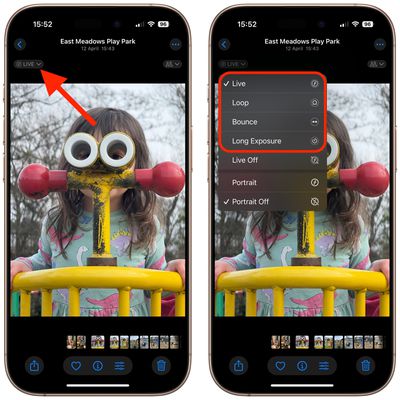
  2. With the Live Photo open, tap the LIVE icon in the top-left corner of the interface.
  3. From the dropdown menu that appears, choose from Live (the default), Loop, Bounce, Long Exposure, and Off.
photos

The effect you choose will be applied immediately, ready for you to share your creation using the Share icon in the bottom-left corner of the screen.

It's worth noting that with Live Photos, if you get a blurry image, you can open it up and see if other frames you captured are clearer, and then select a replacement "key photo" for it. Click the link to learn how it's done.


Top Rated Comments

racerhomie Avatar
15 months ago
Live Photos are one the reasons I never got a Digital Camera after the iPhone 6S. There is something very powerful about having a Live Photo, that even a higher quality Standalone Camera can’t replicate. I would say it’s a bit of Apple Magic!

Score: 4 Votes (Like | Disagree)
15 months ago
What I need from Live Photos is a way to turn it off relatively permanently. I shoot RAW still images and hate the fact that an inadvertent display touch or whatever shifts to Live Photos (RAW captures contain far more still image data).

I do not object to Live Photos being an available choice for other photogs, because they are a useful tool for amateur pix of kids and pets. I just need a method to make inadvertent shifts to Live Photos mode impossible. Ideally, I would have to dive deep into some menu(s) if I ever wanted to get out of pure RAW still image captures.
Score: 4 Votes (Like | Disagree)
uacd Avatar
15 months ago
Moreover, you can even take it further and make a .gif from it via shortcuts! (Not sharing the shortcut because it might be against the rules, so you can simply replicate it). Oh btw you can also add “open recent photos” at the end so it will take you straight to your newly-created .gif. Quality is pretty bad compared to live photo but can be fun for sharing on social platforms!


Attachment Image
Score: 3 Votes (Like | Disagree)
15 months ago
Nice article. I usually keep Live photos off. Will turn it on and try these out.
Score: 2 Votes (Like | Disagree)
15 months ago
I keep turning Live Photos off. And magically it comes back on after a while. Usually after a system update. Personally, I think it's a ploy from Apple to sell more iCloud storage.
Score: 2 Votes (Like | Disagree)
sw1tcher Avatar
15 months ago

Not sure why, but on the iPhone 16 Pro Max running iOS 18.5, these instructions don't work.
Do you have any Live Photo saved in your Photos app? If not, take a Live Photo. Then go to Photos app to view that Live Photo. You should then be able to see that "Live" icon near upper left corner.
Score: 2 Votes (Like | Disagree)

Popular Stories

Apple Event Logo

Apple Working on All-New Operating System

Wednesday July 29, 2026 11:39 am PDT by
Apple is developing an all-new operating system that is essentially a mix of tvOS, watchOS, and iOS, according to Bloomberg's Mark Gurman. In a report this week, he said the operating system will feature a grid of icons, widgets, and apps, along with customizable clock faces. The new software platform is intended for Apple's long-rumored smart home hub. With built-in facial recognition,...
imac video apple feature

Apple Made Its Second-Biggest Acquisition Ever This Year

Wednesday July 29, 2026 12:03 pm PDT by
Apple this year acquired Israeli startup Q.ai for close to $2 billion, according to the Financial Times. That would make this Apple's second-biggest acquisition ever, after it paid $3 billion for the popular headphone maker Beats in 2014. This is also the largest known Apple acquisition since the company purchased Intel's smartphone modem business and patents for $1 billion in 2019. Q.ai...
Dynamic Island iPhone 18 Pro Feature

iPhone 18 Pro: Twelve Changes Coming to Apple's Next Flagship

Thursday July 30, 2026 3:43 am PDT by
We're less than two months out from the launch of Apple's premium next-generation smartphone lineup, and while we're not expecting a dramatic change in terms of functionality, there are still several enhancements rumored to be coming to the iPhone 18 Pro and iPhone 18 Pro Max. One thing worth noting is that Apple is reportedly planning a major change to its iPhone release cycle this year,...

🔗 Related Apple News & Rumors

Stay updated with the latest Apple ecosystem news and verified rumors










































