How to Link Shazam to Your Spotify Account - MacRumorsOpen MenuShow RoundupsShow Forums menuVisit ForumsOpen Sidebar
Skip to Content

How to Link Shazam to Your Spotify Account

by

Shazam is an Apple-owned popular service that can identify the names and lyrics of songs, music videos, TV shows, and more, simply by listening to and deciphering whatever is playing.
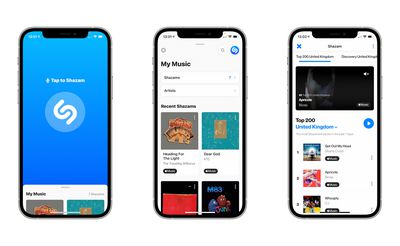
shazam 14
After you've identified songs in the Shazam app by pressing the big Shazam button, you can use streaming services like Spotify and Apple Music to listen to them. In this article, we're going to show you how to link Shazam to your Spotify account.

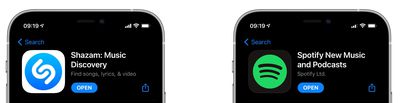
  1. First, make sure you have the Spotify and Shazam apps downloaded on your iPhone, iPad, or iPod touch, otherwise you won't be able to connect the two services. Both apps are available on the App Store.
    shazam spotify app store

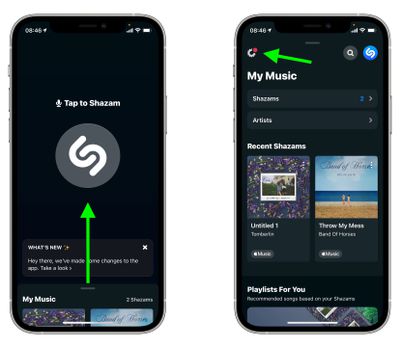
  2. Next, launch the Shazam app on your iOS device, then swipe up to My Music from the main Shazam screen and tap the Settings button (the cog icon in the upper left corner of the screen).
    Shazam

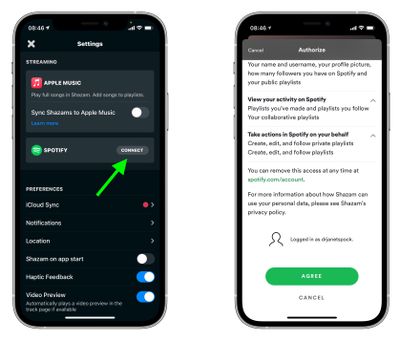
  3. In Settings, tap Connect next to Spotify, then when Spotify opens, scroll down and tap the green Agree button to authorize the link.
    Shazam

Once you've connected Shazam to your Spotify account, you can listen to your Shazams in full. In Shazam, tap the play button next to a song to listen to a 30-second preview. To listen to the whole song in Spotify, tap Spotify next to a Shazam or when viewing a Shazam in fullscreen.
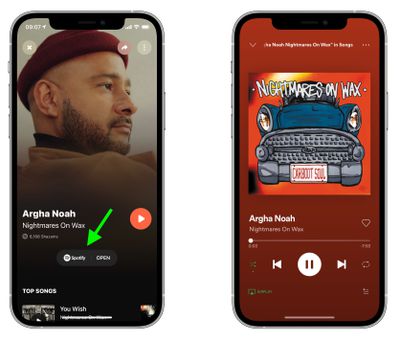
Shazam
You can also get Shazam to create a "My Shazam Tracks" playlist in Spotify. Simply go into Shazam's Settings and toggle the switch next to Sync Shazams to Spotify to the green ON position. Once that's done, you'll be able to listen to all your previous Shazams in the "My Shazam Tracks" playlist in the Spotify app.


Top Rated Comments

74 months ago
How about Youtube Music?
Score: 1 Votes (Like | Disagree)
dyvog Avatar
74 months ago

For someone like myself that never uses Shazam or SoundHound, can someone tell me one or two reasons why it's so helpful and should be a part of my listening experience?
you can ask Siri-
"Hey Siri, what am I Listening to?" or "Hey Siri, what is this song?" and hold your phone near an audio source, it many cases it should be able to identify the song in about 15 seconds.

Score: 1 Votes (Like | Disagree)
74 months ago
I’ve found that, for my uses, SoundHound works a lot better than Shazam. Easy integration with Spotify too!
Score: 1 Votes (Like | Disagree)

Popular Stories

iOS 27 Next to iPhone

Here's When iOS 27 Rolls Out Today in Every Time Zone [Update: It's Out]

Sunday September 13, 2026 3:00 am PDT by
Update 10:04 a.m.: iOS 27 is rolling out now, though it may take a bit for all users to see it, so keep checking! Apple is about to release iOS 27, which will finally deliver more advanced Siri AI capabilities as well as a variety of other refinements, improvements, and new features to iPhones. It's Apple's biggest software update of the year, and Apple announced at Wednesday's iPhone event...
deep black iphone 18 pro

Apple Says iPhone 18 Pro Max Sold in U.S. Differs in One Way

Saturday September 12, 2026 3:27 pm PDT by
As noted by Nicolas Lellouche, who writes for the French tech website Numerama, Apple has updated its tech specs pages for the iPhone 18 Pro and iPhone 18 Pro Max to clarify which models are equipped with its new C2 cellular modem and where. Apple now says the iPhone 18 Pro has a C2 modem worldwide, while the iPhone 18 Pro Max uses the chip in every country except for the U.S. According...
iOS 27 Icon iPhone

iOS 27 Available Today With These 8 New Features

Monday September 14, 2026 12:00 am PDT by
Update: Apple has released iOS 27. During its iPhone 18 Pro and iPhone Duo event last week, Apple announced that iOS 27 will be released widely on Monday, September 14. iOS 27 should be available around 10 a.m. Pacific Time / 1 p.m. Eastern Time today via the Settings app, under General → Software Update. Below, we have highlighted eight new features and changes coming with iOS...

🔗 Related Apple News & Rumors

Stay updated with the latest Apple ecosystem news and verified rumors