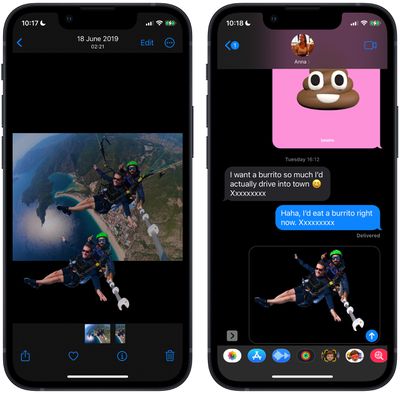
In iOS 16, Apple has enhanced its Visual Look Up capability for photos by making it possible to isolate the subject of a picture from its background so that you can copy it to the clipboard for use elsewhere or share it in another app.


Apple says the feature relies on advanced machine learning, and in our time experimenting with it in iOS 16, its ability to recognize subjects in photos is pretty impressive.

Indeed, its ease of use is likely to make performing painstaking subject isolation actions in image editing apps a thing of the past. Here's how it works.

  1. Launch Photos and select an image from your library containing a well-defined subject.
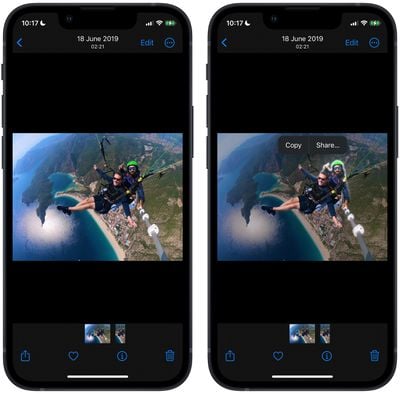
  2. Press and hold on the subject until it ripples and a white glow flows around its outline.
  3. In the popup menu that appears, tap Copy to send the isolated subject to the clipboard for pasting elsewhere, or tap Share... to access the standard sharing options in the Action menu and send it on its way.
    photos

  4. Alternatively, press and hold the subject to lift it from the background. Now, without taking your finger off the screen, use another finger to exit the ‌Photos‌ app and launch Messages, Mail, Notes, or another app that accepts images.
  5. Now drag and let go of the subject to place it where you want in the input field.
    photos

That's all there is to it. You can even use it in paused frames in videos. The feature works not just in ‌Photos‌, but also in screenshots and the Quick Look feature in the Files app.

As mentioned, the feature uses advanced machine learning and image analysis, therefore it is only available on phones with the A12 Bionic or newer chip. The A12 Bionic processor debuted in 2018 in the iPhone XS, ‌iPhone‌ XS Max, and the ‌iPhone‌ XR, so you need to be using one of these iPhones or a later model for it to work. iOS 16 is expected to be released in the fall.


Related Forum: iOS 16

Top Rated Comments

MrGimper Avatar
48 months ago

That looks cool. I assumed it would only work on portrait photos as it has information on where the subject is. But this is an entirely different league.
Nope, I’ve used it already to extract people from pictures I just downloaded off the web. It’s very good.
Score: 11 Votes (Like | Disagree)
bradman83 Avatar
48 months ago
This is going to seriously improve my ability to add additional cats to memes (because memes can never have enough cats in them).
Score: 7 Votes (Like | Disagree)
NightFox Avatar
48 months ago

Seems useless, don't get the hype around this
If you haven't wasted days of your life trying to cut out people or objects in PhotoShop, then you never will truly understand the hype.
Score: 5 Votes (Like | Disagree)
hagar Avatar
48 months ago
That looks cool. I assumed it would only work on portrait photos as it has information on where the subject is. But this is an entirely different league. Nice!
Score: 3 Votes (Like | Disagree)
PsykX Avatar
48 months ago
Now this is next level.

And to say I baffled someone last week by demonstrating this feature in Pixelmator Pro. This will seriously improve my workflow.
Score: 3 Votes (Like | Disagree)
lllusion Avatar
44 months ago
I found a way, on an iPhone, to 'paste' a clipped subject into an existing photo! Pixelmator ('https://apps.apple.com/se/app/pixelmator/id924695435?l=en'). Just like with Photoshop or Pixelmator Pro on macOS, the user opens the bottom layer photo then adds another image as a layer, i.e. the previously clipped and saved subject. What's really cool is that, just like with full-fledged image editors, 'effects', i.e. focus blur, can be applied per layer.


Attachment Image
Score: 2 Votes (Like | Disagree)

Popular Stories

Apple Logo Black

Apple Just Made Its Second-Biggest Acquisition Ever After Beats

Thursday January 29, 2026 10:07 am PST by
Apple today confirmed to Reuters that it has acquired Q.ai, an Israeli startup that is working on artificial intelligence technology for audio. Apple paid close to $2 billion for Q.ai, according to sources cited by the Financial Times. That would make this Apple's second-biggest acquisition ever, after it paid $3 billion for the popular headphone and audio brand Beats in 2014. Q.ai has...
Aston Martin CarPlay Ultra Screen

Apple's CarPlay Ultra to Expand to These Vehicle Brands Later This Year

Sunday February 1, 2026 10:08 am PST by
Last year, Apple launched CarPlay Ultra, the long-awaited next-generation version of its CarPlay software system for vehicles. Nearly nine months later, CarPlay Ultra is still limited to Aston Martin's latest luxury vehicles, but that should change fairly soon. In May 2025, Apple said many other vehicle brands planned to offer CarPlay Ultra, including Hyundai, Kia, and Genesis. In his Powe...
14 inch MacBook Pro Keyboard

Apple Changes How You Order a Mac

Saturday January 31, 2026 10:51 am PST by
Apple recently updated its online store with a new ordering process for Macs, including the MacBook Air, MacBook Pro, iMac, Mac mini, Mac Studio, and Mac Pro. There used to be a handful of standard configurations available for each Mac, but now you must configure a Mac entirely from scratch on a feature-by-feature basis. In other words, ordering a new Mac now works much like ordering an...
Apple Logo Black

Apple's Next Launch is 'Imminent'

Sunday February 1, 2026 12:31 pm PST by
The calendar has turned to February, and a new report indicates that Apple's next product launch is "imminent," in the form of new MacBook Pro models. "All signs point to an imminent launch of next-generation MacBook Pros that retain the current form factor but deliver faster chips," Bloomberg's Mark Gurman said on Sunday. "I'm told the new models — code-named J714 and J716 — are slated...
Apple MacBook Pro M4 hero

New MacBook Pros Reportedly Launching Alongside macOS 26.3

Sunday February 1, 2026 5:42 am PST by
Apple is planning to launch new MacBook Pro models with M5 Pro and M5 Max chips alongside macOS 26.3, according to Bloomberg's Mark Gurman. "Apple's faster MacBook Pros are planned for the macOS 26.3 release cycle," wrote Gurman, in his Power On newsletter today. "I'm told the new models — code-named J714 and J716 — are slated for the macOS 26.3 software cycle, which runs from...