

The iPhone 17 lineup brings a new video feature that lets you record from both the front and rear cameras simultaneously. Dual Capture creates picture-in-picture recordings that should be perfect for reaction videos, tutorials, or any scenario where you want to capture both yourself and the action in front of you. Here's what you need to know about the feature.
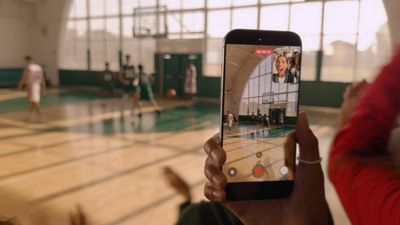
iphone 17 dual capture video
Dual Capture works across the iPhone 17 series, including the iPhone Air. Here's how to get up and running with the new feature.

iPhone 17: How to Enable Dual Capture Mode

  1. Open the Camera app on your iPhone.
  2. Tap Video at the bottom.
  3. Tap the icon made up of dots at the top right of the interface, or alternatively, tap again the selected video option in the carousel at the bottom of the interface.
  4. Select Dual Capture from the pop-up menu, then tap in the viewfinder.
  5. Tap the shutter to start recording via both front and rear cameras.
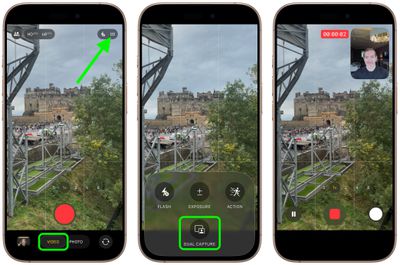
enable dual capture video iphone 17

Once you have used Dual Capture mode, for the rest of the app session the camera interface will show a handy new icon in the top-right corner, allowing you to turn it on and off without involving the pop-up menu.
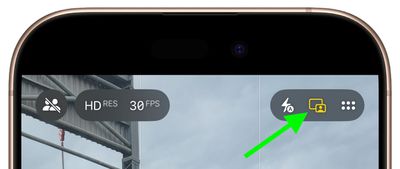
iphone 17 dual capture icon

What You Can Do While Recording

Once you start recording, you gain several useful controls. On iPhone 17 Pro and Pro Max models, you can switch between the 48MP main camera, 48MP ultrawide, and 48MP telephoto lenses for different perspectives without stopping your recording.

The smaller front camera window can also be moved around the screen by dragging it with your finger, which is handy if the preview window blocks something important in your shot. Bear in mind that any repositioning of the window gets saved in your final video, though.
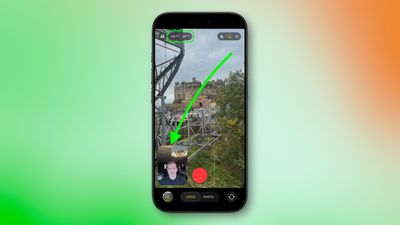
iphone 17 dual capture move camera window

Recording Quality and Limitations

Dual Capture records in either 1080p or 4K resolution at 24 or 30 fps. For maximum editing flexibility later, 4K at 30fps will likely deliver the best results.

The feature does come with some trade-offs. For one, you're locked into Apple's single layout design, where the rear camera takes up most of the frame while the front camera appears in a smaller window. Unlike Samsung's similar feature, you can't switch the feeds or choose a split-screen layout that shows both cameras equally.

Lastly, bear in mind that everything saves as one video file, not separate clips for each camera.


Related Roundups: iPhone 17, iPhone 17 Pro, iPhone Air
Related Forum: iPhone

Top Rated Comments

TheMountainLife Avatar
19 weeks ago
I'm not looking forward to more reaction videos
Score: 25 Votes (Like | Disagree)
mihighil Avatar
19 weeks ago

Understand & know this is new, but anyone know why it’s limited to the 17 series? Must be hardware requirements.
Use the rode capture app (usable on older models) its a arbitrary limitation on older models.
Score: 15 Votes (Like | Disagree)
Yourbigpalal83 Avatar
19 weeks ago
Theres been apps doing this for years. I used to use DoubleTake when i was still doing Youtube. Hell of a good app. You could also record two seperate feeds though that and edit it how you like later on.
Score: 11 Votes (Like | Disagree)
Ralfi Avatar
19 weeks ago
This will result in very corny videos with non-genuine & staged reactions.

When the broadcasters script fans in the crowd to yell something when the camera pans to them, it’s fake, cringy & very off-putting.
Score: 7 Votes (Like | Disagree)
mihighil Avatar
19 weeks ago
This was available through the Rode Capure app, great app and its free (no in app purchases)
Score: 6 Votes (Like | Disagree)
berrymetal Avatar
19 weeks ago
I wish the videos were non-destructive, in a way that you can reposition the selfie PiP later on when you edit the video (and resize it maybe). Perhaps that's something we will see in the future...
Score: 6 Votes (Like | Disagree)

Popular Stories

Aston Martin CarPlay Ultra Screen

Apple's CarPlay Ultra to Expand to These Vehicle Brands Later This Year

Sunday February 1, 2026 10:08 am PST by
Last year, Apple launched CarPlay Ultra, the long-awaited next-generation version of its CarPlay software system for vehicles. Nearly nine months later, CarPlay Ultra is still limited to Aston Martin's latest luxury vehicles, but that should change fairly soon. In May 2025, Apple said many other vehicle brands planned to offer CarPlay Ultra, including Hyundai, Kia, and Genesis. In his Powe...
Apple Logo Black

Apple's Next Launch is 'Imminent'

Sunday February 1, 2026 12:31 pm PST by
The calendar has turned to February, and a new report indicates that Apple's next product launch is "imminent," in the form of new MacBook Pro models. "All signs point to an imminent launch of next-generation MacBook Pros that retain the current form factor but deliver faster chips," Bloomberg's Mark Gurman said on Sunday. "I'm told the new models — code-named J714 and J716 — are slated...
Apple MacBook Pro M4 hero

New MacBook Pros Reportedly Launching Alongside macOS 26.3

Sunday February 1, 2026 5:42 am PST by
Apple is planning to launch new MacBook Pro models with M5 Pro and M5 Max chips alongside macOS 26.3, according to Bloomberg's Mark Gurman. "Apple's faster MacBook Pros are planned for the macOS 26.3 release cycle," wrote Gurman, in his Power On newsletter today. "I'm told the new models — code-named J714 and J716 — are slated for the macOS 26.3 software cycle, which runs from...
iOS 26

iOS 26.3 and iOS 26.4 Will Add These New Features to Your iPhone

Tuesday February 3, 2026 7:47 am PST by
We are still waiting for the iOS 26.3 Release Candidate to come out, so the first iOS 26.4 beta is likely still at least a week or two away. Following beta testing, iOS 26.4 will likely be released to the general public in March or April. Below, we have recapped known or rumored iOS 26.3 and iOS 26.4 features so far. iOS 26.3 iPhone to Android Transfer Tool iOS 26.3 makes it easier...
14 inch MacBook Pro Keyboard

Apple Changes How You Order a Mac

Saturday January 31, 2026 10:51 am PST by
Apple recently updated its online store with a new ordering process for Macs, including the MacBook Air, MacBook Pro, iMac, Mac mini, Mac Studio, and Mac Pro. There used to be a handful of standard configurations available for each Mac, but now you must configure a Mac entirely from scratch on a feature-by-feature basis. In other words, ordering a new Mac now works much like ordering an...














