

iPhone 16: Edit Photographic Styles After Shooting - MacRumorsOpen MenuShow RoundupsShow Forums menuVisit ForumsOpen Sidebar
Skip to Content

iPhone 16: Edit Photographic Styles After Shooting

by

With Apple's iPhone 16 models, you can use new Photographic Styles to adjust specific colors in certain parts of your photos to create the exact look you want. Photographic Styles can also be changed after shooting. Keep reading to learn how.
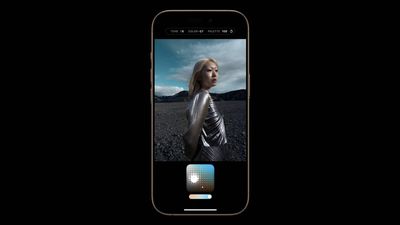
photographic styles iphone 16
When you choose a default Photographic Style, it's saved and reflected across all of the photos you take, and you can make adjustments to it in the Camera app or edit it in the Photos app. Think of this capability as providing flexibility similar to ProRAW, though with less creative control.

Here's how to adjust photos taken in a Photographic Style after shooting:

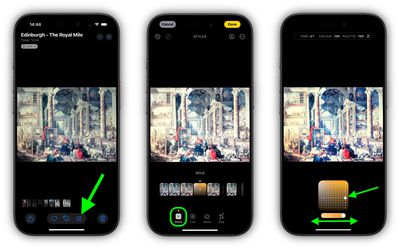
  1. Open the Photos app on your iPhone 16.
  2. Choose a picture taken with a photographic style, then tap the Edit icon (it looks like three sliders).
  3. Tap Styles in the editing toolbar, then drag along the row of predefined styles to preview each one. Available styles include: Cool Rose, Neutral, Rose Gold, Gold, Amber, Vibrant, Natural, Luminous, Dramatic, Quiet, Cosy, Ethereal, Muted B&W, and Stark B&W.
  4. To adjust one of the predefined styles, simply tap it, then drag your finger on the dotted square to simultaneously adjust the tone and color. Drag your finger on the slider below the square to adjust the intensity level. When you're finished, tap a space on the screen to return to the editing tools UI.
  5. When you're happy with the result, tap Done.
photographic styles photos iphone 16

Bear in mind that as you make adjustments to a photographic style, the values for tone, color, and intensity will be shown at the top of the screen. To reset these values, simply tap the circular arrow.

Related Roundup: iPhone 16
Related Forum: iPhone

Popular Stories

meta ai

Meta's New AI Image Tool Can Use Your Public Instagram Photos by Default

Wednesday July 8, 2026 1:52 pm PDT by
Meta is rolling out a new feature that lets people use public Instagram posts and reels to generate AI content, and it's turned on by default. If you have an Instagram account that's not set to private, there is a setting allowing anyone to generate content on Meta AI using your images and videos. The option was added to support Meta's new image generation model, Muse Image. Muse Image is...

Apple Event Logo

Apple Working on All-New Operating System

Wednesday July 29, 2026 11:39 am PDT by
Apple is developing an all-new operating system that is essentially a mix of tvOS, watchOS, and iOS, according to Bloomberg's Mark Gurman. In a report this week, he said the operating system will feature a grid of icons, widgets, and apps, along with customizable clock faces. The new software platform is intended for Apple's long-rumored smart home hub. With built-in facial recognition,...
Four iPhone 18 Pro Colors Mock Feature

iPhone 18 Pro and iPhone Ultra: Pre-Orders and Release Date

Thursday July 30, 2026 6:12 am PDT by
Apple has yet to reveal when the iPhone 18 Pro and iPhone Ultra will be announced and released, but the dates usually follow a familiar pattern. Labor Day is September 7 this year. The last time the holiday fell on that day was in 2020, but the iPhone event that year was delayed until October due to the COVID-19 pandemic. So, the last time Labor Day was on September 7 in a normal year was in ...

🔗 Related Apple News & Rumors

Stay updated with the latest Apple ecosystem news and verified rumors











































