

iPhone 14: How Crash Detection Works and How to Turn It Off - MacRumorsOpen MenuShow RoundupsShow Forums menuVisit ForumsOpen Sidebar
Skip to Content

iPhone 14: How Crash Detection Works and How to Turn It Off

by

With the launch of iPhone 14 and new Apple Watch models, Apple introduced a new safety feature called Crash Detection. Keep reading to learn what it is, how it works, and how to turn it on and off.
crash detection 1

What Is Crash Detection?

Crash Detection is designed to detect severe car crashes in passenger cars. If you're in a severe crash and unresponsive, your Apple device can automatically call emergency services on your behalf.

How Does Crash Detection Work?

While you're driving or you're a passenger in a motor vehicle, the motion sensor with a high dynamic range gyroscope and high-g accelerometer, GPS, barometer, microphone, and advanced motion algorithms work together in your iPhone or Apple Watch to accurately detect a crash.

When a severe crash is detected, an alert displays on your Apple Watch or iPhone display for 10 seconds. If you're still responsive, you can swipe the screen to call emergency services immediately or dismiss the alert if you don't need to contact them. If after 10 seconds you haven't interacted with your Apple device, a 10-second countdown will start. When it ends, emergency services are contacted.
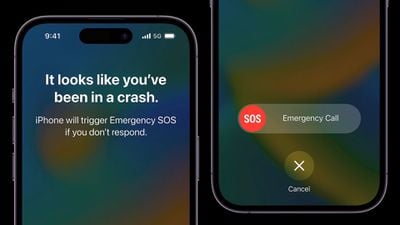
iphone 14 pro car crash detection
When emergency services pick up, the following audio message from Siri begins playing on a loop with five seconds of silence between each replay: "The owner of this iPhone was in a severe car crash and is not responding to their phone." ‌Siri‌ will then relay your estimated location with latitude and longitude and search radius both to emergency services and through your device's speaker.

The message is loudest the first time it is played, after which other replays have a reduced volume in case you are able to speak to emergency services. The message continues to repeat until you tap the Stop Recorded Message button or the call ends.

If you have emergency contacts set up, they will also be notified of the crash after another 10-second countdown, and if you have configured Medical ID information, a slider will appear on the Lock Screen for quick access.
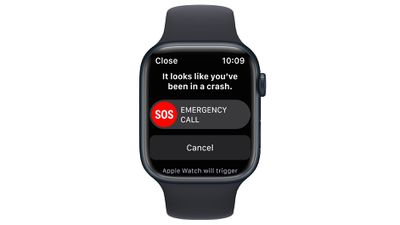
apple watch series 8 crash detection

What Kinds of Crashes Can It Detect?

According to Apple, Crash Detection can detect front impacts, side impacts, rear-end collisions, and rollovers.

Which Apple Devices Support Crash Detection?

Crash Detection is supported on the following iPhone and Apple Watch models.

  • iPhone 14
  • iPhone 14 Plus
  • iPhone 14 Pro
  • iPhone 14 Pro Max
  • Apple Watch SE (2nd Generation)
  • Apple Watch Series 8
  • Apple Watch Ultra

How to Enable Crash Detection

No setup is required. Crash Detection is enabled by default on the above supported devices, so you don't need to do a thing. If you're concerned that the feature could mistakenly register a crash and call emergency services, you can disable it by following the steps below.

How to Disable Crash Detection

  1. Launch the Settings app on your iPhone.
  2. Scroll down and tap through to Emergency SOS.
  3. Under "Crash Detection," toggle off the switch next to Call After Severe Crash.
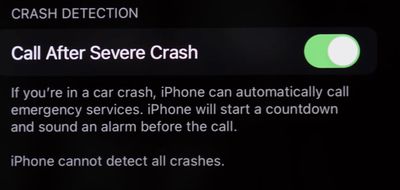
settings
If ever you want to enable the feature, simply toggle on the switch again in Settings.

Related Forums: Apple Watch, iPhone

Top Rated Comments

ProfessionalFan Avatar
51 months ago
When did people become so skeptical and negative of every single thing?

This sounds like a great and useful feature that hopefully nobody here ever needs.

I see no valid reason to disable it.

Score: 14 Votes (Like | Disagree)
51 months ago

Yep. Turning this off.

I really cannot conceive of a point in my city life where a crash that is severe enough that I would need this, and no one else would've called already, if I weren't conscious. I've had too many automated things "butt-dial"... last thing I need is for this to crash detect that I threw groceries on the counter and get the cops to my home.
What absolute nonsense. If you're literally launching your groceries from a trebuchet or something, this'll be one feature that will be very hard to get a false positive on. The feature relies on gyroscopic, microphone, accelerometer, GPS and barometric inputs to trigger it - you won't get all five by slamming your groceries down or putting it in your pocket.
Score: 14 Votes (Like | Disagree)
51 months ago

I really cannot conceive of a point in my city life where a crash that is severe enough that I would need this, and no one else would've called already
Single car crash, no witnesses–maybe at night or in a sparsely populated area. Groceries will not trigger it.
Score: 11 Votes (Like | Disagree)
The Game 161 Avatar
51 months ago
lol zero reason to turn it off
Score: 6 Votes (Like | Disagree)
51 months ago
It’s literally no reason to turn this off. The same people that would turn this off probably don’t wear seatbelts and disable the airbags in their car. Can’t fix stupid.
Score: 5 Votes (Like | Disagree)
PsykX Avatar
51 months ago
Maybe if you don't care about your life, you can turn it off.
Even if it consumes a bit of battery, I'll keep it on :)
Score: 5 Votes (Like | Disagree)

Popular Stories

3 4 24 Sport Band Refresh Feature

Sketchy Rumor Claims Apple Watch Series 12 Could Introduce Sensor in Band

Friday July 3, 2026 8:54 am PDT by
The Apple Watch Series 12 could ship with a new health sensor built directly into one of its bands, according to a sketchy rumor from a known leaker. The leaker known as "Kosutami" says the sensor will be injection-molded into a silicone band, and only a silicone band, apparently because Apple has not yet solved how to embed similar hardware in bands made from other materials. No detail was...
watchos 27

Siri AI Comes to Apple Watch in watchOS 27 Beta 3

Monday July 6, 2026 1:24 pm PDT by
With watchOS 27 beta 3, Apple added support for Siri AI and the Siri app, so Apple Watch users can now use the features right from their wrist. Apple said Siri AI would be coming to the watch back when watchOS 27 was first introduced, but the feature wasn't live until now. The Dynamic App Grid that pops up when the Digital Crown is pressed displays the Siri app in the center, and the...
Apple Watch Series 10 Jet Black

Apple Watch Series 13 Rumored to Mark the End of an Era

Wednesday July 8, 2026 1:29 pm PDT by
While the Apple Watch Series 12 is still a few months away, a new rumor suggests that next year's Apple Watch Series 13 will mark the end of an era. According to a recent post from a known leaker on the Chinese social media platform Weibo, the Apple Watch will be receiving a major redesign next year, and this will apparently include a new way of attaching bands to the watch. As a result, the ...

🔗 Related Apple News & Rumors

Stay updated with the latest Apple ecosystem news and verified rumors











































