With the launch of iPhone 14 and new Apple Watch models, Apple introduced a new safety feature called Crash Detection. Keep reading to learn what it is, how it works, and how to turn it on and off.
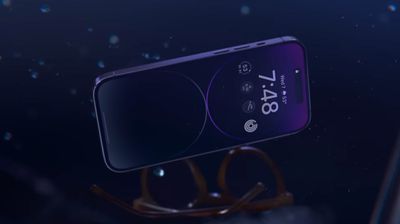
crash detection 1

What Is Crash Detection?

Crash Detection is designed to detect severe car crashes in passenger cars. If you're in a severe crash and unresponsive, your Apple device can automatically call emergency services on your behalf.

How Does Crash Detection Work?

While you're driving or you're a passenger in a motor vehicle, the motion sensor with a high dynamic range gyroscope and high-g accelerometer, GPS, barometer, microphone, and advanced motion algorithms work together in your ‌iPhone‌ or Apple Watch to accurately detect a crash.

When a severe crash is detected, an alert displays on your Apple Watch or ‌iPhone‌ display for 10 seconds. If you're still responsive, you can swipe the screen to call emergency services immediately or dismiss the alert if you don't need to contact them. If after 10 seconds you haven't interacted with your Apple device, a 10-second countdown will start. When it ends, emergency services are contacted.
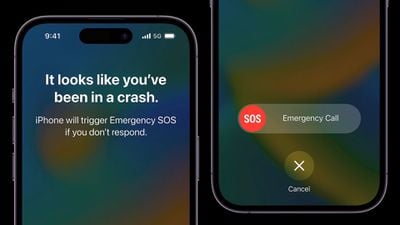
iphone 14 pro car crash detection
When emergency services pick up, the following audio message from Siri begins playing on a loop with five seconds of silence between each replay: "The owner of this ‌iPhone‌ was in a severe car crash and is not responding to their phone." ‌Siri‌ will then relay your estimated location with latitude and longitude and search radius both to emergency services and through your device's speaker.

The message is loudest the first time it is played, after which other replays have a reduced volume in case you are able to speak to emergency services. The message continues to repeat until you tap the Stop Recorded Message button or the call ends.

If you have emergency contacts set up, they will also be notified of the crash after another 10-second countdown, and if you have configured Medical ID information, a slider will appear on the Lock Screen for quick access.
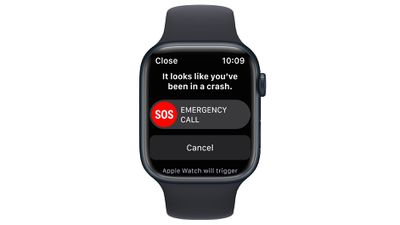
apple watch series 8 crash detection

What Kinds of Crashes Can It Detect?

According to Apple, Crash Detection can detect front impacts, side impacts, rear-end collisions, and rollovers.

Which Apple Devices Support Crash Detection?

Crash Detection is supported on the following ‌iPhone‌ and Apple Watch models.

  • ‌iPhone‌ 14
  • ‌iPhone‌ 14 Plus
  • ‌iPhone‌ 14 Pro
  • ‌iPhone‌ 14 Pro Max
  • Apple Watch SE (2nd Generation)
  • Apple Watch Series 8
  • Apple Watch Ultra

How to Enable Crash Detection

No setup is required. Crash Detection is enabled by default on the above supported devices, so you don't need to do a thing. If you're concerned that the feature could mistakenly register a crash and call emergency services, you can disable it by following the steps below.

How to Disable Crash Detection

  1. Launch the Settings app on your ‌iPhone‌.
  2. Scroll down and tap through to Emergency SOS.
  3. Under "Crash Detection," toggle off the switch next to Call After Severe Crash.
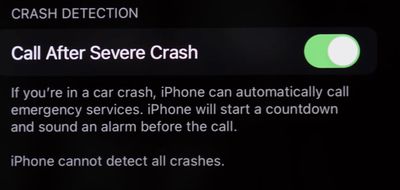
settings
If ever you want to enable the feature, simply toggle on the switch again in Settings.

Related Forums: Apple Watch, iPhone

Top Rated Comments

ProfessionalFan Avatar
44 months ago
When did people become so skeptical and negative of every single thing?

This sounds like a great and useful feature that hopefully nobody here ever needs.

I see no valid reason to disable it.
Score: 14 Votes (Like | Disagree)
Unggoy Murderer Avatar
44 months ago

Yep. Turning this off.

I really cannot conceive of a point in my city life where a crash that is severe enough that I would need this, and no one else would've called already, if I weren't conscious. I've had too many automated things "butt-dial"... last thing I need is for this to crash detect that I threw groceries on the counter and get the cops to my home.
What absolute nonsense. If you're literally launching your groceries from a trebuchet or something, this'll be one feature that will be very hard to get a false positive on. The feature relies on gyroscopic, microphone, accelerometer, GPS and barometric inputs to trigger it - you won't get all five by slamming your groceries down or putting it in your pocket.
Score: 14 Votes (Like | Disagree)
chabig Avatar
44 months ago

I really cannot conceive of a point in my city life where a crash that is severe enough that I would need this, and no one else would've called already
Single car crash, no witnesses–maybe at night or in a sparsely populated area. Groceries will not trigger it.
Score: 11 Votes (Like | Disagree)
The Game 161 Avatar
44 months ago
lol zero reason to turn it off
Score: 6 Votes (Like | Disagree)
tallflguy Avatar
44 months ago
It’s literally no reason to turn this off. The same people that would turn this off probably don’t wear seatbelts and disable the airbags in their car. Can’t fix stupid.
Score: 5 Votes (Like | Disagree)
infinitejest Avatar
44 months ago
Why would anyone turn this off? Are people that lazy that the convenience of having to click on "cancel" in case you're in just a minor car crash and prefer calling the emergency hotline yourself is more important than actually saving your life in case you really need the feature?
Score: 5 Votes (Like | Disagree)

Popular Stories

Aston Martin CarPlay Ultra Screen

Apple's CarPlay Ultra to Expand to These Vehicle Brands Later This Year

Sunday February 1, 2026 10:08 am PST by
Last year, Apple launched CarPlay Ultra, the long-awaited next-generation version of its CarPlay software system for vehicles. Nearly nine months later, CarPlay Ultra is still limited to Aston Martin's latest luxury vehicles, but that should change fairly soon. In May 2025, Apple said many other vehicle brands planned to offer CarPlay Ultra, including Hyundai, Kia, and Genesis. In his Powe...
Apple Logo Black

Apple Just Made Its Second-Biggest Acquisition Ever After Beats

Thursday January 29, 2026 10:07 am PST by
Apple today confirmed to Reuters that it has acquired Q.ai, an Israeli startup that is working on artificial intelligence technology for audio. Apple paid close to $2 billion for Q.ai, according to sources cited by the Financial Times. That would make this Apple's second-biggest acquisition ever, after it paid $3 billion for the popular headphone and audio brand Beats in 2014. Q.ai has...
Apple Logo Black

Apple's Next Launch is 'Imminent'

Sunday February 1, 2026 12:31 pm PST by
The calendar has turned to February, and a new report indicates that Apple's next product launch is "imminent," in the form of new MacBook Pro models. "All signs point to an imminent launch of next-generation MacBook Pros that retain the current form factor but deliver faster chips," Bloomberg's Mark Gurman said on Sunday. "I'm told the new models — code-named J714 and J716 — are slated...
14 inch MacBook Pro Keyboard

Apple Changes How You Order a Mac

Saturday January 31, 2026 10:51 am PST by
Apple recently updated its online store with a new ordering process for Macs, including the MacBook Air, MacBook Pro, iMac, Mac mini, Mac Studio, and Mac Pro. There used to be a handful of standard configurations available for each Mac, but now you must configure a Mac entirely from scratch on a feature-by-feature basis. In other words, ordering a new Mac now works much like ordering an...
Apple MacBook Pro M4 hero

New MacBook Pros Reportedly Launching Alongside macOS 26.3

Sunday February 1, 2026 5:42 am PST by
Apple is planning to launch new MacBook Pro models with M5 Pro and M5 Max chips alongside macOS 26.3, according to Bloomberg's Mark Gurman. "Apple's faster MacBook Pros are planned for the macOS 26.3 release cycle," wrote Gurman, in his Power On newsletter today. "I'm told the new models — code-named J714 and J716 — are slated for the macOS 26.3 software cycle, which runs from...