Apple has modified the screenshot experience in iOS 26 to accommodate Visual Intelligence and its new Liquid Glass aesthetic. Taking a screenshot is still done by pressing the Side button and Volume Up button on your iPhone, but the interface has been redesigned, while there's another change that might slow down your workflow if you're used to the streamlined approach taken in iOS 18 and earlier.
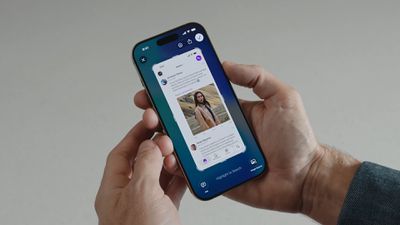
iOS 26 Screenshots

Why You Might Want to Switch Back

If you regularly use Apple's screen capture tools in iOS 18, you'll know that screenshots appear as small thumbnails in the bottom-left corner that you can quickly tap to edit and save or ignore. This lets you continue using your iPhone without interruption, while still giving you the option to markup and/or share a screenshot when required.

In contrast, the new full-screen preview mode in iOS 26 displays your screenshot across the entire display by default, complete with editing tools and Visual Intelligence options at the bottom. While this gives you immediate access to cropping, markup, and AI-powered features, it may feel intrusive compared to iOS 18's approach.

Disabling Full-Screen Previews

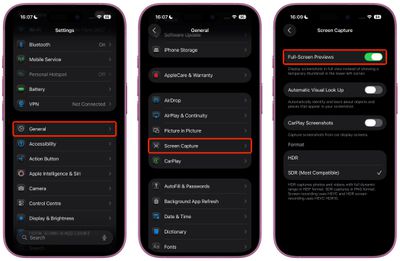
When you take your first screenshot after updating to iOS 26, you should see an on-screen prompt asking if you'd like to "Switch to Thumbnail View." If you missed this opportunity or accidentally tapped "Not Now," you can still revert to the old thumbnail approach, thanks to a new settings menu:

  1. Open Settings on your iPhone.
  2. Tap General.
  3. Select Screen Capture.
  4. Toggle off Full-Screen Previews.

settings

Once disabled, screenshots will revert to the familiar iOS 18 behavior, appearing as temporary thumbnails in the bottom-left corner. You can still access all editing features by tapping the thumbnail when you need them, or you can review the images later in the Photos app.

Additional Screenshot Options

While you're in Screen Capture settings, you'll also find new options for enabling HDR screenshots (saved in HEIF image format), a CarPlay Screenshots toggle for when your iPhone is connected to CarPlay, and Visual Lookup (iPhone 15 Pro and newer models only).


Top Rated Comments

Gobeatty Avatar
7 months ago

It would be nice if Apple allowed the ability to take screenshots, but also have the option of NOT saving the screenshot to the photo library

This would be useful for when you’re looking to share information with friends or family, but not necessarily want to save that screenshot to your photo library
iOS 18 does have this option. After tapping 'Done' there is a 'Copy and Delete' option, which is perfect for your use case (which is also often a use case for me).
Score: 11 Votes (Like | Disagree)
jz0309 Avatar
7 months ago
Thank you1 I love these type of articles!
Score: 9 Votes (Like | Disagree)
Justin Cymbal Avatar
7 months ago

Additional Screenshot Options

While you're in Screen Capture settings, you'll also find new options for enabling HDR screenshots (saved in HEIF image format), a CarPlay Screenshots toggle for when your iPhone is connected to CarPlay, and Visual Lookup (iPhone 15 Pro and newer models only).

It would be nice if Apple allowed the ability to take screenshots, but also have the option of NOT saving the screenshot to the photo library

This would be useful for when you’re looking to share information with friends or family, but not necessarily want to save that screenshot to your photo library
Score: 6 Votes (Like | Disagree)
Gobeatty Avatar
7 months ago
I am a heavy screenshot user but it isn't obvious to me - just from reading - that the change needs to be undone. Always good to have a setting to turn it off and a tutorial on how to do that, but I will try the new default behavior first. I am not a dev so waiting for the public beta to drop.
Score: 4 Votes (Like | Disagree)
Moonjumper Avatar
7 months ago
I'd like the option to just capture the screen and have no preview, going straight to saving to Photos, just like it used to be. I'd also like the same on Mac, which is where I notice the difference most. The click and carry on flow has gone. I'm not saying it should be the default, but it should be an option.
Score: 4 Votes (Like | Disagree)
jayducharme Avatar
7 months ago

good grief, I just tell Siri to take a screenshot..
"Here's what I found for screenshots on the web."

I have a slightly different problem: I inadvertently take screenshots just by picking up the phone. I wish Apple had left the power button on the top of the device, rather than opposite the volume buttons (though I realize that's inconvenient with ginormous phones).
Score: 4 Votes (Like | Disagree)

Popular Stories

Aston Martin CarPlay Ultra Screen

Apple's CarPlay Ultra to Expand to These Vehicle Brands Later This Year

Sunday February 1, 2026 10:08 am PST by
Last year, Apple launched CarPlay Ultra, the long-awaited next-generation version of its CarPlay software system for vehicles. Nearly nine months later, CarPlay Ultra is still limited to Aston Martin's latest luxury vehicles, but that should change fairly soon. In May 2025, Apple said many other vehicle brands planned to offer CarPlay Ultra, including Hyundai, Kia, and Genesis. In his Powe...
Apple Logo Black

Apple Just Made Its Second-Biggest Acquisition Ever After Beats

Thursday January 29, 2026 10:07 am PST by
Apple today confirmed to Reuters that it has acquired Q.ai, an Israeli startup that is working on artificial intelligence technology for audio. Apple paid close to $2 billion for Q.ai, according to sources cited by the Financial Times. That would make this Apple's second-biggest acquisition ever, after it paid $3 billion for the popular headphone and audio brand Beats in 2014. Q.ai has...
Apple Logo Black

Apple's Next Launch is 'Imminent'

Sunday February 1, 2026 12:31 pm PST by
The calendar has turned to February, and a new report indicates that Apple's next product launch is "imminent," in the form of new MacBook Pro models. "All signs point to an imminent launch of next-generation MacBook Pros that retain the current form factor but deliver faster chips," Bloomberg's Mark Gurman said on Sunday. "I'm told the new models — code-named J714 and J716 — are slated...
14 inch MacBook Pro Keyboard

Apple Changes How You Order a Mac

Saturday January 31, 2026 10:51 am PST by
Apple recently updated its online store with a new ordering process for Macs, including the MacBook Air, MacBook Pro, iMac, Mac mini, Mac Studio, and Mac Pro. There used to be a handful of standard configurations available for each Mac, but now you must configure a Mac entirely from scratch on a feature-by-feature basis. In other words, ordering a new Mac now works much like ordering an...
Apple MacBook Pro M4 hero

New MacBook Pros Reportedly Launching Alongside macOS 26.3

Sunday February 1, 2026 5:42 am PST by
Apple is planning to launch new MacBook Pro models with M5 Pro and M5 Max chips alongside macOS 26.3, according to Bloomberg's Mark Gurman. "Apple's faster MacBook Pros are planned for the macOS 26.3 release cycle," wrote Gurman, in his Power On newsletter today. "I'm told the new models — code-named J714 and J716 — are slated for the macOS 26.3 software cycle, which runs from...