iOS 26: Reduce Transparency of Apple's Liquid Glass Design - MacRumorsOpen MenuShow RoundupsShow Forums menuVisit ForumsOpen Sidebar
Skip to Content

iOS 26: Reduce Transparency of Apple's Liquid Glass Design

by

Apple's iOS 26 update, currently in beta, introduces a striking visual overhaul with its new Liquid Glass design language. However, if the translucent elements are causing readability issues or you simply prefer a more opaque interface, there's a quick accessibility setting that can help tone things down.
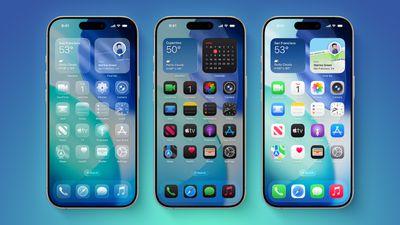
iOS 26 on Three iPhones
The Liquid Glass design brings transparency effects throughout the system interface and stock apps. On the Home Screen, you'll notice the search bar, dock, and app folders all feature translucent backgrounds. App icons themselves now sport a new layered glass appearance that adds visual depth and dimension to your device – plus there's a new Clear appearance option that ups the ante even more.

While visually impressive, these transparency effects can sometimes interfere with readability, especially for anyone with certain visual needs. Fortunately, Apple has included accessibility options to make the interface more accessible.

How to Reduce Transparency

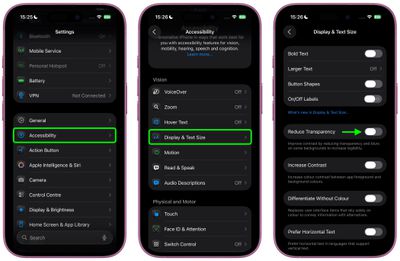
The quickest way to make iOS 26's interface more opaque is through the Reduce Transparency setting:

  1. Open Settings on your iPhone.
  2. Tap Accessibility.
  3. Select Display & Text Size.
  4. Toggle on Reduce Transparency.

settings

This setting adds darker backgrounds to translucent areas like Control Center, app icons, and app folders, so you should see increased contrast between elements throughout the system.

Note that Reduce Transparency doesn't completely eliminate all translucent elements or change button shapes – it simply makes translucent areas more opaque while maintaining the overall iOS 26 aesthetic.

Add Reduce Transparency to Control Center

For quick access to this setting, you can add it to your Accessibility Shortcuts to get to it from the Control Center interface:

  1. Go to Settings ➝ Accessibility.
  2. Scroll down and tap Accessibility Shortcut.
  3. Select Reduce Transparency in the list.
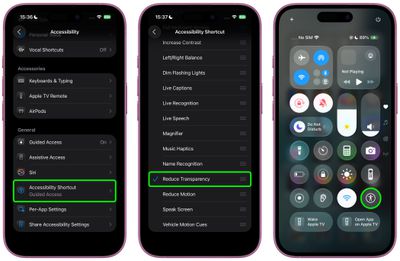
settings

If you like, you can add the Accessibility Shortcut button to Control Center (long press a space between the interface's buttons, then tap Add Control). After you've done that, you can quickly toggle the setting on and off directly from Control Center, making it easy to switch between the full Liquid Glass experience and a more opaque interface as needed.

Additional Contrast Options

If you're still having legibility issues after enabling Reduce Transparency, return to Settings ➝ Accessibility ➝ Display & Text Size, then toggle on Increase Contrast. Note that enabling both Reduce Transparency and Increase Contrast will cause icons to lose most of their translucency.

The Liquid Glass design is still in beta, so Apple will likely continue refining the visual effects based on feedback. A wider official rollout of iOS 26 is expected sometime in September.


Top Rated Comments

turbineseaplane Avatar
16 months ago
Shamefully bad UI team.

Users shouldn't need to enable a whole bunch of accessibility settings to get basic legibility and clarity.
Score: 78 Votes (Like | Disagree)
sjalfr Avatar
16 months ago

Shamefully bad UI team.

Users shouldn't need to enable a whole bunch of accessibility settings to get basic legibility and clarity.
Right. Now I feel like it's my fault that I can't see anything on the washed out default screen. What are they thinking? I wish they'd stop making things so white and polished just because it looks slick and cool at the price of readability and functionality.
Score: 38 Votes (Like | Disagree)
16 months ago
Apple UI overhaul team is probably the same team behind Siri!
Score: 28 Votes (Like | Disagree)
16 months ago
Essential tweak for me. It looks so much better.

Score: 26 Votes (Like | Disagree)
Astuces iOS Avatar
16 months ago

Shamefully bad UI team.

Users shouldn't need to enable a whole bunch of accessibility settings to get basic legibility and clarity.
True at this point it should be an option on general or something
Score: 23 Votes (Like | Disagree)
VulchR Avatar
16 months ago
Honestly I wish Apple would spend more time on more important issues in iOS, like using AI better to correct grammar and spelling mistakes by looking at the semantic content of text rather than looking a word at a time (which misses 'tot he' for 'to the' for instance). Indeed, you'd think the new computing power in iPhones, iOS would use simple AI to learn the kinds of typing mistakes one makes and correct them (possibly even adjusting the sizes and positions of keys to reduce errors - e.g., I keep hitting n instead of space, so why not make the n smaller and nudge it away from space by a few pixels?) rather than faffing about with GUI features that actually reduce visibility. We all want elegant design, but part of elegance is functionality. Just my two cents.
Score: 19 Votes (Like | Disagree)

Popular Stories

iPhone Duo Display Cracking

Apple Alerts Stores to iPhone Duo's Display Cracking Issue

Friday October 30, 2026 3:20 pm PDT by
In a memo shared with Apple Stores and Apple Authorized Service Providers this week, and later obtained by MacRumors, Apple provided technicians with guidance on how to diagnose and address the iPhone Duo's inner display cracking issue. If a customer reports the issue, Apple advised technicians to inspect the iPhone Duo and repair or replace it in accordance with their standard procedures....
iPad mini OLED feature 1

Apple Executive Comments on New iPad Mini Lacking 120Hz Display

Thursday October 29, 2026 1:47 pm PDT by
While the new iPad mini has an OLED display, the device does not support ProMotion, meaning the display's refresh rate is limited to 60Hz instead of 120Hz. ProMotion support would have allowed for the iPad mini's refresh rate to automatically adjust from 10Hz to 120Hz depending on the content being displayed, but evidently Apple has kept the feature exclusive to the iPad Pro among iPad...
Pinched iPad Mini

Apple Avoids Showing Pinched Fingers on iPad Mini Page in South Korea

Thursday October 29, 2026 11:52 am PDT by
In the U.S. and most other countries, Apple's website shows the new iPad mini being held by pinched fingers, but this is not the case in South Korea. The new iPad mini shown with pinched fingers on Apple's website in the U.S. On its South Korean website, Apple simply shows an image of the iPad mini on its own. The new iPad mini shown without pinched fingers on Apple's website in South Korea ...
Latest Stories
Apple Watch Ultra 4 Hits All-Time Low Price With Amazon's $99 Discount
8 hours ago
Reminder: Apple's Big Discount on Beats 360 Ear Cushions Ends Today
8 hours ago
Here's a New Tour of Apple's HomeView Software
8 hours ago
Apple Reveals New iPad Mini's Battery Capacity
10 hours ago
Top Stories: Apple's Big MacBook Pro, iPad mini and iMac Updates
11 hours ago
'Pluribus' Season 2 Reportedly Starts Production Today
17 hours ago
iPhone 18 Pro Sales Surge in China, Offsetting Decline in U.S. and Japan
18 hours ago
HomeView Software 27.2: Wallpapers, Control Center, and More
1 day ago
Apple Alerts Stores to iPhone Duo's Display Cracking Issue
1 day ago
iOS 27.3 Will Enable These Apple Intelligence Features in China
1 day ago
Apple Says iOS 27.3 Beta Coming Next Week
1 day ago
Apple's Flash Storage Suppliers Are Finally 'Getting Their Revenge'
1 day ago
14 New Things Your iPhone Can Do in iOS 27.2
1 day ago
iPhone Duo Review: One Week Later
1 day ago
Samsung Mocks iPhone Duo Display Cracks in New Ad Campaign
1 day ago
The MacRumors Show: OLED MacBook Pro, iPad Mini 8, and More
1 day ago
MacBook Pro With Touch Display: 15 More Details Revealed
1 day ago
Russia Places Apple on State Surveillance Registry
1 day ago
Halloween Weekend Brings Discounts on Apple Accessories and Pre-Orders
1 day ago
Apple Has Released More Than 25 New Products in the Past Two Months
1 day ago
Local Code Launches as Free, Private AI Assistant Tool for Mac
1 day ago
Apple Acquires Ascend.io
1 day ago
HomePod Mini 2 Launches Today: All the New Features
1 day ago
AirTag 2 4-Pack Drops to New Low Price of $69.99
1 day ago
Rian Johnson's iPhone Camera App Goes Viral
2 days ago
Where Did All the iPhone Duos Go? Mostly to Apple's Stores
2 days ago
Apple's Touchscreen MacBook Pro Could Ship 1.5M Units in 2027
2 days ago
New Apple TV 4K and iPad Mini: RAM Amounts Revealed
2 days ago
Apple Executive Comments on New iPad Mini Lacking 120Hz Display
2 days ago
Here's a Hands-On Look at HomePod Mini 2's New Two-Tone Colors
2 days ago

🔗 Related Apple News & Rumors

Stay updated with the latest Apple ecosystem news and verified rumors