

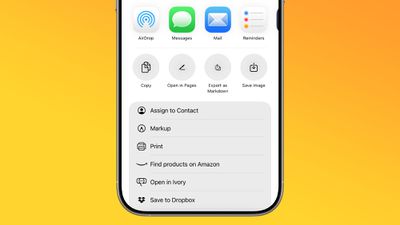
In iOS 26, currently in beta, Apple Notes has gained new Markdown support, letting you seamlessly import and export files in the popular plain-text formatting language. Whether you're a developer, writer, or content creator, this long-awaited feature should bridge the gap between your existing Markdown workflow and Apple's native note-taking app.
ios 26 notes app markdown
For those unfamiliar with Markdown, it's a simple way of writing that uses plain text symbols (like ** for bold or # for headings) to format documents without complicated menus. It's popular because the same text works both as easy-to-read notes and as polished, styled content when exported.

In Apple's Notes app, the new functionality works both ways: you can bring existing Markdown files into Notes while preserving formatting like headings, links, and lists, or export your Notes content as Markdown for use in other apps. The following steps show you how to do both.

Bear in mind that Notes doesn't display Markdown syntax while you're writing – it continues to show rich text formatting as usual. The Markdown conversion happens during the import and export process, so you'll see the plain text formatting only when viewing the file outside of Notes.

Import Markdown Files into Notes

  1. Locate your Markdown (.md) file on your iPhone (e.g., in Files or your writing app).
  2. Open the file, tap Share, then choose Notes.
  3. Tap Import at the prompt to save the file to an Imported Notes folder.
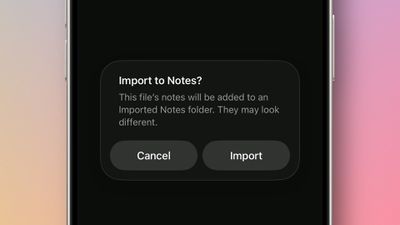
import markdown notes ios

If you're working in the Notes app on an iPad running iPadOS 26, you can also choose File ➝ Import to Notes… from the Notes menu bar (accessed with a swipe down from the top of the screen). Select your Markdown file from the files interface, then tap Import to confirm the import.

Once the note is imported, look for the Imported Notes folder where your note will be saved. Then you can verify that key formatting has been preserved in the note. When you import a Markdown file, Notes automatically converts the plain text formatting into rich text, preserving headings, links, bulleted lists, and text styling like bold and italics.

Export Notes in Markdown Format

  1. In Notes, open the note you want to export.
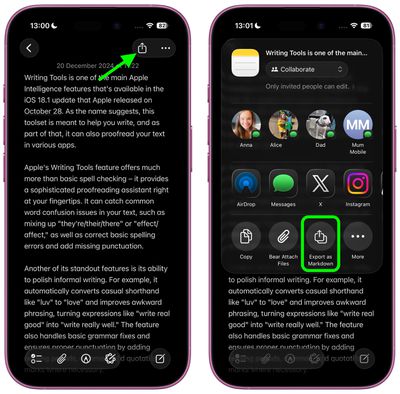
  2. Tap the Share icon in the top-right corner.
  3. Select Export as Markdown.
  4. Choose where to share or save the markdown file from the share sheet options.
settings

The exported file retains the note's structure and formatting as standard Markdown syntax, making it compatible with text editors, documentation tools, and publishing platforms that support the format.

Apple is expected to officially release iOS 26 in September.

Top Rated Comments

TheDailyApple Avatar
22 weeks ago

I'm glad they're doing this for interoperability, but on a practical level I only care to use Markdown when I can hide the cluttery _formatting_ *characters* as much as possible. Conceptually, I think Markdown is very elegant, but I don't want to have the "how the sausage is made" part in my face all the time. I use Ulysses a lot and it does let me dial down the color of the Markdown so it's not visible, but it still junks up the spacing and flow of text. I have used another app (forgetting the name) which optionally will entirely hide Markdown tags, and I think that's the best way to go IMO.
I highly recommend Obsidian. It completely hides the markdown formatting characters, and is generally one of the more elegant applications I've used. It's also free.
Score: 6 Votes (Like | Disagree)
ignatius345 Avatar
22 weeks ago

Can we finally bulk export notes?
Just tested this. In the Tahoe beta, you can multiple select notes and export to PDF or Markdown. The individual exported notes appear as separate files within a folder.
Score: 5 Votes (Like | Disagree)
MakeAppleAwesomeAgain Avatar
22 weeks ago
Quite funny that this is the year they added Markdown support but ditched John Gruber as interviewer ?
Score: 4 Votes (Like | Disagree)
novagamer Avatar
22 weeks ago

Here's what I get:


BTW, I'm finding running the beta in a virtual machine is a nice way to play around with it without subjecting my Mac to potential bugs. VirtualBuddy is very easy for this (and free).
Maybe my input didn’t have the spaces, thank you!! I will try this later. Much appreciated. :)

edit: works great. Huge time saver, this might be my favorite iOS26 feature.
Score: 1 Votes (Like | Disagree)
Korb3n_Dallas Avatar
22 weeks ago
What is nice for all the people who use discord is we can format messages in notes and then export it in markup for discord posts.
Score: 1 Votes (Like | Disagree)
ignatius345 Avatar
22 weeks ago
I'm glad they're doing this for interoperability, but on a practical level I only care to use Markdown when I can hide the cluttery _formatting_ *characters* as much as possible. Conceptually, I think Markdown is very elegant, but I don't want to have the "how the sausage is made" part in my face all the time. I use Ulysses a lot and it does let me dial down the color of the Markdown so it's not visible, but it still junks up the spacing and flow of text. I have used another app (forgetting the name) which optionally will entirely hide Markdown tags, and I think that's the best way to go IMO.
Score: 1 Votes (Like | Disagree)

Popular Stories

Aston Martin CarPlay Ultra Screen

Apple's CarPlay Ultra to Expand to These Vehicle Brands Later This Year

Sunday February 1, 2026 10:08 am PST by
Last year, Apple launched CarPlay Ultra, the long-awaited next-generation version of its CarPlay software system for vehicles. Nearly nine months later, CarPlay Ultra is still limited to Aston Martin's latest luxury vehicles, but that should change fairly soon. In May 2025, Apple said many other vehicle brands planned to offer CarPlay Ultra, including Hyundai, Kia, and Genesis. In his Powe...
Apple Logo Black

Apple's Next Launch is 'Imminent'

Sunday February 1, 2026 12:31 pm PST by
The calendar has turned to February, and a new report indicates that Apple's next product launch is "imminent," in the form of new MacBook Pro models. "All signs point to an imminent launch of next-generation MacBook Pros that retain the current form factor but deliver faster chips," Bloomberg's Mark Gurman said on Sunday. "I'm told the new models — code-named J714 and J716 — are slated...
Apple MacBook Pro M4 hero

New MacBook Pros Reportedly Launching Alongside macOS 26.3

Sunday February 1, 2026 5:42 am PST by
Apple is planning to launch new MacBook Pro models with M5 Pro and M5 Max chips alongside macOS 26.3, according to Bloomberg's Mark Gurman. "Apple's faster MacBook Pros are planned for the macOS 26.3 release cycle," wrote Gurman, in his Power On newsletter today. "I'm told the new models — code-named J714 and J716 — are slated for the macOS 26.3 software cycle, which runs from...
iOS 26

iOS 26.3 and iOS 26.4 Will Add These New Features to Your iPhone

Tuesday February 3, 2026 7:47 am PST by
We are still waiting for the iOS 26.3 Release Candidate to come out, so the first iOS 26.4 beta is likely still at least a week or two away. Following beta testing, iOS 26.4 will likely be released to the general public in March or April. Below, we have recapped known or rumored iOS 26.3 and iOS 26.4 features so far. iOS 26.3 iPhone to Android Transfer Tool iOS 26.3 makes it easier...
14 inch MacBook Pro Keyboard

Apple Changes How You Order a Mac

Saturday January 31, 2026 10:51 am PST by
Apple recently updated its online store with a new ordering process for Macs, including the MacBook Air, MacBook Pro, iMac, Mac mini, Mac Studio, and Mac Pro. There used to be a handful of standard configurations available for each Mac, but now you must configure a Mac entirely from scratch on a feature-by-feature basis. In other words, ordering a new Mac now works much like ordering an...















