

iOS 26: Fine-Tune Podcast Playback Speeds - MacRumorsOpen MenuShow RoundupsShow Forums menuVisit ForumsOpen Sidebar
Skip to Content

iOS 26: Fine-Tune Podcast Playback Speeds

by

With iOS 26 (currently in beta), Apple has finally caught up with rival podcast apps like Overcast by adding more fine-grained playback speed controls to the Podcasts app.
iOS 26 Podcasts Glass Feature
While competitors have long offered precise speed adjustments, Apple's rigid presets often left you caught between speeds that felt either too slow or uncomfortably fast.

In previous versions of iOS, Apple's stock Podcasts app provided only four fixed playback speed options: 1.25x, 1.5x, 1.75, and 2x. That's changed in iOS 26, and users now have a lot more flexibility.

Not only has Apple increased the range of playback speeds from 0.5x to 3x, the updated setting also allows you to adjust the speed in 0.1x increments, thanks to a new, more granular adjustment interface.

How to Adjust Podcast Playback Speed

Here's how to find your perfect playback speed.

  1. Open the Podcasts app and start playing any show.
  2. Open the fullscreen playback controls.
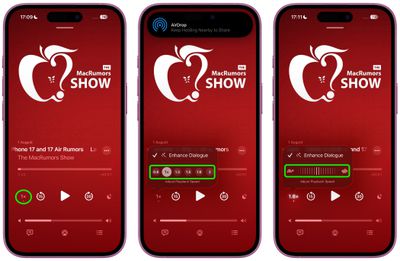
  3. Tap the playback speed button (1x) in the bottom left.
  4. Tap one of the preset playback speed options. Alternatively, drag your finger over the preset options to invoke a dial allowing for 0.1x incremental adjustments.
podcasts

The expanded range opens up new possibilities: Super slow speeds may be useful for listening to podcasts where the host speaks too fast, as well as language learning or transcription work, whereas the upper speeds can be used to boost the pace of plodding narrators, or help you when you just want to skim-listen to a show.

Best of all, the new playback speed setting remembers your preference for each individual podcast, so you shouldn't need to adjust it every time you return to the same show.

Apple will roll out iOS 26 to compatible iPhones in September 2025.

Top Rated Comments

16 months ago
I see Apple have not yet Sherlocked the one feature that keeps me on Overcast. Namely the ability to reduce the period of silence between people speaking. Truly excellent feature.

Score: 12 Votes (Like | Disagree)
LanaDelDeathRay Avatar
16 months ago
Even better—You can also just drag your finger up/down directly on the playback speed button. Yw
Score: 8 Votes (Like | Disagree)
16 months ago
This is just another example of a feature they should have shipped ages ago through a normal app update. Instead we have to wait and pray simple features are included in upcoming OS updates; doesn't make any sense.
Score: 5 Votes (Like | Disagree)
nutmac Avatar
15 months ago

I see Apple have not yet Sherlocked the one feature that keeps me on Overcast. Namely the ability to reduce the period of silence between people speaking. Truly excellent feature.
That and also automatic volume (voice boost). I use Overcast over Apple's for these two features alone.
Score: 4 Votes (Like | Disagree)
ericg301 Avatar
16 months ago
Every year I retry the native podcast app (compared to Pocket Casts, my daily driver), and every year I am still flummoxed by UP NEXT and how it differs from the queue. I just want the default screen to open on the latest episodes, in order, that I can add to the queue.
Score: 3 Votes (Like | Disagree)
16 months ago

Even better—You can also just drag your finger up/down directly on the playback speed button. Yw
LOL actually THANK YOU for this because I probably would've BARELY, very randomly discovered it in like a year's time!!! While trying to scrub a little stain off the screen protector in the area of that playback speed selector while having the app open and listening to a podcast. 😆🥲

The addition of the scrubber (or whatever the term is for it) is welcome in iOS 26; but minus points for UI/UX design on that one! Am I the only one that feels that way? Like I randomly discovered through a "butt swipe" that you can increment the speed through a horizontal scroll; but the implementation still has room for improvement! The first time I did it I didn't even know what the outcome of the action was; because visually the change happens, you feel the haptic response yet you don't see it in the moment, since it updates the indicator - which is UNDER your finger (the touch target) as it touches the screen... You end up having to lift your finger up while still touching the screen to "peek" under.

And I don't even think it has anything to do with being left/right handed; I can see how the approach is a bit faulty if you've got chunkier fingers as well/a big hand. :confused:
Score: 2 Votes (Like | Disagree)

Popular Stories

iPhone Duo Display Cracking

Apple Alerts Stores to iPhone Duo's Display Cracking Issue

Friday October 30, 2026 3:20 pm PDT by
In a memo shared with Apple Stores and Apple Authorized Service Providers this week, and later obtained by MacRumors, Apple provided technicians with guidance on how to diagnose and address the iPhone Duo's inner display cracking issue. If a customer reports the issue, Apple advised technicians to inspect the iPhone Duo and repair or replace it in accordance with their standard procedures....
iPad mini OLED feature 1

Apple Executive Comments on New iPad Mini Lacking 120Hz Display

Thursday October 29, 2026 1:47 pm PDT by
While the new iPad mini has an OLED display, the device does not support ProMotion, meaning the display's refresh rate is limited to 60Hz instead of 120Hz. ProMotion support would have allowed for the iPad mini's refresh rate to automatically adjust from 10Hz to 120Hz depending on the content being displayed, but evidently Apple has kept the feature exclusive to the iPad Pro among iPad...
Pinched iPad Mini

Apple Avoids Showing Pinched Fingers on iPad Mini Page in South Korea

Thursday October 29, 2026 11:52 am PDT by
In the U.S. and most other countries, Apple's website shows the new iPad mini being held by pinched fingers, but this is not the case in South Korea. The new iPad mini shown with pinched fingers on Apple's website in the U.S. On its South Korean website, Apple simply shows an image of the iPad mini on its own. The new iPad mini shown without pinched fingers on Apple's website in South Korea ...
Latest Stories
Apple Watch Ultra 4 Hits All-Time Low Price With Amazon's $99 Discount
11 hours ago
Reminder: Apple's Big Discount on Beats 360 Ear Cushions Ends Today
12 hours ago
Here's a New Tour of Apple's HomeView Software
12 hours ago
Apple Reveals New iPad Mini's Battery Capacity
13 hours ago
Top Stories: Apple's Big MacBook Pro, iPad mini and iMac Updates
14 hours ago
'Pluribus' Season 2 Reportedly Starts Production Today
21 hours ago
iPhone 18 Pro Sales Surge in China, Offsetting Decline in U.S. and Japan
21 hours ago
HomeView Software 27.2: Wallpapers, Control Center, and More
1 day ago
Apple Alerts Stores to iPhone Duo's Display Cracking Issue
1 day ago
iOS 27.3 Will Enable These Apple Intelligence Features in China
1 day ago
Apple Says iOS 27.3 Beta Coming Next Week
1 day ago
Apple's Flash Storage Suppliers Are Finally 'Getting Their Revenge'
1 day ago
14 New Things Your iPhone Can Do in iOS 27.2
1 day ago
iPhone Duo Review: One Week Later
1 day ago
Samsung Mocks iPhone Duo Display Cracks in New Ad Campaign
1 day ago
The MacRumors Show: OLED MacBook Pro, iPad Mini 8, and More
1 day ago
MacBook Pro With Touch Display: 15 More Details Revealed
1 day ago
Russia Places Apple on State Surveillance Registry
2 days ago
Halloween Weekend Brings Discounts on Apple Accessories and Pre-Orders
2 days ago
Apple Has Released More Than 25 New Products in the Past Two Months
2 days ago
Local Code Launches as Free, Private AI Assistant Tool for Mac
2 days ago
Apple Acquires Ascend.io
2 days ago
HomePod Mini 2 Launches Today: All the New Features
2 days ago
AirTag 2 4-Pack Drops to New Low Price of $69.99
2 days ago
Rian Johnson's iPhone Camera App Goes Viral
2 days ago
Where Did All the iPhone Duos Go? Mostly to Apple's Stores
2 days ago
Apple's Touchscreen MacBook Pro Could Ship 1.5M Units in 2027
2 days ago
New Apple TV 4K and iPad Mini: RAM Amounts Revealed
2 days ago
Apple Executive Comments on New iPad Mini Lacking 120Hz Display
2 days ago
Here's a Hands-On Look at HomePod Mini 2's New Two-Tone Colors
2 days ago

🔗 Related Apple News & Rumors

Stay updated with the latest Apple ecosystem news and verified rumors












































