iOS 18: Use New Library and Notes Features in Apple Maps - MacRumorsOpen MenuShow RoundupsShow Forums menuVisit ForumsOpen Sidebar
Skip to Content

iOS 18: Use New Library and Notes Features in Apple Maps

by

Apple Maps in iOS 18 introduces two helpful new features: a centralized Library for saved content and the ability to add personal notes to locations. Here's how to take advantage of these new tools.

Generic iOS 18 Maps Feature

Using the New Library

Apple's iOS 18 update brings significant improvements to the Maps app, and streamlines the process of saving and organizing your favorite locations. Building on the existing Guides feature, the new version introduces a simple "+" button on location listings for quick saving.

A new Library menu now houses all of your saved places, including those from Guides and Pinned locations. The Library also automatically incorporates previously saved locations, offering a comprehensive view of your favorite spots.
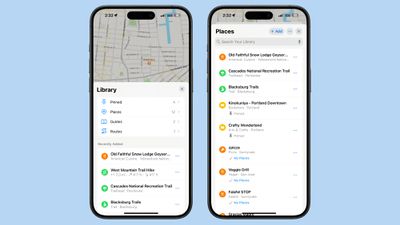
ios 18 maps library
You can individually search through your Pinned, Places, Guides, and Routes collections, and use the three-dot button to sort them by date added, name, or distance, and toggle between list and grid views. The update also enables direct saving of new locations from within the Library itself, via the + Add button.

In summary, the new Library consolidates content that was previously spread across different sections of the app, which makes your saved place information a lot more accessible.

Adding Notes to Locations

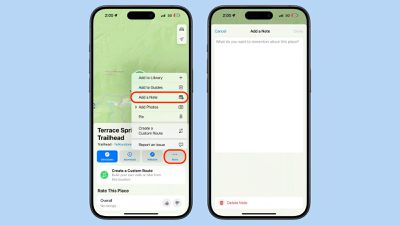
iOS 18 also introduces the ability to add personal notes to any location in Apple Maps. This feature allows you to jot down reminders, impressions, or any other information you want to associate with a specific place. To add a note:

  1. Search for or tap on a location in Maps.
  2. Tap the More button (three dots) in the location's information card.
  3. Tap Add a Note.
  4. Type your note, then tap Done.

maps

Your notes are private and stored only on devices logged into your Apple account. This feature can be particularly useful for remembering details about restaurants, marking meeting spots, or keeping track of places you want to visit.

These new features in iOS 18's Maps app offer enhanced organization and personalization, and there are other additional tools checking out that we've covered elsewhere, including custom routes, hiking trails, and a new Search Here function.


Top Rated Comments

27 months ago
Ever since Maps got the capability of pinning locations, I've wanted the ability to be notified when I'm near a pin or saved location. I always read reviews of restaurants in places away from home but forget about them when I travel there. I'd love to get off a plane and have a reminder with a list of places I should check out. The same capability would be useful for a lot of situations I think.

Score: 8 Votes (Like | Disagree)
jz0309 Avatar
27 months ago
I am still irritated when sometimes, seemingly at random, the map “moves” and North is not at the top anymore, happens in CarPlay and on phone…
Just give me a setting for “North at top” as in any printed map
Score: 3 Votes (Like | Disagree)
27 months ago
Excellent new and useful features for Maps. Something I'll use a lot.
Score: 2 Votes (Like | Disagree)
SnowCrocodile Avatar
27 months ago

it’s been possible to collaborate on ”Guides” (which are essentially collections of bookmarks) for at least 2-3 years: swipe left on a guide and select ”share”. Alas the collaborative aspect has been randomly broken about a year after it was introduced: participants now get a copy of the Guide rather than a shared version. Haven’t tried recently to see if it’s fixed…

Those who suggest using Google Maps are obviously ok with their location being sold to anyone with even a remote interest… not for me, thanks v.m.
So I take if you are not using a cell phone then ?

https://www.zdnet.com/article/us-cell-carriers-selling-access-to-real-time-location-data/

Apple Maps is OK for getting to familiar places. However it left me stranded far too many times.

Just in the last two years:

- asked it for a gas stop before dropping off a rental. When resumed the trip, it routed me to a service drive at the wrong end of the airport. Took me an extra 25 minutes to get through the traffic. Barely made my flight.

- Went to a first meeting with a customer. AM gets me to the opposite side of a major freeway - I could see their office across the road, but had to drive a few miles and turn around to get there.

- Another customer moved their operations to a new building in 2021. Apple Maps still shows old location. They submitted error reports to Apple. I submitted error reports to Apple. Still showing old address as of last year.

- Just this past Sunday - driving back from a getaway weekend upstate, wanted to stop for lunch at a restaurant that we’ve been to a dozen times before. AM could not recognize the name or could not find it several times in a row. Finally I gave up and asked Google Maps, found it right away.

When it does work it’s great and super convenient. And I like the design more. But when I need to go to an unfamiliar location and it’s important to get there on time, I use Google Maps.
Score: 1 Votes (Like | Disagree)
alexandr Avatar
27 months ago

Some of the map data is terrible. There's a couple of roads near me that are completely wrong (in London, UK) and have been there at least 50-70 years. Not sure where the data comes from but it's not on OSM or Google Maps which are both correct.

YMMV. Take more than one map everywhere.
I always do! I also download maps onto my phone in case there's no service where I am. Last trip to Japan I encountered several dead zones, so it's always a good idea.
Score: 1 Votes (Like | Disagree)
cjsuk Avatar
27 months ago

That's good to know, I'm going in 2 weeks, perhaps I'll give  another shot :) But it better not get me lost!! :D
Some of the map data is terrible. There's a couple of roads near me that are completely wrong (in London, UK) and have been there at least 50-70 years. Not sure where the data comes from but it's not on OSM or Google Maps which are both correct.

YMMV. Take more than one map everywhere.
Score: 1 Votes (Like | Disagree)

Popular Stories

iPhone Duo Display Cracking

Apple Alerts Stores to iPhone Duo's Display Cracking Issue

Friday October 30, 2026 3:20 pm PDT by
In a memo shared with Apple Stores and Apple Authorized Service Providers this week, and later obtained by MacRumors, Apple provided technicians with guidance on how to diagnose and address the iPhone Duo's inner display cracking issue. If a customer reports the issue, Apple advised technicians to inspect the iPhone Duo and repair or replace it in accordance with their standard procedures....
iPad mini OLED feature 1

Apple Executive Comments on New iPad Mini Lacking 120Hz Display

Thursday October 29, 2026 1:47 pm PDT by
While the new iPad mini has an OLED display, the device does not support ProMotion, meaning the display's refresh rate is limited to 60Hz instead of 120Hz. ProMotion support would have allowed for the iPad mini's refresh rate to automatically adjust from 10Hz to 120Hz depending on the content being displayed, but evidently Apple has kept the feature exclusive to the iPad Pro among iPad...
Pinched iPad Mini

Apple Avoids Showing Pinched Fingers on iPad Mini Page in South Korea

Thursday October 29, 2026 11:52 am PDT by
In the U.S. and most other countries, Apple's website shows the new iPad mini being held by pinched fingers, but this is not the case in South Korea. The new iPad mini shown with pinched fingers on Apple's website in the U.S. On its South Korean website, Apple simply shows an image of the iPad mini on its own. The new iPad mini shown without pinched fingers on Apple's website in South Korea ...


Latest Stories
Apple Watch Ultra 4 Hits All-Time Low Price With Amazon's $99 Discount
14 hours ago
Reminder: Apple's Big Discount on Beats 360 Ear Cushions Ends Today
14 hours ago
Here's a New Tour of Apple's HomeView Software
14 hours ago
Apple Reveals New iPad Mini's Battery Capacity
15 hours ago
Top Stories: Apple's Big MacBook Pro, iPad mini and iMac Updates
16 hours ago
'Pluribus' Season 2 Reportedly Starts Production Today
23 hours ago
iPhone 18 Pro Sales Surge in China, Offsetting Decline in U.S. and Japan
1 day ago
HomeView Software 27.2: Wallpapers, Control Center, and More
1 day ago
Apple Alerts Stores to iPhone Duo's Display Cracking Issue
1 day ago
iOS 27.3 Will Enable These Apple Intelligence Features in China
1 day ago
Apple Says iOS 27.3 Beta Coming Next Week
1 day ago
Apple's Flash Storage Suppliers Are Finally 'Getting Their Revenge'
1 day ago
14 New Things Your iPhone Can Do in iOS 27.2
1 day ago
iPhone Duo Review: One Week Later
1 day ago
Samsung Mocks iPhone Duo Display Cracks in New Ad Campaign
2 days ago
The MacRumors Show: OLED MacBook Pro, iPad Mini 8, and More
2 days ago
MacBook Pro With Touch Display: 15 More Details Revealed
2 days ago
Russia Places Apple on State Surveillance Registry
2 days ago
Halloween Weekend Brings Discounts on Apple Accessories and Pre-Orders
2 days ago
Apple Has Released More Than 25 New Products in the Past Two Months
2 days ago
Local Code Launches as Free, Private AI Assistant Tool for Mac
2 days ago
Apple Acquires Ascend.io
2 days ago
HomePod Mini 2 Launches Today: All the New Features
2 days ago
AirTag 2 4-Pack Drops to New Low Price of $69.99
2 days ago
Rian Johnson's iPhone Camera App Goes Viral
2 days ago
Where Did All the iPhone Duos Go? Mostly to Apple's Stores
2 days ago
Apple's Touchscreen MacBook Pro Could Ship 1.5M Units in 2027
2 days ago
New Apple TV 4K and iPad Mini: RAM Amounts Revealed
2 days ago
Apple Executive Comments on New iPad Mini Lacking 120Hz Display
2 days ago
Here's a Hands-On Look at HomePod Mini 2's New Two-Tone Colors
2 days ago

🔗 Related Apple News & Rumors

Stay updated with the latest Apple ecosystem news and verified rumors