

One frequent complaint of smartphone users is the limited amount of battery life our tech devices have. With the constant trend toward making devices thinner and lighter, battery life is a key tradeoff to be considered, and some users find their devices not lasting as long as they'd prefer.

For those pushing their devices to the limit, Apple has added a new feature to iOS 9 that is designed to help you conserve those last few drops of juice when you wont be able to charge your iPhone anytime soon. The new feature is known as Low Power Mode, and it can increase your battery life up to three hours but at the expense of some functions of your device. It is only available on iPhone devices running iOS 9.
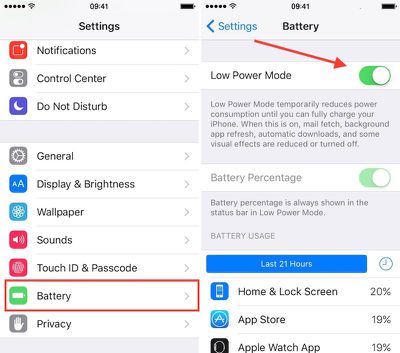
Low Power Mode
Enabling Low Power Mode only takes a few steps.

  1. Open the Settings app on your iPhone.
  2. Select Battery from the menu list.
  3. Toggle Low Power Mode to the On position.
  4. The battery icon will turn yellow to indicate that you are using Low Power Mode.

Low Power Mode reduces your iPhone's performance and cuts out some background activities. For example, mail must be fetched manually, background app refresh is disabled, and motion and brightness are reduced.

Benchmarks have shown the iPhone's CPU performance with Low Power Mode on is significantly reduced in an effort to save on power consumption, so while simple tasks may continue to work just fine on an iPhone in Low Power Mode, more demanding ones may become sluggish.

You don't have to keep Low Power Mode on all of the time; you can manually shut it off whenever you want. However, the general impression of users has been that the real-world slowdown is not so severe that you can't continue to use your iPhone.

With iOS 9, you will receive a prompt when your iOS device goes below 20 percent of its battery power left. The popup will allow you to quickly toggle Low Power Mode on so you can still use your device for only the most necessary of functions until you are able to recharge it.

This feature might be familiar to Apple Watch owners, as Power Reserve is a somewhat similar feature designed to allow the wrist-worn device to continue functioning as a basic watch as the battery drains toward zero by cutting off all other functions of the device.

Low Power Mode is a nice addition to iOS 9 for improving the performance of your iPhone's battery.


Related Forum: iOS 9

Top Rated Comments

KALLT Avatar
135 months ago
A shame that they didn’t include an option to automatically enable it without a popup. I also think that they should have added it to the control centre.
Score: 10 Votes (Like | Disagree)
Westside guy Avatar
135 months ago
It's too bad you can't just pick a battery level and tell iOS to automatically turn on Low Power Mode when it hits that point.

I'll go out on a limb and predict this idea will be in a new jailbreak tweak within a few days of iOS 9 being jailbroken, because it's so bleeding obvious.
Score: 4 Votes (Like | Disagree)
simmonsj Avatar
135 months ago
Looks like IOS9 turns low power mode off automatically.

I left my phone in low power mode last night, but charging. This morning, I missed the exact message, but it had automatically turned off low power mode and said something like "Low Power mode turned off because you now have sufficient battery charge".

Edit: Thanks to the other posters who have confirmed this happens when your phone hits 80% charge.
Score: 2 Votes (Like | Disagree)
rediffusion Avatar
135 months ago
I wish you could set specific times of the day to automatically go into Low Battery mode (i.e. night time, when I'm at work, etc)
Score: 2 Votes (Like | Disagree)
JohnApples Avatar
135 months ago
A shame that they didn’t include an option to automatically enable it without a popup. I also think that they should have added it to the control centre.
That's actually a great, simple idea. I would much rather have a Low Power Mode in CC than the Camera, especially since my Camera app is in my dock.
Score: 2 Votes (Like | Disagree)
macsba Avatar
135 months ago
Wonder why this feature hasn't been added to both the iPad and iPod Touch.
Score: 2 Votes (Like | Disagree)

Popular Stories

Aston Martin CarPlay Ultra Screen

Apple's CarPlay Ultra to Expand to These Vehicle Brands Later This Year

Sunday February 1, 2026 10:08 am PST by
Last year, Apple launched CarPlay Ultra, the long-awaited next-generation version of its CarPlay software system for vehicles. Nearly nine months later, CarPlay Ultra is still limited to Aston Martin's latest luxury vehicles, but that should change fairly soon. In May 2025, Apple said many other vehicle brands planned to offer CarPlay Ultra, including Hyundai, Kia, and Genesis. In his Powe...
Apple Logo Black

Apple's Next Launch is 'Imminent'

Sunday February 1, 2026 12:31 pm PST by
The calendar has turned to February, and a new report indicates that Apple's next product launch is "imminent," in the form of new MacBook Pro models. "All signs point to an imminent launch of next-generation MacBook Pros that retain the current form factor but deliver faster chips," Bloomberg's Mark Gurman said on Sunday. "I'm told the new models — code-named J714 and J716 — are slated...
iOS 26

iOS 26.3 and iOS 26.4 Will Add These New Features to Your iPhone

Tuesday February 3, 2026 7:47 am PST by
We are still waiting for the iOS 26.3 Release Candidate to come out, so the first iOS 26.4 beta is likely still at least a week or two away. Following beta testing, iOS 26.4 will likely be released to the general public in March or April. Below, we have recapped known or rumored iOS 26.3 and iOS 26.4 features so far. iOS 26.3 iPhone to Android Transfer Tool iOS 26.3 makes it easier...
Apple MacBook Pro M4 hero

New MacBook Pros Reportedly Launching Alongside macOS 26.3

Sunday February 1, 2026 5:42 am PST by
Apple is planning to launch new MacBook Pro models with M5 Pro and M5 Max chips alongside macOS 26.3, according to Bloomberg's Mark Gurman. "Apple's faster MacBook Pros are planned for the macOS 26.3 release cycle," wrote Gurman, in his Power On newsletter today. "I'm told the new models — code-named J714 and J716 — are slated for the macOS 26.3 software cycle, which runs from...
iOS 26 Home Feature

Apple Gives Final Warning to Home App Users

Tuesday February 3, 2026 8:55 am PST by
In 2022, Apple introduced a new Apple Home architecture that is "more reliable and efficient," and the deadline to upgrade and avoid issues is fast approaching. In an email this week, Apple gave customers a final reminder to upgrade their Home app by February 10, 2026. Apple says users who do not upgrade may experience issues with accessories and automations, or lose access to their smart...














