In iOS 10, Apple is making it even easier to use emojis with an all-new replacement and predictive system that replaces key words and phrases with relevant emoji characters. Although still short of a full-featured search functionality -- which many have asked for -- the new emoji replacement ability turns text messages into emoji-filled communications that are fun alternatives to basic blocks of text.

Using Emoji Replacement

To insert a few emojis into texts for yourself, follow these steps:
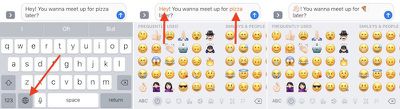
How To Emoji 3

  1. Open Messages.
  2. Tap on the person you want to chat with.
  3. Type a message as normal, but don't hit the send arrow yet.
  4. Long-tap on the Globe icon to bring up your list of installed keyboards, and choose "Emoji."
  5. Tap any orange-highlighted word directly in your text message to turn it into an emoji. If no highlighted words appear, Apple didn't find any potential emoji replacement opportunities in your message.
  6. Tap the send arrow when you're finished.

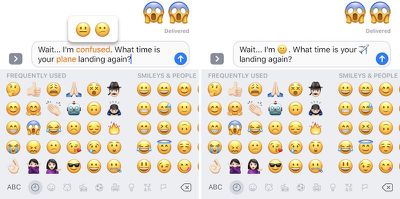
Some emojis have multiple potential keywords, and for these you'll be presented with a pop-up box where you choose the emoji you want to use. The word "confused," for example, is associated with both the "confused" and "neutral" faces.
How To Emoji 4

Using Emoji Prediction

Emoji predictions also begin as you type your message out, thanks to the predictive text box in the iOS keyboard. Follow these steps to make sure you have the setting enabled, and then start sending out emojis faster than ever.
How To Emoji 6

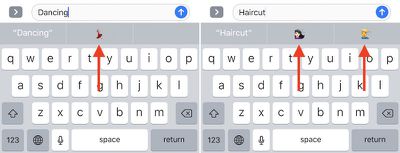
Refer to the image above for Steps 6-8

  1. Open Settings and go to "General." Then scroll down to "Keyboard" and tap it.
  2. Scroll down to the bottom of Keyboard settings to find "Predictive," and toggle it on if it isn't already.
  3. Open Messages and navigate to the person you want to chat with.
  4. Type a word connected to an emoji, like "Happy," "Beach," or "Sheep" to see its related emoji pop up in one of the three predictive text boxes.
  5. Tap the emoji to replace the typed word with a character.
  6. Keep typing out your message, and tap the send arrow when you're finished.

This predictive feature has the potential to be used as a search function for simply-titled emojis, mainly emotional ones like "Sad" or things related to the weather, but complex characters are still tough to propagate. Words in the ballpark of "Smiling Imp" and "Information Desk Woman" never successfully call up the relevant emojis, but as long as you're searching for basic characters emoji prediction is yet another useful and fun feature addition in iOS 10's new Messages app.


Related Forum: iOS 10

Top Rated Comments

chrismail627 Avatar
123 months ago
I really hope people don't start texting me like this...
Score: 13 Votes (Like | Disagree)
639051 Avatar
123 months ago
So much for English. Lets communicate with hieroglyphics instead. If anyone starts sending this crap to me they're gunna get deleted off my contacts list and banned.
SMS tough guy right here. XD
Score: 11 Votes (Like | Disagree)
predation Avatar
123 months ago
The human race is becoming dumber.
Score: 4 Votes (Like | Disagree)
Bawstun Avatar
123 months ago
I get the sarcasm. But really, sometimes emoji can be better than words. You can't interpret the 'lol' a million different (condescending) ways if the user chooses to turn it into a laughing emoji . The usefulness varies, but I kind of like the idea for lightening up the feel of some chats.
Score: 4 Votes (Like | Disagree)
now i see it Avatar
123 months ago
So much for English. Lets communicate with hieroglyphics instead. If anyone starts sending this crap to me they're gunna get deleted off my contacts list and banned.
Score: 4 Votes (Like | Disagree)
DTphonehome Avatar
123 months ago
Doesn't seem to work for me unless I switch over to the Emoji keyboard after typing out my message. Would be more convenient if it could identify matches on the fly and highlight them and yellow so I could just select and replace them without having to go to the Emoji keyboard.
Score: 4 Votes (Like | Disagree)

Popular Stories

iOS 26

iOS 26.3 and iOS 26.4 Will Add These New Features to Your iPhone

Tuesday February 3, 2026 7:47 am PST by
We are still waiting for the iOS 26.3 Release Candidate to come out, so the first iOS 26.4 beta is likely still at least a week or two away. Following beta testing, iOS 26.4 will likely be released to the general public in March or April. Below, we have recapped known or rumored iOS 26.3 and iOS 26.4 features so far. iOS 26.3 iPhone to Android Transfer Tool iOS 26.3 makes it easier...
Aston Martin CarPlay Ultra Screen

Apple's CarPlay Ultra to Expand to These Vehicle Brands Later This Year

Sunday February 1, 2026 10:08 am PST by
Last year, Apple launched CarPlay Ultra, the long-awaited next-generation version of its CarPlay software system for vehicles. Nearly nine months later, CarPlay Ultra is still limited to Aston Martin's latest luxury vehicles, but that should change fairly soon. In May 2025, Apple said many other vehicle brands planned to offer CarPlay Ultra, including Hyundai, Kia, and Genesis. In his Powe...
Apple Logo Black

Apple's Next Launch is 'Imminent'

Sunday February 1, 2026 12:31 pm PST by
The calendar has turned to February, and a new report indicates that Apple's next product launch is "imminent," in the form of new MacBook Pro models. "All signs point to an imminent launch of next-generation MacBook Pros that retain the current form factor but deliver faster chips," Bloomberg's Mark Gurman said on Sunday. "I'm told the new models — code-named J714 and J716 — are slated...
Apple MacBook Pro M4 hero

New MacBook Pros Reportedly Launching Alongside macOS 26.3

Sunday February 1, 2026 5:42 am PST by
Apple is planning to launch new MacBook Pro models with M5 Pro and M5 Max chips alongside macOS 26.3, according to Bloomberg's Mark Gurman. "Apple's faster MacBook Pros are planned for the macOS 26.3 release cycle," wrote Gurman, in his Power On newsletter today. "I'm told the new models — code-named J714 and J716 — are slated for the macOS 26.3 software cycle, which runs from...
iOS 26 Home Feature

Apple Gives Final Warning to Home App Users

Tuesday February 3, 2026 8:55 am PST by
In 2022, Apple introduced a new Apple Home architecture that is "more reliable and efficient," and the deadline to upgrade and avoid issues is fast approaching. In an email this week, Apple gave customers a final reminder to upgrade their Home app by February 10, 2026. Apple says users who do not upgrade may experience issues with accessories and automations, or lose access to their smart...