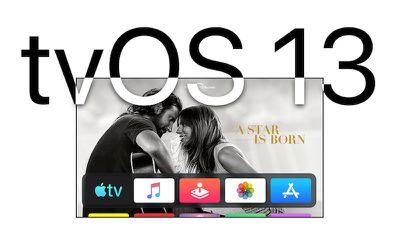
Apple on Monday seeded the first beta of an upcoming tvOS 13 software update to its public beta testing group, giving non-developers a chance to try out the new Apple TV software ahead of its public release in the fall.
tvos13
tvOS 13 introduces several changes to the ‌Apple TV‌ interface, including a new Home screen designed to make it easier to find new content. It also introduces multi-user support, a picture-in-picture mode, console controller support as part of the upcoming Apple Arcade game subscription service, and more.

But before you rush to install the tvOS 13 beta, it's worth remembering that this is pre-release software, so don't expect things to work trouble-free. Beta software is typically unstable, as it often contains bugs and issues that have yet to be ironed out. Still interested? Then read on.

Is tvOS 13 Compatible With My Apple TV?

tvOS 13 is designed to run on the fourth and fifth-generation ‌Apple TV‌ models (‌Apple TV‌ HD and ‌Apple TV‌ 4K, respectively). It is not compatible with earlier versions of the ‌Apple TV‌, because those models do not support tvOS.

How to Enroll in the Apple Beta Software Program

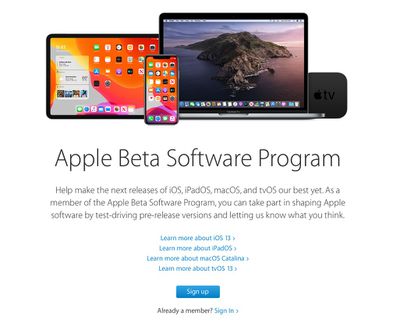
To download and install the tvOS 13 beta, you must enroll in the free Apple Beta Software Program. If you're already enrolled, you can skip these steps and jump to the next section.

  1. Open Apple's Safari browser on a computer or iOS device and navigate to the Apple Beta Software Program.
  2. Tap the Sign up button.
    apple beta software program

  3. Enter your Apple ID credentials and tap the Sign in button.
  4. Agree to the Apple Beta Software Program terms and conditions if necessary.
How to Download and Install tvOS 13 on Apple TV

Once your ‌Apple TV‌ is enrolled in the Apple Beta Software Program, you'll need to carry out the following steps on the set-top box.

  1. From your ‌Apple TV‌, click through to Settings -> Accounts.
  2. Under ‌Apple ID‌, sign into at least one of the account options (iCloud, iTunes and App Store, or Game Center) with the same ‌Apple ID‌ that you used to register for the Apple Beta Software Program.
  3. On your ‌Apple TV‌, click through to Settings -> System -> Software Update.
    apple tv software updates

  4. Click Get Public Beta Updates to turn it on.
  5. Follow the onscreen instructions to complete the process.
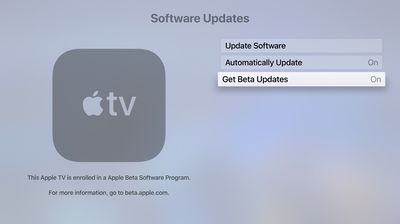

Your ‌Apple TV‌ should automatically download and install the latest public beta software if you have Automatically Update turned on in the Software Updates settings, but you can always manually check for updates by clicking through to Settings -> System -> Software Updates -> Update Software.


Related Roundup: Apple TV
Buyer's Guide: Apple TV (Don't Buy)

Top Rated Comments

Kabeyun Avatar
86 months ago
Step 1 is actually exercise caution and remember that beta software is beta software. There are reports of ATV bricking in the other tvOS13 thread ('https://www.macrumors.com/2019/06/26/hands-on-with-tvos-13/').
Score: 4 Votes (Like | Disagree)

Popular Stories

Aston Martin CarPlay Ultra Screen

Apple's CarPlay Ultra to Expand to These Vehicle Brands Later This Year

Sunday February 1, 2026 10:08 am PST by
Last year, Apple launched CarPlay Ultra, the long-awaited next-generation version of its CarPlay software system for vehicles. Nearly nine months later, CarPlay Ultra is still limited to Aston Martin's latest luxury vehicles, but that should change fairly soon. In May 2025, Apple said many other vehicle brands planned to offer CarPlay Ultra, including Hyundai, Kia, and Genesis. In his Powe...
Apple Logo Black

Apple Just Made Its Second-Biggest Acquisition Ever After Beats

Thursday January 29, 2026 10:07 am PST by
Apple today confirmed to Reuters that it has acquired Q.ai, an Israeli startup that is working on artificial intelligence technology for audio. Apple paid close to $2 billion for Q.ai, according to sources cited by the Financial Times. That would make this Apple's second-biggest acquisition ever, after it paid $3 billion for the popular headphone and audio brand Beats in 2014. Q.ai has...
Apple Logo Black

Apple's Next Launch is 'Imminent'

Sunday February 1, 2026 12:31 pm PST by
The calendar has turned to February, and a new report indicates that Apple's next product launch is "imminent," in the form of new MacBook Pro models. "All signs point to an imminent launch of next-generation MacBook Pros that retain the current form factor but deliver faster chips," Bloomberg's Mark Gurman said on Sunday. "I'm told the new models — code-named J714 and J716 — are slated...
14 inch MacBook Pro Keyboard

Apple Changes How You Order a Mac

Saturday January 31, 2026 10:51 am PST by
Apple recently updated its online store with a new ordering process for Macs, including the MacBook Air, MacBook Pro, iMac, Mac mini, Mac Studio, and Mac Pro. There used to be a handful of standard configurations available for each Mac, but now you must configure a Mac entirely from scratch on a feature-by-feature basis. In other words, ordering a new Mac now works much like ordering an...
Apple MacBook Pro M4 hero

New MacBook Pros Reportedly Launching Alongside macOS 26.3

Sunday February 1, 2026 5:42 am PST by
Apple is planning to launch new MacBook Pro models with M5 Pro and M5 Max chips alongside macOS 26.3, according to Bloomberg's Mark Gurman. "Apple's faster MacBook Pros are planned for the macOS 26.3 release cycle," wrote Gurman, in his Power On newsletter today. "I'm told the new models — code-named J714 and J716 — are slated for the macOS 26.3 software cycle, which runs from...