How to Import WhatsApp Chats into Telegram on iPhone - MacRumorsOpen MenuShow RoundupsShow Forums menuVisit ForumsOpen Sidebar
Skip to Content

How to Import WhatsApp Chats into Telegram on iPhone

by

Over 100 million new users joined encrypted messaging app Telegram in January 2021. The stunning growth in the platform's user base was linked to an exodus from rival chat app WhatsApp, which concerned many of its users with a confusing privacy policy update that seemed to imply that more of their data would be shared with Facebook.

Telegram app
WhatsApp tried to deal with the fallout by clarifying that the changes were related to business users, and that nothing would change about the privacy of people's messages on the platform. However, for many, the damage had already been done.

Regardless of the truth of the matter, Telegram's developers were quick to take advantage of the situation and swiftly released an update to their own app that allows users to import their old WhatsApp chats into Telegram.

If you're leaving WhatsApp for Telegram but don't want to lose your chat history in the process, then read on. The following steps show you how transfer individual conversations to the rival platform intact.

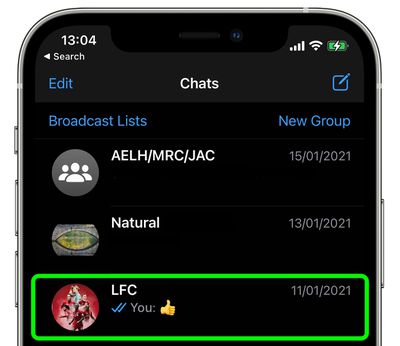
  1. Launch WhatsApp on your iPhone and tap the conversation thread that you want to export to Telegram.
    whatsapp

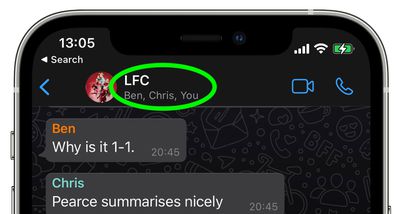
  2. Tap the contact's name (or the conversation title if it's a group chat) at the top of the screen.
    whatsapp

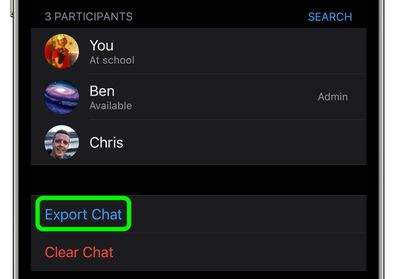
  3. Scroll down and select Export Chat.
    whatsapp

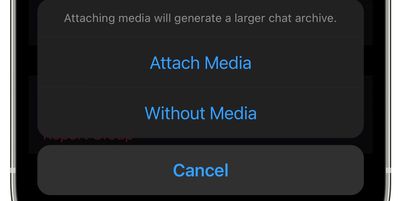
  4. From the pop-up that appears, select either Attach Media or Without Media.
    whatsapp

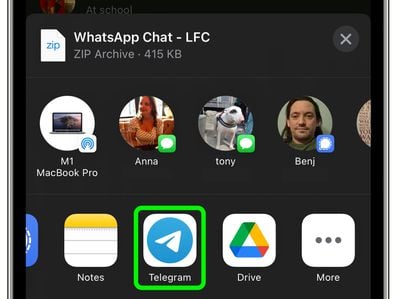
  5. From the Share menu that appears, select the Telegram app.
    whatsapp

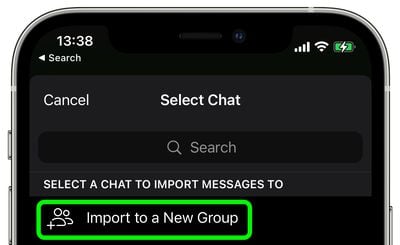
  6. Select the contact that you want to import the chat to. If it's a group conversation that you're importing, select Import to a New Group.
    whatsapp

  7. Tap Import from the pop-up prompt to confirm.
  8. Once Telegram says the import has completed successfully, tap Done.
That's all there is to it. Messages will be imported into the current day but will also include their original timestamps, and all members of the chat on Telegram will see the messages.


Popular Stories

Whatsapp Feature

WhatsApp Beta Adds Green Dot to Show Who's Online

Monday July 6, 2026 3:56 am PDT by
WhatsApp appears to be introducing a new visual indicator that shows when a contact is online, according to WaBetaInfo. The feature adds a small green circle to a contact's profile photo when they're active in the app, and which disappears the moment they leave, all updated in real time. The indicator is now being tested for the WhatsApp iPhone app in TestFlight after it debuted on Android...

Whatsapp Feature

WhatsApp Beta Reveals iCloud Backup Alternative for iPhone

Tuesday July 14, 2026 3:06 am PDT by
WhatsApp is developing a first-party cloud storage option for chat backups on iPhone, providing users with an alternative to iCloud for the first time, according to app tinkerer WABetaInfo. Code found in the WhatsApp beta for iOS (version 26.28.10.16), available through TestFlight, suggests that users will eventually be able to pick their preferred backup destination directly from the app's...
Whatsapp Feature

WhatsApp Begins Rolling Out New Username Feature

Friday July 17, 2026 5:32 am PDT by
WhatsApp has started rolling out its new username feature, reports WABetaInfo. Some users who reserved their username have started receiving a notification that their username is active, and that they can now use it to send and receive messages to other users without revealing their phone number. When someone creates a username, WhatsApp will notify people who already have an active chat with...

🔗 Related Apple News & Rumors

Stay updated with the latest Apple ecosystem news and verified rumors