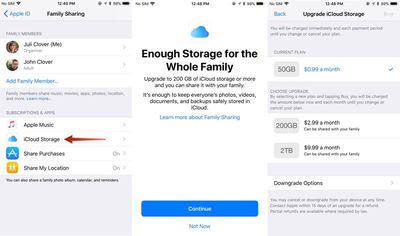
Apple's Family Sharing feature allows you to share music, movies, apps, photos, and more with family members, and in iOS 11, Family Sharing extends to Apple's iCloud Storage plans.

When you purchase a 200GB or 2TB iCloud Storage plan, all members of your family can share the storage space. Depending on how many family members you have, family plans offer more storage at a better price than individual plans.

For example, a 50GB storage plan is priced at $0.99 per person. For two people, the $2.99 200GB plan offers each person an additional 50GB of storage for only $1 more.

How to Upgrade to a Family iCloud Storage Plan

  1. Open the Settings app.
  2. Tap on your Apple ID profile at the top of the app.
  3. Choose "Family Sharing," the sixth option in the list.icloudfamilysharing
  4. Tap on "iCloud Storage" to bring up a notice about the new Family Sharing options.
  5. Click "Continue" to choose a plan.
  6. Pick a 200GB or 2TB plan.

You can also access the plan settings through the standard iCloud Storage menu in the Settings app, accessible by going to iCloud > Manage Storage after tapping on your profile.

How to Stop Sharing iCloud Storage With Family

You can sign up for a 2TB or 200GB storage plan and keep family members from accessing your storage space. Here's how:

  1. Open the Settings app.
  2. Tap on your Apple ID profile.
  3. Choose "Family Sharing."
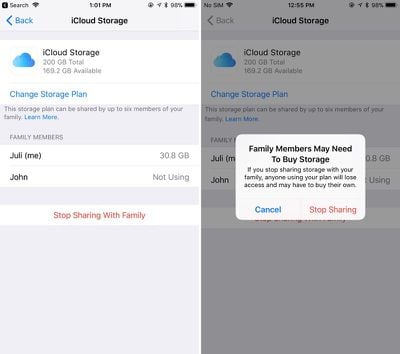
  4. Choose "iCloud Storage."familystoragestopsharing
  5. Tap on "Stop Sharing With Family."

How to Downgrade iCloud Storage

If you want to go back to a cheaper iCloud Storage option, downgrading is as simple as choosing a new plan. New rates won't kick in until the next billing period.

  1. Open the Settings app.
  2. Tap on your Apple ID profile.
  3. Choose "iCloud."
  4. Tap on "Manage Storage."
  5. Choose "Change" under the iCloud Storage option.
  6. Select a 5GB or 50GB plan to downgrade.

It's important to note that there's no way to allocate how much storage each person gets when using one of Apple's new iCloud Storage plans for families, so it's not always an even split. If a family member is hogging too much space, that's a problem that will need to be worked out offline. You can see how much storage each family member is using by going to profile > Family Sharing > iCloud Storage.
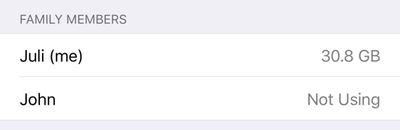
familystoragespaceused
When you choose a 200GB or 2TB storage plan and opt in to Family Sharing, family members who are on the free 5GB plan will be upgraded automatically and will begin using the family storage plan.

Family members who already have a paid plan will need to opt in to the family storage plan to transfer over from their own plans. If they want to have separate storage, your family members can continue to pay for their own plans and choose not to opt into the family plan.

To let your family know that you've signed up for a family iCloud plan, Apple offers an automatic iMessage alert that can be sent out to family members that lets them easily switch over to the family plan.


Tag: iCloud

Top Rated Comments

Blackstick Avatar
109 months ago
Great. When can I share the damn Photos library with my wife?
Score: 11 Votes (Like | Disagree)
higgalls Avatar
109 months ago
This is a great question. I hope so because the shared folders are not full resolution. I want to share photo library with my wife but with current iCliud set up it can't be done. Basically the way it works now is one of us has he main photo library that is synced to the family iMac and one has another iCloud account where we have to airdrop the pics we want into the main one.
This is why my wife and I still use the same iCloud account when setting up our iPhones. I just make sure I turn some things off that conflict between the two (or that we don't want - iCloud Drive, iMessages and FaceTime for each others number etc), and just live with it. But in an ideal world, we should be able to have our own accounts under family sharing, and just sync the same default photo albums. I like how I can just open up my Photos app and see what photos my wife has taken of my kids today when they were out, and vice versa.
Score: 4 Votes (Like | Disagree)
Anonymous Freak Avatar
109 months ago
Great. When can I share the damn Photos library with my wife?
+1, need! As it stands, we have to manually copy photos in to a shared album. It's silly.
Score: 3 Votes (Like | Disagree)
load97 Avatar
109 months ago
+1, need! As it stands, we have to manually copy photos in to a shared album. It's silly.
It’s embarrassing for Apple.
Score: 3 Votes (Like | Disagree)
Eduardo1971 Avatar
109 months ago
Thank you for the reminder MR!!!

With all these iOS 11 goodies I totally forgot about this...I’m adding my family to this!!
Score: 3 Votes (Like | Disagree)
brian3uk Avatar
109 months ago
And lo, the single famililess are again forgotten. But seriously, the free tier should be more than 5GB now.
Score: 2 Votes (Like | Disagree)

Popular Stories

Aston Martin CarPlay Ultra Screen

Apple's CarPlay Ultra to Expand to These Vehicle Brands Later This Year

Sunday February 1, 2026 10:08 am PST by
Last year, Apple launched CarPlay Ultra, the long-awaited next-generation version of its CarPlay software system for vehicles. Nearly nine months later, CarPlay Ultra is still limited to Aston Martin's latest luxury vehicles, but that should change fairly soon. In May 2025, Apple said many other vehicle brands planned to offer CarPlay Ultra, including Hyundai, Kia, and Genesis. In his Powe...
Apple Logo Black

Apple's Next Launch is 'Imminent'

Sunday February 1, 2026 12:31 pm PST by
The calendar has turned to February, and a new report indicates that Apple's next product launch is "imminent," in the form of new MacBook Pro models. "All signs point to an imminent launch of next-generation MacBook Pros that retain the current form factor but deliver faster chips," Bloomberg's Mark Gurman said on Sunday. "I'm told the new models — code-named J714 and J716 — are slated...
iOS 26

iOS 26.3 and iOS 26.4 Will Add These New Features to Your iPhone

Tuesday February 3, 2026 7:47 am PST by
We are still waiting for the iOS 26.3 Release Candidate to come out, so the first iOS 26.4 beta is likely still at least a week or two away. Following beta testing, iOS 26.4 will likely be released to the general public in March or April. Below, we have recapped known or rumored iOS 26.3 and iOS 26.4 features so far. iOS 26.3 iPhone to Android Transfer Tool iOS 26.3 makes it easier...
Apple MacBook Pro M4 hero

New MacBook Pros Reportedly Launching Alongside macOS 26.3

Sunday February 1, 2026 5:42 am PST by
Apple is planning to launch new MacBook Pro models with M5 Pro and M5 Max chips alongside macOS 26.3, according to Bloomberg's Mark Gurman. "Apple's faster MacBook Pros are planned for the macOS 26.3 release cycle," wrote Gurman, in his Power On newsletter today. "I'm told the new models — code-named J714 and J716 — are slated for the macOS 26.3 software cycle, which runs from...
iOS 26 Home Feature

Apple Gives Final Warning to Home App Users

Tuesday February 3, 2026 8:55 am PST by
In 2022, Apple introduced a new Apple Home architecture that is "more reliable and efficient," and the deadline to upgrade and avoid issues is fast approaching. In an email this week, Apple gave customers a final reminder to upgrade their Home app by February 10, 2026. Apple says users who do not upgrade may experience issues with accessories and automations, or lose access to their smart...