iPhone battery health became a hot topic in 2018, after Apple was found to be quietly throttling the processor speeds of iOS devices that have degraded batteries to prolong their life as long as possible.
Apple responded to concerns about this background behavior by issuing a software update for iOS 11 that introduced a Battery Health feature, providing more information about the state of a device's battery and whether or not it is impacting performance.
Since then, Apple has added a new option to its Battery Health feature called "Optimized Battery Charging," which is designed to extend the total battery life of a device running iOS 13. When enabled, this option learns from your personal device habits and waits to finish charging all the way up until you need your iPhone.
The way it works makes a lot of sense in practice. For example, if you regularly charge your iPhone up at night while you're asleep, the device may opt to limit its charging to the 80 percent mark, and then wait for an hour or so before you wake up to charge the remaining 20 percent. This keeps the iPhone at an optimal capacity for battery health by reducing the amount of time that it's sat on the charger at 100 percent charged, which can reduce its life over time.
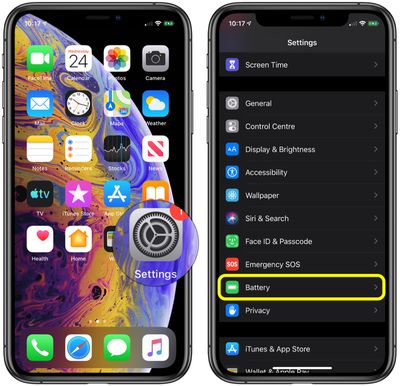
To turn on the new Optimized Battery Charging option, launch the Settings app on your iPhone or iPad, then scroll down and tap Battery. On the next screen, select Battery Health, and then toggle the switch next to Optimized Battery Charging to the green ON position.
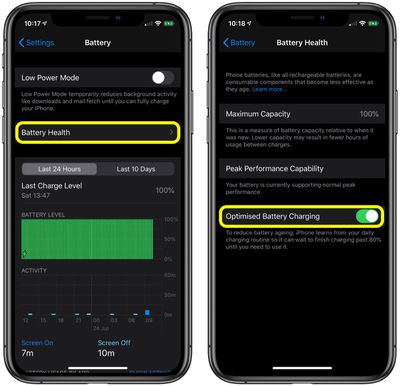
Note that the Battery Health screen contains useful additional information about the status of your device's battery, which you can use to decide if it needs replacing.
Peak Performance Capability indicates that the battery on our device supports peak performance, so we shouldn't experience any kind of throttling during general usage.
Check this status to see if a degraded battery has resulted in performance slowdowns. Keep in mind that throttling doesn't kick in until the battery becomes severely degraded and can no longer offer enough power to support spikes in processor usage.
If you have a bad battery, it will say "Your battery's health is significantly degraded," and it will let you know that an Apple Authorized Service Provider can replace the battery to restore full performance. If an unexpected shutdown shutdown occurs, performance management is turned on automatically. Note, however, that a small Disable option will appear when this happens. If you tap it, you'll be given the option to disable performance management.
Elsewhere on the Battery Health screen, Maximum Capacity gives you a measure of battery capacity compared to when your battery was brand new. If the maximum capacity percentage falls, you'll likely get less usage out of your device between charges. In other words, it's an indicator of how your battery is performing overall and directly correlates with how long your iPhone will last on a single charge.