Apple's HomePod was updated this week to version 12, which debuted alongside iOS 12 for iPhones and iPads. The HomePod update brings about a handful of new abilities for Apple's smart speaker, including support for multiple timers, lyric search, find my iPhone, making and receiving phone calls, and more.
Because of all the useful and handy new additions arriving on HomePod this week, we've written this guide to provide quick steps that can help you figure out each new feature, and added in some tips as well.
On previous HomePod software you could only make one timer and not name it, but with the new software Apple is letting you create and name as many as over 20 timers at once (our testing reached about 23). This should greatly help out HomePod owners, especially those who have placed the speaker in their kitchen.
Note: Because HomePod relies entirely on voice controls for timers (and other features in this guide), there may be other sentence patterns that result in the same responses as the ones we've discovered. With that being said, below you'll find a few examples of Siri commands for multiple timers on HomePod. To create multiple timers, simply begin listing one timer after the other to Siri:
Setting Timers
"Hey Siri, set a 15 minute timer for food."
"Hey Siri, set a burger timer for 20 minutes."
"Hey Siri, set a 25 minute french fries timer."
"Hey Siri, set a 45 minute timer for the laundry."
"Hey Siri, set a 3 hour timer for the sprinklers."
Checking Individual Timers
"Hey Siri, what's left on the food timer?"
"Hey Siri, how's the french fries timer?"
"Hey Siri, what's the sprinklers timer at?"
"Hey Siri, how long until the laundry is done?"
"Hey Siri, is the burger timer almost done?"
Checking All Timers
"Hey Siri, where are the timers at?"
"Hey Siri, how much time is left?"
"Hey Siri, list the timers."
The limit of any timer is a maximum of 23 hours (as it was previously). If you create a timer but don't give it a name, Siri will name the timer by its original length, saying something like "There is 1 minute left on the 10 minute timer."
When you have multiple timers running and one ends, the usual timer ending chime will sound, but it will now be interspersed with Siri stating which timer is completed. As usual, you can tap the top of HomePod to silence the timer, or ask Siri to shut it off. If you have numerous timers running simultaneously and want to end them all, you can say "Hey Siri, stop/cancel all of the timers."
Lyric Search
Similar to Apple Music on iOS, you can now search for a song through its lyrics using Siri on HomePod. Try out these commands to start using voice-enabled lyric search:
"Hey Siri, search for a song with the lyrics [lyrics]."
"Hey Siri, play the song with the lyrics [lyrics]."
"Hey Siri, search for the song that goes [lyrics]."
"Hey Siri, play the song that goes [lyrics]."
If you just want to perform a search for a song based on its lyrics without playing it, you can say something like "Hey Siri, what song has the lyrics [lyrics]?"
Find My iPhone
If you've lost track of your iPhone but know it's somewhere nearby, HomePod can now send out a helpful ping so you can more easily locate your misplaced iPhone. Try these commands to get started:
"Hey Siri, find my iPhone."
"Hey Siri, find [iPhone name]."
"Hey Siri, where's my iPhone?"
"Hey Siri, ping my iPhone."
"Hey Siri, can you find my iPhone?"
"Hey Siri, is my iPhone nearby?"
"Hey Siri, I can't find my iPhone."
Siri will respond to each one of these commands by asking "Should I try to make it play a sound?", to which you'll need to reply yes or no.
This feature extends to any iOS or macOS device connected to your Apple ID, so you can also search for a missing iPad or MacBook, as long as they're all connected to the internet at the time of the search.
You can provide the specific name of each device to ping, but Siri does have some trouble recognizing custom names at times. When the alert is sent, you'll get a notification on the lost device and an email to your connected Apple ID account.
Phone Calls
One of the biggest new additions to HomePod this week is the ability to make and receive phone calls via your connected iPhone. Make sure your iPhone is on iOS 12 and your HomePod is updated (with Personal Requests turned on), and follow these steps to make calls on HomePod:
Making a call: "Hey Siri, call Ben." When a call comes in on iPhone: "Hey Siri, answer my phone." Hanging up: "Hey Siri, hang up." Checking a missed call: "Hey Siri, who just called?"
During a call, HomePod's top Siri waveform display will turn a bright green, indicating that you're on the phone with someone. If you don't want to speak to Siri to hang up, you can simply tap once on HomePod to end the call. Of course, the usual volume indicators can also make the person on the other end softer or louder.
If you answered a call on iPhone and want to move over to HomePod, follow these steps:
Transferring a call from iPhone to HomePod
Answer or place a call on iPhone
Tap "Audio" in the Phone app while the call is live
Choose your HomePod speaker
Notably, you won't be able to perform any of Siri's basic search or query functionalities while HomePod is being used as a speakerphone. If someone else calls you while you're talking on HomePod, you can tap the green light at the top of HomePod to switch to it, or double tap the green light to end the current call and switch to the new one. To continuously switch between calls, tap the top of HomePod.
More details on HomePod's new update can be found in our launch post, and if you need a refresher on HomePod's overall set of features be sure to visit our full HomePod Roundup.
Yes but before you could just say "Set a timer for x minutes" and it would only have the one timer. It'll then prompt you to amend the existing timer if you set another.
Now you can say "Set 15 minutes for the cuttlefish, set 3 minutes for the asparagus, set 50 minutes for the inevitable toilet break", and it'll have a separate timer for each, which you can also check by saying "How long on the cuttlefish?"
Seems like a reasonable article IMHO; I wouldn't have known this otherwise.
Cuttlefish, asparagus and a toilet break? Isn’t this part of the plot from the iPad episode of South Park?
Gonna go out on a limb here but the entire point of Siri is that you can tell it what you want to do. So we should be able to assume that you simply ask it to do any of the things this guide includes.
If you want it to set a 15 minute timer, you ask it to set a 15 minute timer?! NO WAY!!
Yes but before you could just say "Set a timer for x minutes" and it would only have the one timer. It'll then prompt you to amend the existing timer if you set another.
Now you can say "Set 15 minutes for the cuttlefish, set 3 minutes for the asparagus, set 50 minutes for the inevitable toilet break", and it'll have a separate timer for each, which you can also check by saying "How long on the cuttlefish?"
Seems like a reasonable article IMHO; I wouldn't have known this otherwise.
Wednesday September 23, 2026 10:04 am PDT by Juli Clover
Apple's smarter, more capable version of Siri is expanding to the HomePod, according to details found by code sleuth pdfu. According to pdfu, HomePod Software 27 includes the system behind Siri AI, called "Linwood," along with new status lights in the Siri AI colors.
Since HomePod Software 27 is out and Siri AI isn't available on existing HomePods, it's possible support will be limited to...
Friday September 4, 2026 2:29 am PDT by Tim Hardwick
Apple appears to be working on some major new HomePod home theater features, including a four-speaker surround sound system and a new "Party Mode," according to code found in audioOS 27 beta 8, and shared on the MacRumors forums by member pdfu.
References in the software for the second-generation HomePod suggest the ability to tune for a setup with front-left, front-right, rear-left, and...
Friday September 4, 2026 8:25 am PDT by Joe Rossignol
Apple has been testing a new full-sized HomePod with Siri AI support, according to Bloomberg's Mark Gurman.
Unfortunately, in his report outlining upcoming Apple products today, Gurman said the new full-sized HomePod "doesn't appear to be imminent," so do not expect the speaker to be updated soon. The current HomePod was unveiled in January 2023....
Apple's first foldable iPhone, with a book-style design featuring a 5.4-inch outer display and a 7.6-inch inner display with a minimal crease down the middle.


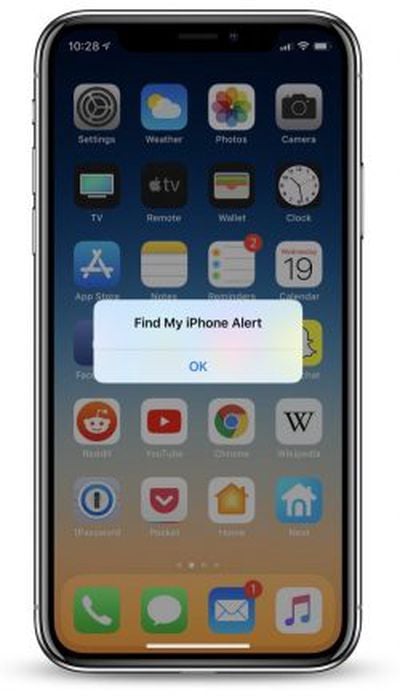 If you've lost track of your iPhone but know it's somewhere nearby, HomePod can now send out a helpful ping so you can more easily locate your misplaced iPhone. Try these commands to get started:
 Making a call: "Hey Siri, call Ben."














































Top Rated Comments
Now you can say "Set 15 minutes for the cuttlefish, set 3 minutes for the asparagus, set 50 minutes for the inevitable toilet break", and it'll have a separate timer for each, which you can also check by saying "How long on the cuttlefish?"
Seems like a reasonable article IMHO; I wouldn't have known this otherwise.