How to Use Your HomePod as a Speaker for Your Apple TV - MacRumorsOpen MenuShow RoundupsShow Forums menuVisit ForumsOpen Sidebar
Skip to Content

How to Use Your HomePod as a Speaker for Your Apple TV

by

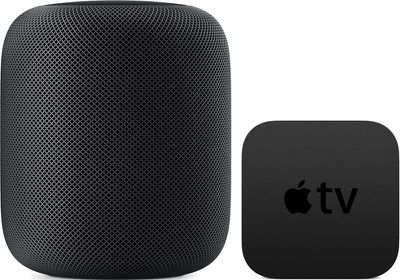
The HomePod offers great sound, and with AirPlay connectivity, you can set the ‌HomePod‌ up to function as a speaker for your Apple TV, routing ‌Apple TV‌ sound through the ‌HomePod‌.

You can use ‌Apple TV‌ and ‌HomePod‌ together as long as you have a third, fourth, or fifth-generation ‌Apple TV‌

homepodappletv

Pairing Apple TV and HomePod

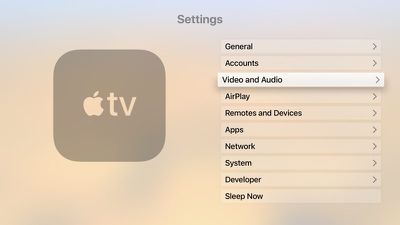
  1. Open the Settings app on the ‌Apple TV‌.
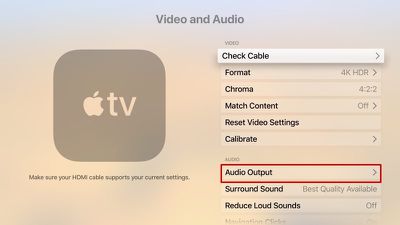
  2. Scroll down to the Video and Audio section and select it. appletvaudiovideo
  3. Choose "Audio Output." audiooutputappletv
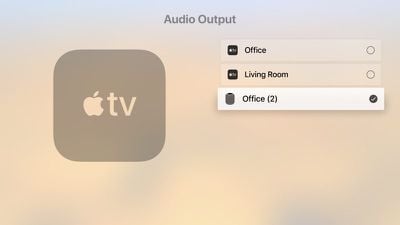
  4. Select the ‌HomePod‌ icon from the list of available devices.homepodappletvaudiooutput

Once the ‌Apple TV‌ is paired with the ‌HomePod‌, TV sound will be routed through your ‌HomePod‌ instead of through your TV. Using the ‌HomePod‌'s physical controls, you can change the volume of the ‌Apple TV‌, or you can ask Siri to do so. You can also play/pause content through the top of the ‌HomePod‌ or through ‌Siri‌.

Unpairing Apple TV and HomePod

You'll presumably want to use your ‌HomePod‌ for purposes beyond playing audio from the ‌Apple TV‌, and unpairing is done through the same settings you used to pair the ‌HomePod‌ and ‌Apple TV‌ in the first place.

  1. Open the Settings app on the ‌Apple TV‌.
  2. Scroll down to the Video and Audio section and select it.
  3. Choose "Audio Output."
  4. Click on the ‌HomePod‌ icon from the list of available devices to deselect it.

Choosing Audio Output Device with the Apple TV Remote

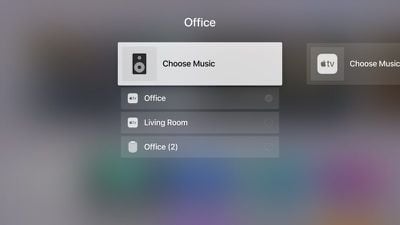
You can also choose your ‌HomePod‌ as your audio output device using your ‌Apple TV‌ Remote, which is a quicker way to swap between devices.

  1. Go to the Home screen of the ‌Apple TV‌.
  2. Hold down the Play/Pause button on the ‌Apple TV‌ Remote.
  3. In the menu that comes up, select the ‌HomePod‌ option. homebuttonaudioinput

To go back to using the ‌Apple TV‌ audio, you can repeat the same steps above, but this time select your ‌Apple TV‌ instead of the ‌HomePod‌.

Related Roundups: Apple TV, HomePod, HomePod mini

Top Rated Comments

Cankoda Avatar
112 months ago
Why is it you have to keep the HomePod plugged in for it to work I just don’t get it couldn’t it have been rechargeable or something I don’t like leaving things plugged in when I’m off to work
So when you leave the house you unplug your tv, stove, microwave, lights, furnace, etc, etc. It’s a good quality speaker with bass and a lot of output, speakers like that almost never have battery’s because they need more power than a battery can give, and leaving it plugged in or anything doesn’t really matter, power draw from anything is very minimal if its off, it’s actually more likley for a battery to combusted than an electrical fire
Score: 28 Votes (Like | Disagree)
robgreene Avatar
112 months ago
Can someone please confirm something. I want to know if you can control the volume output on the HomePod with the Siri remote the same way you can control the volume when using AirPods on the Apple TV?
Yes. Pull one of your HomePods out of your ear and it will pause the Apple TV.
Score: 15 Votes (Like | Disagree)
rshev Avatar
112 months ago
There is a much faster way - just hold play/pause button on the home screen, and then select audio output.
Score: 8 Votes (Like | Disagree)
112 months ago
The audio volume is so low using when using apps in Apple TV. I crank the volume up to max, and it's not really very loud. This is my one disappointment with homepod. Not sure why this is the case. Grrr. :(
They need to put out an update for the Apple TV so the output isn’t so low when using the HomePod. I’ve noticed having it cranked all the way up is still significantly lower volume than when I’m using the speaker on it’s own.


FWIW, now that I think about it, when I use my AirPods with the Apple TV I do the same thing - have the sound nearly at 100%
Score: 7 Votes (Like | Disagree)
ike1707 Avatar
112 months ago
My only ultimate disappointment with this product thus far is 2 home pods are explicitly not designed to work as stereo TV speakers together. If I could replace a set of traditional tower speakers with these puppies, it would be an instant sale.
Score: 6 Votes (Like | Disagree)
thisisnotmyname Avatar
112 months ago
Why is it you have to keep the HomePod plugged in for it to work I just don’t get it couldn’t it have been rechargeable or something I don’t like leaving things plugged in when I’m off to work
do you unplug your refrigerator?
Score: 5 Votes (Like | Disagree)

Popular Stories

Where is the New Apple TV Feature

Next Apple TV's Chip Revealed in Latest Leak

Tuesday September 8, 2026 10:19 am PDT by
The next Apple TV 4K will be equipped with an A19 or A19 Pro chip, according to evidence in Apple's code uncovered by MacRumors contributor Aaron Perris. In particular, the device's model identifier points towards the A19 generation of chips. Accordingly, the next Apple TV would have 8GB or 12GB of RAM, up from 4GB in the current 2022 model with the A15 Bionic chip. Other rumored upgrades for...
iOS 27 Feature Cool

Apple Releases New iOS 27, iPadOS 27, macOS 27, and tvOS 27 Public Betas

Monday August 31, 2026 2:13 pm PDT by
Apple today released the sixth public betas of iOS 27, iPadOS 27, tvOS 27, and macOS Golden Gate, allowing anyone with a compatible device to download and test the new software. The sixth betas come a week after Apple seeded the fifth betas and a few hours after the eighth developer betas. You can get started by signing up on Apple's beta website and then opting in to the public beta by...
Apple TV Remote Icon

iOS 27 to Upgrade Apple TV Remote App in Two Ways

Thursday September 10, 2026 2:33 am PDT by
Apple has updated the design of the virtual Apple TV Remote for the iOS 27 Release Candidate, which was released yesterday, and there are two new features that have been added to the iPhone app's interface. First up, Apple has added a new button to the top-right corner of the Remote UI with a glyph showing four squares. Pressing the button pops out an app menu similar to the Apple TV home...

🔗 Related Apple News & Rumors

Stay updated with the latest Apple ecosystem news and verified rumors