

Hide iPhone Find My Location Without Raising Suspicion - MacRumorsOpen MenuShow RoundupsShow Forums menuVisit ForumsOpen Sidebar
Skip to Content

Hide iPhone Find My Location Without Raising Suspicion

by

Ever need a moment of privacy without raising suspicion? If you're secretly shopping for a holiday gift or planning a surprise party, you might want to temporarily obscure your actual location in Apple's Find My app on your iPhone without completely turning off location sharing.

FindMy Feature
Here's a clever trick that lets you keep sharing enabled while displaying a different location – all by using another Apple device you own.

To hide your actual location, you'll need to own an iPhone and an iPad, or two iPhones or two iPads (i.e. not a Mac) signed in to your Apple Account with Find My enabled. This method works by telling Find My to use a stationary device's location instead of your iPhone's.

Start by leaving the device you want to use as your displayed location (like an iPad) in a convincing spot – perhaps your home or office. Then, take your iPhone and follow these steps:

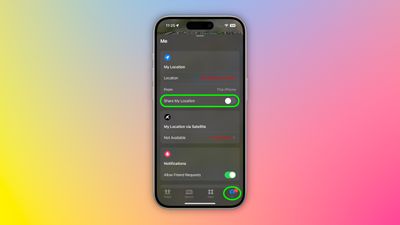
  1. Open the Find My app and tap the Me tab at the bottom of the screen.
  2. Scroll down to find "Use This iPhone as My Location" and make sure it's toggled off.
    find my

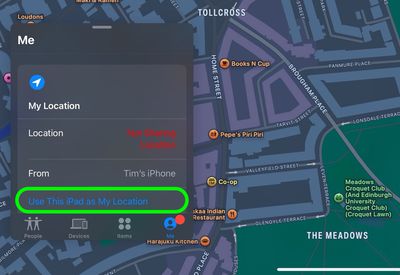
  3. Grab your other Apple device and open Find My.
  4. Tap the Me tab, then select "Use this [device] as My Location."
    find my

  5. Toggle on the switch next to Share My Location. Your shared location will now show where this device is stationed, not where you actually are with your iPhone.
  6. When you're ready to resume normal location sharing, simply return to your iPhone's Find My app and toggle "Use This iPhone as My Location" back on.
Remember that this trick only works as long as your decoy device stays put and powered on. Lastly, we trust that you'll use this tip responsibly – like keeping that upcoming surprise party under wraps!

Top Rated Comments

24 months ago
« If you're secretly shopping for a holiday gift or planning a surprise party » well sure…😏🤥
Score: 59 Votes (Like | Disagree)
24 months ago
Strip club, here I come!!!!! :D

j/k
Score: 43 Votes (Like | Disagree)
Dwalls90 Avatar
24 months ago
I have seen some use this functionality, and it wasn't for buying holiday gifts...
Score: 42 Votes (Like | Disagree)
24 months ago
I can't believe people let other people constantly track their location on their phone. I've never used this feature and never will, nor will I ever expect anyone else to have me constantly tracking them.
Score: 26 Votes (Like | Disagree)
24 months ago
I’m sure that’s exactly what people will use this for, much in the same way Craig Federighi hides Hair Track Pro on his phone. 😉
Score: 22 Votes (Like | Disagree)
brett_x Avatar
24 months ago
Cheaters gonna cheat
Score: 19 Votes (Like | Disagree)

Popular Stories

General iCloud App Feature

iCloud, Photos, Find My and More Experiencing Issues

Tuesday August 18, 2026 1:56 pm PDT by
Several iCloud services are experiencing issues, according to Apple's system status page. Find My, Game Center, Photos, iCloud Calendar, iCloud Mail, iCloud Contacts, iCloud Web Apps, and iWork for iCloud are all experiencing service interruptions. Apple says only some users may run into problems. The issue started at 3:33 p.m. Eastern Time and is...
iOS 27 Next to iPhone

Here's When iOS 27 Rolls Out Today in Every Time Zone [Update: It's Out]

Sunday September 13, 2026 3:00 am PDT by
Update 10:04 a.m.: iOS 27 is rolling out now, though it may take a bit for all users to see it, so keep checking! Apple is about to release iOS 27, which will finally deliver more advanced Siri AI capabilities as well as a variety of other refinements, improvements, and new features to iPhones. It's Apple's biggest software update of the year, and Apple announced at Wednesday's iPhone event...
iOS 27 Icon iPhone

iOS 27 Available Now With These 8 New Features

Monday September 14, 2026 9:00 am PDT by
Update — 10 a.m. Pacific Time: Apple has released iOS 27. During its iPhone 18 Pro and iPhone Duo event last week, Apple announced that iOS 27 will be released widely on Monday, September 14. iOS 27 should be available around 10 a.m. Pacific Time / 1 p.m. Eastern Time today via the Settings app, under General → Software Update. Below, we have highlighted eight new features and...

🔗 Related Apple News & Rumors

Stay updated with the latest Apple ecosystem news and verified rumors











































