How to Hide the Toolbar in Safari for iOS - MacRumorsOpen MenuShow RoundupsShow Forums menuVisit ForumsOpen Sidebar
Skip to Content

How to Hide the Toolbar in Safari for iOS

by

ios7 safari iconIn the Safari browser for iOS 13, Apple has added a new Website View menu that brings together useful options for browsing web pages, making them less challenging to navigate and easier on the eyes.

The Website View menu includes one-tap settings that let you change text size options, request the desktop version of a website, and more. Here we're going to check out the new Hide Toolbar option.

In earlier versions of iOS, Safari hides the top and bottom toolbars when scrolling down a web page, and to view them again you have to tap the URL or swipe down on the page.

In iOS 13 though, you can get Safari to hide the toolbar completely when navigating a website, which makes for a less disruptive experience.
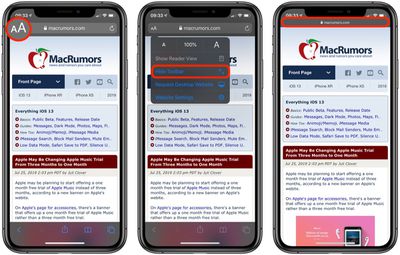
how to hide the toolbar in safari ios
You can find the Website View menu in what's called the Smart Search field at the top of the Safari interface. Launch the app and navigate to a website, then tap the "aA" icon in the upper left corner of the screen.

Simply select Hide Toolbar from the dropdown menu, and the toolbar will shrink to show just the URL. This more slimline arrangement will remain while you navigate the website, but you can re-instate the toolbar anytime by tapping the mini URL bar at the top of the screen.


Tag: Safari
Related Forum: iOS 13

Popular Stories

safari notify macos 27

New Safari Can Monitor a Webpage and Notify You of Updates

Monday June 8, 2026 11:04 am PDT by
Apple's new version of Safari browser in macOS 27 and iOS 27 can be tasked to monitor a webpage and notify you of any changes, thanks to a new built-in feature. With "Notify Me," Safari can keep checking a website on your behalf – such as a product you've been watching for when it comes back in stock – and alert you when a change occurs. In other upcoming feature additions, using the ...
safari tab groups apple intelligence

Apple Brings AI Tab Organization and AI-Generated Extensions to Safari

Monday June 8, 2026 1:18 pm PDT by
Apple today unveiled a raft of Safari upgrades powered by Apple Intelligence, including automatic tab organization, AI-generated custom extensions, and new privacy-first browsing tools. The centerpiece feature is automatic tab organization, which uses Apple Intelligence to group a user's open tabs into relevant topics without any manual intervention. If someone is planning a weekend trip,...
American Express Gold Apple Pay Feature

American Express Announces New Apple Pay Feature

Tuesday June 30, 2026 10:27 am PDT by
American Express today announced that you can now redeem Membership Rewards points when checking out with Apple Pay on the web and in apps on the iPhone and iPad. When checking out with Apple Pay on iOS 18 or iPadOS 18 or later, tap on your eligible American Express card (Platinum, Gold, Green, and others) and select the Membership Rewards points option. You can use points to cover all or...

🔗 Related Apple News & Rumors

Stay updated with the latest Apple ecosystem news and verified rumors