

How to Hide Pictures in the Photos App on iPhone and iPad - MacRumorsOpen MenuShow RoundupsShow Forums menuVisit ForumsOpen Sidebar
Skip to Content

How to Hide Pictures in the Photos App on iPhone and iPad

by

Sometimes you might not want certain pictures shot on your iPhone or iPad to take pride of place in your Photo Library, but for whatever reason, you don't want to just outright delete them. Fortunately, Apple's Photos app includes an option to hide certain photos from the main library. This article shows you how.
hide photos feature

Bear in mind that hiding pictures via the following method ensures they won't appear in the Photos or For You sections of the Photos app, but they will still be accessible in the Albums section. If you're looking for a more secure way to squirrel away pictures, consider using a third-party app like Safe Lock instead.

How to Hide Pictures in the Photos App

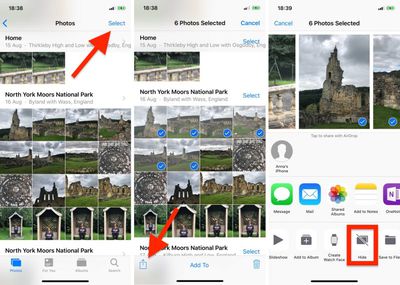
  1. Launch the Photos app on your iPhone or iPad.
  2. Tap Select in the top-right corner of the screen.
  3. Tap the pictures you want to hide.
    hide photos ios 12

  4. Tap the Share button in the bottom-left corner of the screen. (It looks like a square with an arrow pointing out.)
  5. In the Share Sheet's bottom row of available actions, tap Hide.
  6. Tap the prompt that appears at the bottom of the screen to confirm.
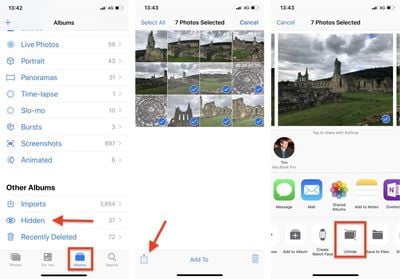
Note that pictures you choose to hide from your photo library are stored in an album called Hidden, which lives in the Albums tab.

How to Unhide Pictures in the Photos App

  1. Launch the Photos app on your iPhone or iPad.
  2. Tap the Albums tab at the bottom of the screen.
  3. Scroll to the bottom and under Other Albums, tap Hidden.
    unhide photos ios 12

  4. Tap Select in the top-right corner of the screen.
  5. Tap the pictures you want to unhide.
  6. Tap the Share button at the bottom-left corner of the screen.
  7. In the Share Sheet's bottom row of available actions, tap Unhide.
Related Forum: iOS 12

Top Rated Comments

102 months ago
Yes cause putting photos in a visible file called “hidden” is so smart.
Score: 12 Votes (Like | Disagree)
102 months ago
Yes cause putting photos in a visible file called “hidden” is so smart.
I’m assuming the intent is to get it out of your main camera roll...not to hide evidence from the cops.
Score: 9 Votes (Like | Disagree)
reybart Avatar
102 months ago
But I can’t put password.
Score: 8 Votes (Like | Disagree)
HelloMikee Avatar
102 months ago
Love this because now when I’m scrolling through my photos I don’t have to be embarrassed by someone seeing my Shawn Mendes photos I’ve saved lol.

But in all seriousness, it’s a nice thing to have. Next step would be allowing to lock the hidden album with Face ID

Score: 7 Votes (Like | Disagree)
itsmilo Avatar
102 months ago
So dumb without Face ID lock. Might as well call it LOOK AT ME

Score: 5 Votes (Like | Disagree)
102 months ago
iOS's most useless feature.

Let me put a lock on certain Albums Apple!
Score: 4 Votes (Like | Disagree)

Popular Stories

Apple Event Logo

Apple Working on All-New Operating System

Wednesday July 29, 2026 11:39 am PDT by
Apple is developing an all-new operating system that is essentially a mix of tvOS, watchOS, and iOS, according to Bloomberg's Mark Gurman. In a report this week, he said the operating system will feature a grid of icons, widgets, and apps, along with customizable clock faces. The new software platform is intended for Apple's long-rumored smart home hub. With built-in facial recognition,...
imac video apple feature

Apple Made Its Second-Biggest Acquisition Ever This Year

Wednesday July 29, 2026 12:03 pm PDT by
Apple this year acquired Israeli startup Q.ai for close to $2 billion, according to the Financial Times. That would make this Apple's second-biggest acquisition ever, after it paid $3 billion for the popular headphone maker Beats in 2014. This is also the largest known Apple acquisition since the company purchased Intel's smartphone modem business and patents for $1 billion in 2019. Q.ai...
Dynamic Island iPhone 18 Pro Feature

iPhone 18 Pro: Twelve Changes Coming to Apple's Next Flagship

Thursday July 30, 2026 3:43 am PDT by
We're less than two months out from the launch of Apple's premium next-generation smartphone lineup, and while we're not expecting a dramatic change in terms of functionality, there are still several enhancements rumored to be coming to the iPhone 18 Pro and iPhone 18 Pro Max. One thing worth noting is that Apple is reportedly planning a major change to its iPhone release cycle this year,...

🔗 Related Apple News & Rumors

Stay updated with the latest Apple ecosystem news and verified rumors












































