How to Hide Your 'Last Seen' Status in WhatsApp - MacRumorsOpen MenuShow RoundupsShow Forums menuVisit ForumsOpen Sidebar
Skip to Content

How to Hide Your 'Last Seen' Status in WhatsApp

by

For a long time now, WhatsApp has included a feature that shows when a user was last online or last active on the messaging platform, which can be either helpful or a hindrance, depending on your personal or business situation.

Whatsapp Feature
As regular WhatsApp users will know, the "Last Seen" status of a contact sits atop the conversation thread, informing you when that contact last opened the app and was active on the platform. But if you don't want people to know when you were last active, WhatsApp includes a setting to hide your Last Seen status or limit its visibility to certain users.

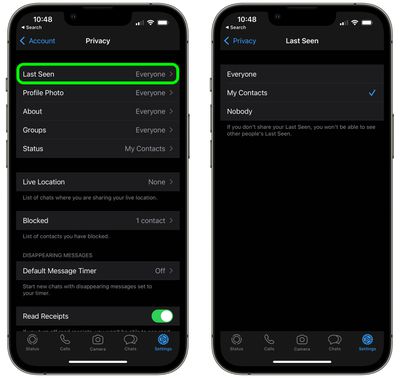
You can set it so that your Last Seen status can be seen by everyone, no-one, or only your contacts. Just bear in mind that if your Last Seen is hidden from another person, you won't be able to see their Last Seen either. Here's how it works.

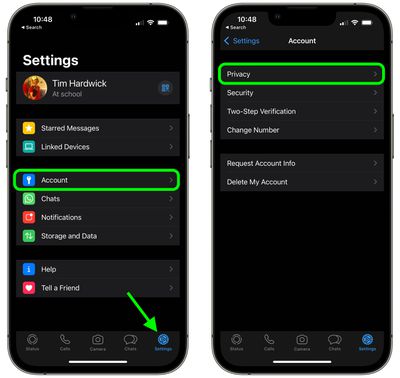
  1. Open the WhatsApp app on your iPhone.
  2. Tap the Settings icon in the bottom-right.

  3. Tap Account.
  4. Tap Privacy.
    whatsapp

  5. Tap Last Seen.
  6. Tap to select Everyone, My Contacts, or Nobody.
    whatsapp

WhatsApp is currently working on giving users the option to adjust the visibility of their Last Seen status on a contact-by-contact basis, according to a September 2021 report, although the option has yet to be rolled out as of writing.

At the end of 2021, WhatsApp also made a privacy change to prevent people on its messaging platform from viewing the Last Seen status of users whom they have never chatted with, however people and businesses a user knows or has previously messaged are not affected by the change.


Popular Stories

Whatsapp Feature

WhatsApp Beta Adds Green Dot to Show Who's Online

Monday July 6, 2026 3:56 am PDT by
WhatsApp appears to be introducing a new visual indicator that shows when a contact is online, according to WaBetaInfo. The feature adds a small green circle to a contact's profile photo when they're active in the app, and which disappears the moment they leave, all updated in real time. The indicator is now being tested for the WhatsApp iPhone app in TestFlight after it debuted on Android...


Whatsapp Feature

WhatsApp Beta Reveals iCloud Backup Alternative for iPhone

Tuesday July 14, 2026 3:06 am PDT by
WhatsApp is developing a first-party cloud storage option for chat backups on iPhone, providing users with an alternative to iCloud for the first time, according to app tinkerer WABetaInfo. Code found in the WhatsApp beta for iOS (version 26.28.10.16), available through TestFlight, suggests that users will eventually be able to pick their preferred backup destination directly from the app's...
Whatsapp Feature

WhatsApp Begins Rolling Out New Username Feature

Friday July 17, 2026 5:32 am PDT by
WhatsApp has started rolling out its new username feature, reports WABetaInfo. Some users who reserved their username have started receiving a notification that their username is active, and that they can now use it to send and receive messages to other users without revealing their phone number. When someone creates a username, WhatsApp will notify people who already have an active chat with...

🔗 Related Apple News & Rumors

Stay updated with the latest Apple ecosystem news and verified rumors