

How to Hide Default Apps on iOS 9 Using Limited Trick - MacRumorsOpen MenuShow RoundupsShow Forums menuVisit ForumsOpen Sidebar
Skip to Content

How to Hide Default Apps on iOS 9 Using Limited Trick

by

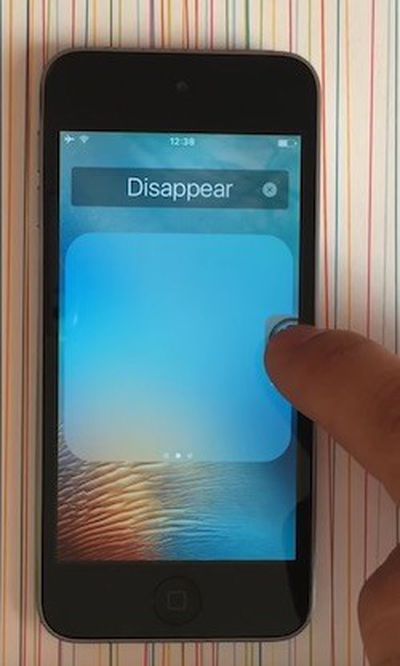
How-to-Hide-App-Icons-iOS-9While Tim Cook has promised Apple will "figure out a way" for iPhone and iPad users to remove certain default apps, a new limited trick allows for stock icons to be temporarily hidden on devices running iOS 9.0 to iOS 9.2 without jailbreaking.

YouTube channel videosdebarraquito shared a video of his trick over the weekend, and we have confirmed the method works as shown. Follow these step-by-step instructions and watch the video below for a demonstration.

How to Hide App Icons on iOS 9

  1. Hold down on the app icon you want to hide until it starts to wiggle.

  2. Drag the app icon over any other app to create a folder.

  3. Take your finger off the icon once in the folder. Do not press the Home button.

  4. Drag the app icon to the second page of the folder. Take your finger off the icon.

  5. Drag the app icon to the third page of the folder and keep your finger on it.

  6. Drag the app icon to the edge of the folder and press the Home button simultaneously.

As long as the device remains powered on, including when the display is locked, the app icons removed with this trick will remain hidden.



Keep in mind that the hidden app icons will reappear when the iPhone and iPad is restarted, so this trick only serves as a temporarily solution.

As a boilerplate disclaimer, this is an unofficial trick and we cannot guarantee it will not cause any unforeseen problems on your iPhone or iPad.

(Thanks, Jose!)

Top Rated Comments

140 months ago
Why can't Apple just make a way to hide apps of the user's choice?

And why do I need an Apple Watch app when I don't have one? Can't the Apple Watch owners just go to the App Store and download the app? :/
Score: 14 Votes (Like | Disagree)
mdridwan47 Avatar
140 months ago
I don't want to just hide it. I want to remove it. And if necessary redownload it from the app store.
Score: 13 Votes (Like | Disagree)
BrodieApple Avatar
140 months ago
I can see why people want apps to be hidden, but I don't see whats so annoying about having it just on the last page of a folder. Or a seperate page on your home screen.

Score: 10 Votes (Like | Disagree)
140 months ago
Is Apple still selling phones with 16GB? Then yes, people will still be b*tching about 100MB.

It's clear from your other post that you don't have an iPhone, but let me put 16GB devices into perspective for you. 100MB is less than 1% of available storage on a 16GB iPhone. Besides, those people bought a 16GB device.

hide default apps on ios 9 2 image

WTH??? Are you blind?

If something is there that you don’t like/need it’s not too much of a stretch that it be described as clutter.
Personally, I’ve never gone down the space used line. But waste is waste and at the premium Apple charge for space I’d rather it was used for something I actually want or that it be free space.
The default apps that I don’t want are crap, (to me), in fact they’re not even that good. At least with the 3rd party ones I can remove them.
Like I said, a simple 'hide' option would solve two of them but as it's not an option yet, just stick them in a folder and done. This really is a non-issue.

And in terms of "premium" Apple storage, 100MB is 20 cents.
Score: 6 Votes (Like | Disagree)
140 months ago
Lol, you iPhone users still can't do that :)

So a simple 'hide' option would solve two of them, so the third is storage space.

Are you really quibbling over 100MB?
Is Apple still selling phones with 16GB? Then yes, people will still be b*tching about 100MB.
Score: 6 Votes (Like | Disagree)
140 months ago
Hold on a sec, this is becoming one very slippery slope... One minute it's about clutter, the next it's about space used and now it's about advertising?

What exactly is your problem with default iOS apps? Make your mind up!
All of the above! :)
Score: 4 Votes (Like | Disagree)

Popular Stories

iOS 27 Next to iPhone

Here's When iOS 27 Rolls Out Today in Every Time Zone [Update: It's Out]

Sunday September 13, 2026 3:00 am PDT by
Update 10:04 a.m.: iOS 27 is rolling out now, though it may take a bit for all users to see it, so keep checking! Apple is about to release iOS 27, which will finally deliver more advanced Siri AI capabilities as well as a variety of other refinements, improvements, and new features to iPhones. It's Apple's biggest software update of the year, and Apple announced at Wednesday's iPhone event...
iOS 27 Icon iPhone

iOS 27 Available Now With These 8 New Features

Monday September 14, 2026 9:00 am PDT by
Update — 10 a.m. Pacific Time: Apple has released iOS 27. During its iPhone 18 Pro and iPhone Duo event last week, Apple announced that iOS 27 will be released widely on Monday, September 14. iOS 27 should be available around 10 a.m. Pacific Time / 1 p.m. Eastern Time today via the Settings app, under General → Software Update. Below, we have highlighted eight new features and...
Apple iCloud Plus expansion hero

iCloud+ Now Includes Apple TV, Apple Arcade, and Curated Apple Music Stations in Over 100 Countries

Tuesday September 15, 2026 1:43 am PDT by
Apple today announced a new subscription initiative that turns paid iCloud+ subscriptions into a broader services bundle in more than 100 countries. In select countries, Apple says every paid iCloud+ plan, including the cheapest 50GB tier, now includes Apple TV and Apple Arcade "at no additional cost," while family sharing extends the storage, TV and Arcade access to up to five people....

🔗 Related Apple News & Rumors

Stay updated with the latest Apple ecosystem news and verified rumors









































