In iOS 15, Apple has added separation alerts to the Find My app, which let you know when you leave an AirTag or other Apple device behind. Separation alerts also support Find My-enabled third-party accessories. This article explains how you set them up.
FindMy Feature
Called "Notify When Left Behind," the new ‌Find My‌ separation alerts let you know every time you are separated from your item at an unknown location, which can be helpful for items you take with you while traveling or visiting public locations.

The feature automatically sets your home as a Trusted Location (somewhere where you leave your items frequently and don't want to be notified every time), so you need to add your home address to your contact card in the Contacts app before enabling it.

The following steps run through the process of setting up separation alerts in the latest iOS 15 developer beta, a version of which will be available to the public next month.

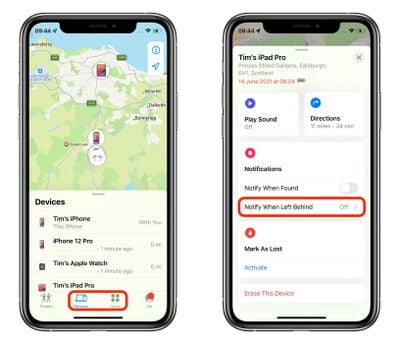
  1. Launch the Find My app on your iPhone.
  2. Select the Devices or Items tab, and tap on the device that you want to set up the alerts for.
  3. Tap Notify When Left Behind.
    find my

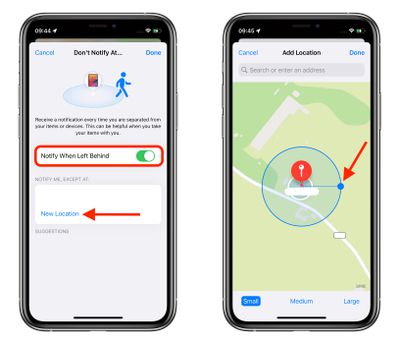
  4. Toggle on the switch for Notify When Left Behind.
  5. Under "Notify Me, Except At," tap New Location to set a Trusted Location where you don't want to receive alerts.
  6. In the "Add Location" map screen, search or enter an address in the input field. You can define the radius of the ringed geofence for your trusted location by dragging the blue dot or using the Small, Medium, or Large options at the bottom. Tap Done when you're finished.
  7. If there are no more location exceptions you want to add, tap Done.
    find my

Now the next time you leave your ‌AirTag‌ or other Apple device behind in a public place, you'll receive an alert informing you in good time, giving you a chance to retrieve it before you travel any further.

Of course, these alerts depend on you not leaving your ‌iPhone‌ behind (there's currently no equivalent separation alert available on Apple Watch for this scenario, sadly), so that's the device you won't want to forget, wherever it is you go.

Apple will make iOS 15 available for general release this fall.

Related Roundup: AirTag
Related Forum: iOS 15

Top Rated Comments

whsbuss Avatar
61 months ago
When will we get a notification on Apple Watch when I leave my iPhone behind!
Score: 18 Votes (Like | Disagree)
i.am.lost Avatar
61 months ago
This finally makes my AirTags useful day-to-day. I’m still surprised this wasn’t a feature at launch.
Score: 9 Votes (Like | Disagree)
Fabian90 Avatar
61 months ago
This is gonna be very handy
Score: 5 Votes (Like | Disagree)
ironpony Avatar
61 months ago
Whoops, left my pants at home again, but it is a "Trusted Location" so no one should notice ...
Score: 5 Votes (Like | Disagree)
Khedron Avatar
61 months ago
According to that screenshot even a small geofence is the size of several buildings?

So this wouldn’t work as a reminder that you left home without something until too late to quickly turn back?

So for smaller homes it would be better to NOT add the trusted location right?

What level of separation triggers the alert?
Score: 4 Votes (Like | Disagree)
DrNevs Avatar
61 months ago

When will we get a notification on Apple Watch when I leave my iPhone behind!
This is what I’ve been after for years. Seems like it would be easy to implement
Score: 3 Votes (Like | Disagree)

Popular Stories

Aston Martin CarPlay Ultra Screen

Apple's CarPlay Ultra to Expand to These Vehicle Brands Later This Year

Sunday February 1, 2026 10:08 am PST by
Last year, Apple launched CarPlay Ultra, the long-awaited next-generation version of its CarPlay software system for vehicles. Nearly nine months later, CarPlay Ultra is still limited to Aston Martin's latest luxury vehicles, but that should change fairly soon. In May 2025, Apple said many other vehicle brands planned to offer CarPlay Ultra, including Hyundai, Kia, and Genesis. In his Powe...
Apple Logo Black

Apple's Next Launch is 'Imminent'

Sunday February 1, 2026 12:31 pm PST by
The calendar has turned to February, and a new report indicates that Apple's next product launch is "imminent," in the form of new MacBook Pro models. "All signs point to an imminent launch of next-generation MacBook Pros that retain the current form factor but deliver faster chips," Bloomberg's Mark Gurman said on Sunday. "I'm told the new models — code-named J714 and J716 — are slated...
Apple MacBook Pro M4 hero

New MacBook Pros Reportedly Launching Alongside macOS 26.3

Sunday February 1, 2026 5:42 am PST by
Apple is planning to launch new MacBook Pro models with M5 Pro and M5 Max chips alongside macOS 26.3, according to Bloomberg's Mark Gurman. "Apple's faster MacBook Pros are planned for the macOS 26.3 release cycle," wrote Gurman, in his Power On newsletter today. "I'm told the new models — code-named J714 and J716 — are slated for the macOS 26.3 software cycle, which runs from...
iOS 26

iOS 26.3 and iOS 26.4 Will Add These New Features to Your iPhone

Tuesday February 3, 2026 7:47 am PST by
We are still waiting for the iOS 26.3 Release Candidate to come out, so the first iOS 26.4 beta is likely still at least a week or two away. Following beta testing, iOS 26.4 will likely be released to the general public in March or April. Below, we have recapped known or rumored iOS 26.3 and iOS 26.4 features so far. iOS 26.3 iPhone to Android Transfer Tool iOS 26.3 makes it easier...
14 inch MacBook Pro Keyboard

Apple Changes How You Order a Mac

Saturday January 31, 2026 10:51 am PST by
Apple recently updated its online store with a new ordering process for Macs, including the MacBook Air, MacBook Pro, iMac, Mac mini, Mac Studio, and Mac Pro. There used to be a handful of standard configurations available for each Mac, but now you must configure a Mac entirely from scratch on a feature-by-feature basis. In other words, ordering a new Mac now works much like ordering an...