

Apple has released the first iOS 18 beta to developers, but even non-developers have the opportunity to download beta software updates on their iPhones for free. Keep reading to learn how it's done.
Traditionally, when Apple announced a major new operating system update, the first wave of betas would only be available to download by paying subscribers to Apple's Developer Program, which costs $99 a year. Public betas would then become available to users enrolled in Apple's Public Beta Software Program after a delay of a few days or weeks after the developer beta has been released. That all changed last year with iOS 17, and now iPhone users no longer have to wait for a publicly released beta to test what's new.
Indeed, anyone who signs in to Apple's developer account website with their Apple ID gets access to developer beta releases as well, even if they are not a paying member of Apple's Developer Program. This means anyone with an Apple ID can download and install the iOS 18, iPadOS 18, and macOS Sequoia betas without waiting for the public betas to launch.
Is My iPhone Compatible With iOS 18?
Note that iOS 18 is compatible with the iPhone XR and newer, and hence also the iPhone XS and iPhone XS Max models with the same A12 Bionic chip, but older iPhone models will miss out. For a full list, iOS 18 supports the following iPhone models:
- iPhone 14
- iPhone 14 Plus
- iPhone 14 Pro
- iPhone 14 Pro Max
- iPhone 13
- iPhone 13 mini
- iPhone 13 Pro
- iPhone 13 Pro Max
- iPhone 12
- iPhone 12 mini
- iPhone 12 Pro
- iPhone 12 Pro Max
- iPhone 11
- iPhone 11 Pro
- iPhone 11 Pro Max
- iPhone XS
- iPhone XS Max
- iPhone XR
- iPhone SE (2nd generation or later)
Should I Install iOS 18 Developer Beta?
Before downloading the update, it's worth noting that Apple does not recommend installing iOS 18 beta updates on your main iPhone, so if you have a secondary device, use that. This is beta software, which means there are often bugs and issues that pop up that can prevent software from working properly or cause other problems.
Make an Archived Backup of Your Device First
Before installing the beta, make sure to back up your iOS device before installing the software using the following method, otherwise you won't be able to revert back to iOS 17 if things go wrong.
- Plug your iPhone into your Mac using the supplied cable.
- Allow the accessory to connect by clicking Allow in the dialog prompt.
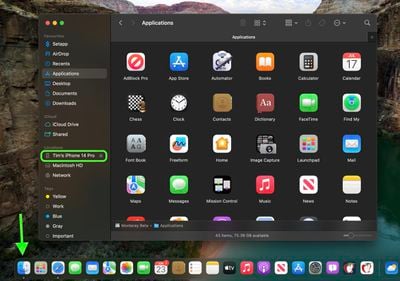
- Open a Finder window by clicking the Finder icon in the Dock.
- Click your iOS device's name in the sidebar.

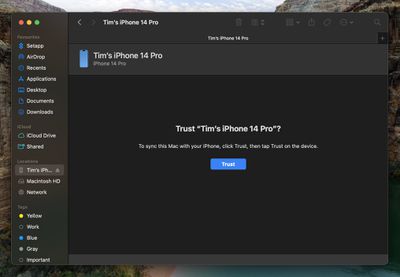
- If this is the first time connecting your device to your Mac, click Trust in the Finder window.
- Tap Trust on your device when prompted, then enter your passcode to confirm.
- In the General tab, click the circle next to where it says Back up all of the data on your iPad to this Mac.
- If you want to encrypt the backup, check the box next to Encrypt local backup, then enter a password to protect your data.
- If you don't want to create an encrypted backup, or you've already set up encrypted backups, click Back Up Now.
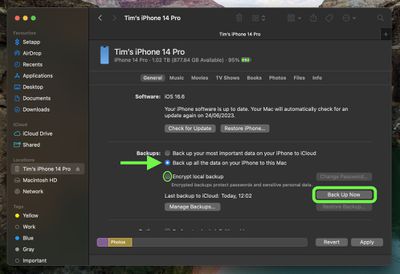
When the backup is finished, you can find the date and time of the last backup in the General tab, just above the Manage Backups button. Remember that this backup will not be overwritten when you manually or automatically back up your iPhone in the future, so you can restore it at any time by using the Restore Backup... option in the same Finder screen.
How to Download iOS 18 Developer Betas
The option to download and install the iOS 18 Developer Beta is immediately available for users who have previously enrolled on Apple's Beta Software Program. If you're currently enrolled to receive Public Betas, you can skip to step 6, otherwise follow these steps.
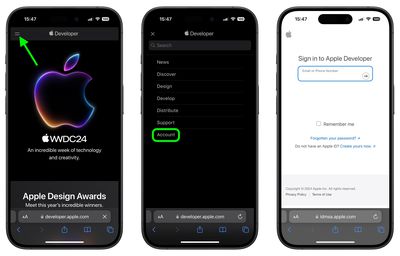
- Open Safari on your iPhone and visit developer.apple.com.
- Tap the menu icon in the top-left corner of the page, then tap Account.
- Under "Sign in to Apple Developer," enter and submit your Apple ID and password using the arrow buttons, then enter the two-factor authentication code sent to your devices.
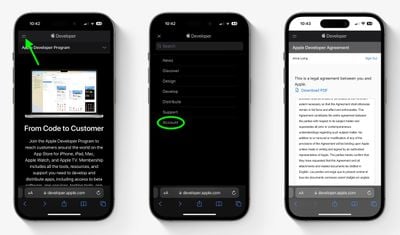
- Tap the top-left menu icon again, then tap Account.
- Accept the legal terms of the Apple Developer Agreement by scrolling down the page, checking the box, and tapping I Agree.
- Make sure your iPhone is running iOS 17.5 or later by going to Settings -> General -> Software Update. If it is, and you have just completed steps 1-5 to register a developer account, restart your iPhone. If it isn't, download and install the latest update to your device, then wait for it to restart.
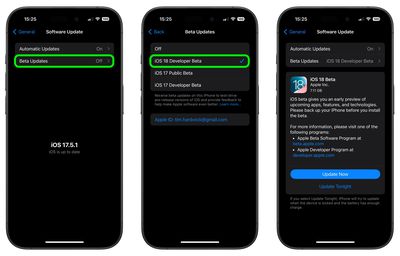
- Now go back to Settings -> General -> Software Update.
- Tap Beta Updates. If you don't see the option, try switching off Download iOS Updates (Automatic Updates -> Download iOS Updates), then tap Back and it should appear.
- Select iOS 18 Developer Beta in the list, then tap Back.
- Wait for the Software Update screen to check Apple's servers. When the iOS 18 Developer Beta appears, tap Download and Install, then follow the instructions and wait for installation to complete.
iOS 18 Features
iOS 18 is a major update that introduces Apple Intelligence, which is what Apple is calling its AI feature set that's deeply integrated into iOS. Apple Intelligence combines generative AI with personal context, and Apple calls it "AI for the rest of us." That said, Apple Intelligence will not go live until later in the year, but there are a range of other updates that are worth checking out.
iOS 18 features new customization tools for the Home Screen. App icons now feature Dark Mode and you can tint them with a color to create a unique look. Apps can also now be placed anywhere on the Home Screen freely.
The Control Center has also been redesigned and is now highly customizable with a new gallery. You can continuously swipe to access other Control Center screens. Lock Screen controls are also customizable.
In Messages, tapbacks have been redesigned and you can now react with any emoji. You can also schedule messages to send later, as well as format text with bold, italicization, underlining, and strikethrough. New text effects provide ways to emphasize words and phrases with automatic suggestions. You can also now send and receive messages with satellite connectivity.
In Mail, emails are automatically sorted into categories to help prioritize messages. There are also new topographical maps with trail networks and hiking routes in the Maps app. In Wallet, a new Tap to Cash feature sends cash by holding iPhones together.
The Photos app is completely redesigned in iOS 18. The app has been unified into a single view, with a photo grid at the top that views the entire library and collections organized by theme below. You can use Months and Years views at the bottom, and there's a filter button that allows you to hide screenshots and sort in other ways.
For a full breakdown of what's new, be sure to check out our comprehensive iOS 18 roundup.















































