Stay Focused or Chill Out With This Hidden iPhone Feature - MacRumorsOpen MenuShow RoundupsShow Forums menuVisit ForumsOpen Sidebar
Skip to Content

Stay Focused or Chill Out With This Hidden iPhone Feature

by

Do you sometimes struggle to maintain focus while you're working, or find it difficult to unwind and relax at the end of the day? Believe it or not, your iPhone could help with that. Keep reading to learn how.

airpods pro adaptive audio
If you are looking to minimize distractions when you focus on something, or just want to zone out after a hard day's work, it's well worth checking out the Background Sounds feature on your iPhone or iPad. Whether you are at home or in a public place, you can play calming sounds with just a few taps on your device to help you concentrate or rest.

In iOS and iPadOS, Apple's Background Sounds include balanced, bright, and dark noise, as well as natural sounds like ocean, rain, and stream. All of the sounds can be set to play in the background to mask unwanted environmental or external noise, and the sounds mix into or duck under other audio and system sounds, so you don't have to drown out what's important to you.

Enable Background Sounds on iPhone and iPad

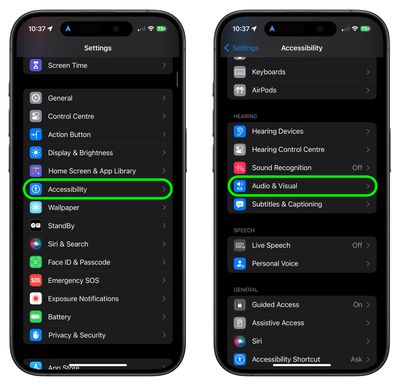
  1. Launch the Settings app on your iPhone or iPad.
  2. Tap Accessibility.
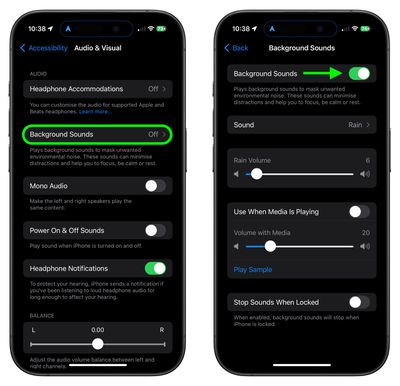
  3. Under "Hearing," tap Audio & Visual.
    accessibility

  4. Tap Background Sounds, then tap the switch to turn on Background Sounds on the next screen.
  5. Tap Sound to choose a sound effect. Choose from Balanced Noise, Bright Noise, Dark Noise, Ocean, Rain, and Stream.
    settings

Your device will need to download individual sound effects when you play them for the first time, so make sure you have an internet connection, but after that you can play the background sound wherever you are.

Note that the last screen in the steps optionally lets you set the volume of the sound, and includes an additional option to automatically stop the sound when you lock your device.

Accessibility Shortcut Access

Once you have downloaded the background sounds, you can quickly start and stop the audio via an Accessibility Shortcut. Here's how to set one up.

Set Up the Accessibility Shortcut

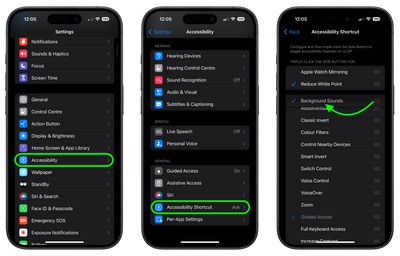
  1. Tap through to Settings ➝ Accessibility.
  2. Select Accessibility Shortcut near the bottom of the menu.
  3. Tap Background Sounds to select it. You can also drag the three lines icon at the far right to change the order in which it appears in the shortcuts menu.
settings

You can triple click your iPhone's Side button to access the Accessibility Shortcut at any time. Alternatively, you can add an Accessibility Shortcut button to your device's Control Center in the following way.

Access Accessibility Shortcut

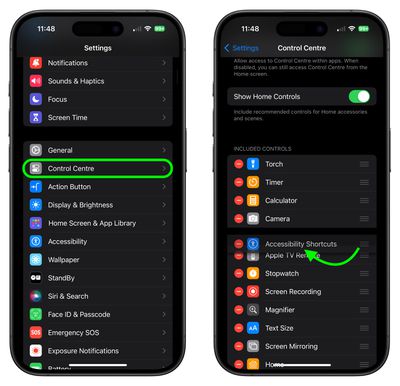
  1. Tap through to Settings ➝ Control Center.
  2. Find Accessibility Shortcuts under the "More Controls" list and then tap the entry to include it in Control Center.
settings
Once that's done, swipe from the top-right corner of your screen to bring up Control Center, then simply tap Accessibility Shortcut button and then tap Background Sounds to turn the audio on or off.
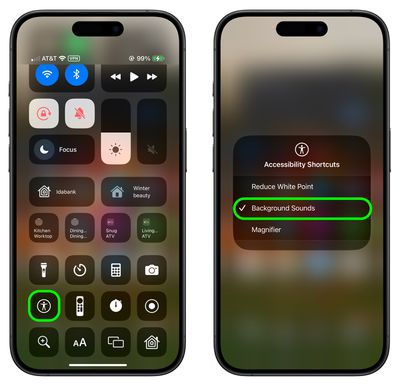
settings

Background sounds are also available on Macs running macOS Ventura or later. Check out our dedicated how-to article for all the details.


Top Rated Comments

diego.caraballo Avatar
28 months ago
Alternatively, you can add the Hearing icon to Control Center and activate the sounds by long pressing it.
Plus, you get the decibel meter to see if you are using a sound volume past recommended levels.



Attachment Image
Score: 27 Votes (Like | Disagree)
klasma Avatar
28 months ago

Do you sometimes struggle to maintain focus while you're working, or find it difficult to unwind and relax at the end of the day?
Yes, and it’s because of the damn phone.


Believe it or not, your iPhone could help with that.
Nah.
Score: 19 Votes (Like | Disagree)
28 months ago
Literally no idea this existed.
Score: 11 Votes (Like | Disagree)
28 months ago
An underrated feature for sure. I bet many have downloaded separate apps providing exactly this.

Score: 10 Votes (Like | Disagree)
iLuddite Avatar
28 months ago
Or just add Hearing to Control Center—I have mine positioned so that it’s right under the volume slider. As an added bonus it also lets you know if your music volume goes over 80 decibels when using headphones.

Attachment Image

Attachment Image

Attachment Image
Score: 7 Votes (Like | Disagree)
Ntombi Avatar
28 months ago
I use background sounds when I’m getting certain medical procedures done. For example, I get infusions at a local cancer center, and, though we’re each in separate areas, the curtains can only do so much to drown out noises. Dark Noise combined with ANC on my AirPods are a godsend.
Score: 7 Votes (Like | Disagree)

Popular Stories

American Express Gold Apple Pay Feature

American Express Announces New Apple Pay Feature

Tuesday June 30, 2026 10:27 am PDT by
American Express today announced that you can now redeem Membership Rewards points when checking out with Apple Pay on the web and in apps on the iPhone and iPad. When checking out with Apple Pay on iOS 18 or iPadOS 18 or later, tap on your eligible American Express card (Platinum, Gold, Green, and others) and select the Membership Rewards points option. You can use points to cover all or...
Apple Acquires Award Winning App Play Feature

Apple Acquires Award-Winning App 'Play'

Monday June 29, 2026 7:39 am PDT by
In February, Apple notified the European Commission that it would be acquiring certain assets from and have the right to hire certain employees from Rabbit 3 Times, the company behind the award-winning app design tool Play. The notification was published on the European Commission's website this week, following a four-month waiting period. Play was a Mac and iPhone app that allowed designers ...
series 10 apple watch titanium digital crown

Report: Apple Watch Redesign Coming Next Year With New Band System

Tuesday June 30, 2026 8:45 am PDT by
A "major overhaul" of the Apple Watch's design is due to arrive next year with a new system for connecting bands, according to a known Weibo leaker. In a set of recent posts, the leaker known as "Instant Digital" linked the new claim to older rumors about an "Apple Watch X" model, which was said to introduce a fresh design and break compatibility with the existing watch band system. Citing...

🔗 Related Apple News & Rumors

Stay updated with the latest Apple ecosystem news and verified rumors