

In previous versions of macOS, relying on your Mac to automatically track down duplicate photos in your Photo Library wasn't an option, and if you wanted to purge your library of duplicates you had to download a third-party app.

In macOS Ventura, however, that's no longer the case, because the Photos app will now automatically detect any duplicates in your library and collate them together for your inspection.
Finding duplicates is easy, since Apple has added a new Duplicates album to the Photos app. You can find it in the Photos sidebar, just note that the album only appears if you do indeed have duplicate images in your library.
Inside the Duplicates album are any duplicates listed in chronological order, with a Merge option beside each set. You can click this button to merge duplicate sets into an individual photo. Even if you take two photos together that are very similar, Apple's merging feature will intelligently keep the highest detail and the most metadata, creating the best possible image.
If, for example, you have one copy of a photo that's high resolution and a second copy that has more metadata, the Photos app will combine the best qualities from both photos into a single image.
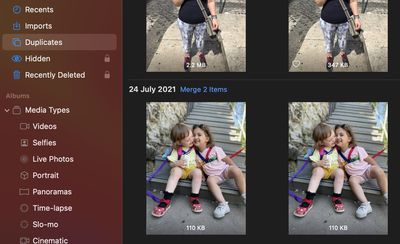
You can also merge several sets of duplicates – or all the duplicates in your Photo Library – simultaneously, by following these steps.
- In the Duplicates album, select the duplicates that you want to merge by clicking them with your cursor while holding the Command key. Alternatively, select one image, then choose Edit -> Select All from the menu bar.
- Click the Merge X Items button at the top-right of the window, X being the number of images selected. Alternatively, you can delete selected duplicates by right-clicking one and choosing Delete X Photos from the contextual menu, X being the number of images selected.
When all duplicates are merged or deleted, the Duplicates album will disappear, but your Mac will continually scan for duplicates, so the album may show up again over time.

















































