

How to Enable Stolen Device Protection on iPhone - MacRumorsOpen MenuShow RoundupsShow Forums menuVisit ForumsOpen Sidebar
Skip to Content

How to Enable Stolen Device Protection on iPhone

by

When Apple released iOS 17.3 in January, it introduced a Stolen Device Protection feature to provide iPhone users with added security. This article explains what it does, why you might want to turn it on, and how to go about doing so.
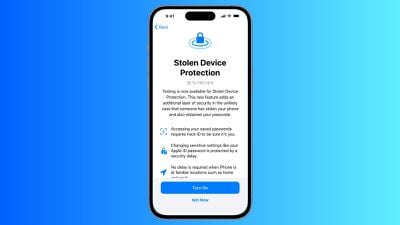
ios stolen device protection
In 2023, reports began emerging about a new method thieves were using to steal iPhones and access users' highly sensitive data. Thieves would surreptitiously spy on their victims in public while they entered their passcode, before going on to steal the device. With the passcode known to them, criminals could empty bank accounts, steal passwords, and make the iPhone untraceable.

Enter, Stolen Device Protection

To make it harder for a thief to access passcode-protected data on a stolen iPhone, Apple in iOS 17.3 included Stolen Device Protection. With the feature enabled, Face ID or Touch ID is required to access passwords in iCloud Keychain, Lost Mode settings, options for erasing the device, and making purchases in Safari.

In addition to the new biometric requirements, the feature also imposes a one-hour security delay on actions like changing an Apple ID password. In other words, if someone tries to change Apple ID login information, Face ID authentication is required, and then an hour must pass before the password can be changed. The only time this wait period is not imposed is when the device at a trusted location like home or work.

Actions Requiring Face ID/Touch ID With Stolen Device Protection Enabled

  • Viewing/using passwords or passkeys saved in iCloud Keychain
  • Applying for a new Apple Card
  • Viewing an Apple Card virtual card
  • Turning off Lost Mode
  • Erasing all content and settings
  • Taking certain Apple Cash and Savings actions in Wallet
  • Using payment methods saved in Safari
  • Using your iPhone to set up a new device

Note that these actions do not have a passcode backup, so you can't use a passcode to avoid using Face ID or Touch ID.

Actions Requiring 1-Hour Delay With Stolen Device Protection Enabled

Actions that require biometric authentication and have a one-hour security delay include the following:

  • Changing your Apple ID password
  • Updating select Apple ID account security settings, including adding or removing a trusted device, trusted phone number, Recovery Key, or Recovery Contact
  • Changing your iPhone passcode
  • Adding or removing Face ID or Touch ID
  • Turning off Find My
  • Turning off Stolen Device Protection

How to Enable Stolen Device Protection

Note that Stolen Device Protection is only available on iPhones that are able to run iOS 17, which includes the iPhone XS and newer. Also, make sure your iPhone is up-to-date and running iOS 17.3 or later (Settings ➝ General ➝ Software Update). Here's how to enable the feature.

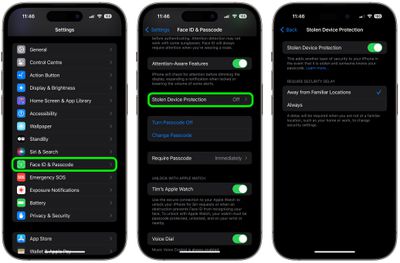
  1. Open the Settings app.
  2. Scroll down and tap Face ID & Passcode (or Touch ID & Passcode, depending on iPhone model).
  3. Enter your passcode at the prompt.
  4. Scroll down and tap Stolen Device Protection.
  5. Toggle on the switch next to Stolen Device Protection, then tap Turn On at the prompt.
settings

Note that if your iPhone is running iOS 17.4 or later, an additional option on this screen lets you choose to require a security delay when your device is Away from Familiar Locations, or Always. Otherwise, that's all there is to it. You can just as easily turn off the feature by toggling off the Stolen Device Protection switch, but you'll need to authenticate to do so.


Top Rated Comments

arkitect Avatar
33 months ago
Haha!

With my experience last week of being locked out of my Apple account for days, spending hours with AppleCare support to no avail?

I'm not touching this with a barge pole.

Score: 16 Votes (Like | Disagree)
33 months ago
Not after last week's incident 😬
Score: 15 Votes (Like | Disagree)
antiprotest Avatar
33 months ago
All is well and good until Apple locks you out and demands you reset the password and refuses to let you reset the password because of stolen device protection.
Score: 14 Votes (Like | Disagree)
33 months ago
**DO NOT DO THIS UNTIL APPLE RESOLVES AN ONGOING ISSUE WHERE SOME APPLE IDs ARE DEMANDING RESETS WITH NO WARNING SINCE LAST WEEK, THIS IS STILL HAPPENING AS OF TODAY 5/2/24 WITH NO WORD FROM APPLE WHY.**

If you set the stolen device protection and a random reset occurs while outside of your home you could be locked out of your devices for an extended period of time. Be very careful... I have a 20+ year Apple ID account getting reset every day or two right now. More details and a forum thread can be found here: https://www.macrumors.com/2024/04/27/apple-id-accounts-logging-out-users/
Score: 8 Votes (Like | Disagree)
33 months ago

With my experience last week of being locked out of my Apple account for days, spending hours with AppleCare support to no avail?
Came here to say the same thing. The fact that Apple hasn't even explained what happened doesn't exactly insprire confidence.
Score: 8 Votes (Like | Disagree)
33 months ago
With all of Apple's buggy services, I can't even imagine how bad this one will be. I think I'll wait a few years and see how it turns out. But I do wish good luck to all of the early adopters.
Score: 7 Votes (Like | Disagree)

Popular Stories

iPhone Duo Display Cracking

Apple Alerts Stores to iPhone Duo's Display Cracking Issue

Friday October 30, 2026 3:20 pm PDT by
In a memo shared with Apple Stores and Apple Authorized Service Providers this week, and later obtained by MacRumors, Apple provided technicians with guidance on how to diagnose and address the iPhone Duo's inner display cracking issue. If a customer reports the issue, Apple advised technicians to inspect the iPhone Duo and repair or replace it in accordance with their standard procedures....
iPad mini OLED feature 1

Apple Executive Comments on New iPad Mini Lacking 120Hz Display

Thursday October 29, 2026 1:47 pm PDT by
While the new iPad mini has an OLED display, the device does not support ProMotion, meaning the display's refresh rate is limited to 60Hz instead of 120Hz. ProMotion support would have allowed for the iPad mini's refresh rate to automatically adjust from 10Hz to 120Hz depending on the content being displayed, but evidently Apple has kept the feature exclusive to the iPad Pro among iPad...
Pinched iPad Mini

Apple Avoids Showing Pinched Fingers on iPad Mini Page in South Korea

Thursday October 29, 2026 11:52 am PDT by
In the U.S. and most other countries, Apple's website shows the new iPad mini being held by pinched fingers, but this is not the case in South Korea. The new iPad mini shown with pinched fingers on Apple's website in the U.S. On its South Korean website, Apple simply shows an image of the iPad mini on its own. The new iPad mini shown without pinched fingers on Apple's website in South Korea ...
Latest Stories
Apple Watch Ultra 4 Hits All-Time Low Price With Amazon's $99 Discount
9 hours ago
Reminder: Apple's Big Discount on Beats 360 Ear Cushions Ends Today
9 hours ago
Here's a New Tour of Apple's HomeView Software
9 hours ago
Apple Reveals New iPad Mini's Battery Capacity
10 hours ago
Top Stories: Apple's Big MacBook Pro, iPad mini and iMac Updates
12 hours ago
'Pluribus' Season 2 Reportedly Starts Production Today
18 hours ago
iPhone 18 Pro Sales Surge in China, Offsetting Decline in U.S. and Japan
19 hours ago
HomeView Software 27.2: Wallpapers, Control Center, and More
1 day ago
Apple Alerts Stores to iPhone Duo's Display Cracking Issue
1 day ago
iOS 27.3 Will Enable These Apple Intelligence Features in China
1 day ago
Apple Says iOS 27.3 Beta Coming Next Week
1 day ago
Apple's Flash Storage Suppliers Are Finally 'Getting Their Revenge'
1 day ago
14 New Things Your iPhone Can Do in iOS 27.2
1 day ago
iPhone Duo Review: One Week Later
1 day ago
Samsung Mocks iPhone Duo Display Cracks in New Ad Campaign
1 day ago
The MacRumors Show: OLED MacBook Pro, iPad Mini 8, and More
1 day ago
MacBook Pro With Touch Display: 15 More Details Revealed
1 day ago
Russia Places Apple on State Surveillance Registry
1 day ago
Halloween Weekend Brings Discounts on Apple Accessories and Pre-Orders
1 day ago
Apple Has Released More Than 25 New Products in the Past Two Months
1 day ago
Local Code Launches as Free, Private AI Assistant Tool for Mac
1 day ago
Apple Acquires Ascend.io
2 days ago
HomePod Mini 2 Launches Today: All the New Features
2 days ago
AirTag 2 4-Pack Drops to New Low Price of $69.99
2 days ago
Rian Johnson's iPhone Camera App Goes Viral
2 days ago
Where Did All the iPhone Duos Go? Mostly to Apple's Stores
2 days ago
Apple's Touchscreen MacBook Pro Could Ship 1.5M Units in 2027
2 days ago
New Apple TV 4K and iPad Mini: RAM Amounts Revealed
2 days ago
Apple Executive Comments on New iPad Mini Lacking 120Hz Display
2 days ago
Here's a Hands-On Look at HomePod Mini 2's New Two-Tone Colors
2 days ago

🔗 Related Apple News & Rumors

Stay updated with the latest Apple ecosystem news and verified rumors











































