

How to Use Reading View in Apple Pages, Numbers, and Keynote - MacRumorsOpen MenuShow RoundupsShow Forums menuVisit ForumsOpen Sidebar
Skip to Content

How to Use Reading View in Apple Pages, Numbers, and Keynote

by

In Apple's Pages, Numbers, and Keynote apps for iPhone and iPad, you can use the reading view feature to look at a document without accidentally editing it.
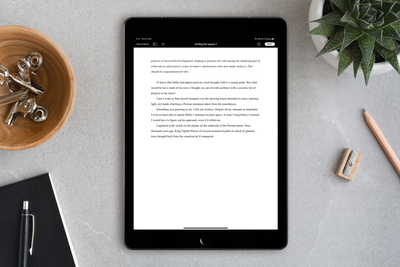
pages
In reading view, you can scroll a document and even interact with text and objects, all while avoiding accidentally moving objects or bringing up the keyboard as you view.

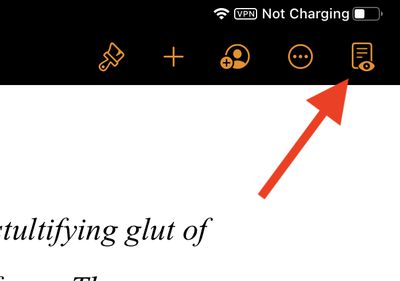
To turn on the reading view, open a document in one of the aforementioned apps, then tap the reading view button in the top-right corner of the screen (the icon looks like a document with an eye in the foreground).
pages reading view
If you don't see the reading view button, tap the More button (the three dots in a circle), then tap Stop Editing.

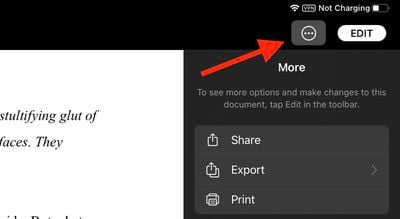
When in reading view, you can use the More button to share, export, or print the document. In Pages specifically, you can also turn the page navigator, two-page view, and word count on or off, as well as show or hide annotations and comments.
pages reading view more
Depending on your device, tap the View Options button or the More button in Pages to access these features.

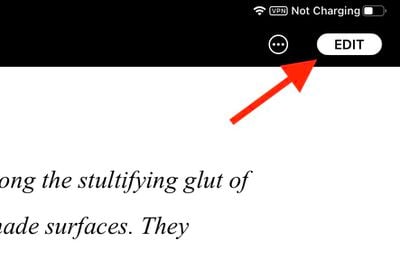
To exit reading view and start editing a document, tap the Edit button in the top-right corner of the toolbar.
pages reading view 2
You can also start editing in reading view if you've selected text, an object, or a table. Simply double-tap text, or touch and hold an object or table, then tap Edit in the pop-up menu.

Popular Stories

Apple Event Logo

Apple Working on All-New Operating System

Wednesday July 29, 2026 11:39 am PDT by
Apple is developing an all-new operating system that is essentially a mix of tvOS, watchOS, and iOS, according to Bloomberg's Mark Gurman. In a report this week, he said the operating system will feature a grid of icons, widgets, and apps, along with customizable clock faces. The new software platform is intended for Apple's long-rumored smart home hub. With built-in facial recognition,...

imac video apple feature

Apple Made Its Second-Biggest Acquisition Ever This Year

Wednesday July 29, 2026 12:03 pm PDT by
Apple this year acquired Israeli startup Q.ai for close to $2 billion, according to the Financial Times. That would make this Apple's second-biggest acquisition ever, after it paid $3 billion for the popular headphone maker Beats in 2014. This is also the largest known Apple acquisition since the company purchased Intel's smartphone modem business and patents for $1 billion in 2019. Q.ai...
Four iPhone 18 Pro Colors Mock Feature

iPhone 18 Pro and iPhone Ultra: Pre-Orders and Release Date

Thursday July 30, 2026 6:12 am PDT by
Apple has yet to reveal when the iPhone 18 Pro and iPhone Ultra will be announced and released, but the dates usually follow a familiar pattern. Labor Day is September 7 this year. The last time the holiday fell on that day was in 2020, but the iPhone event that year was delayed until October due to the COVID-19 pandemic. So, the last time Labor Day was on September 7 in a normal year was in ...

🔗 Related Apple News & Rumors

Stay updated with the latest Apple ecosystem news and verified rumors











































