

With the release of iOS 16.1, Apple is launching its new Live Activities feature for iPhone Lock Screens and iPhone 14 Pro models with Dynamic Island. Keep reading to learn what it does and how you can enable it.
What Are Live Activities?
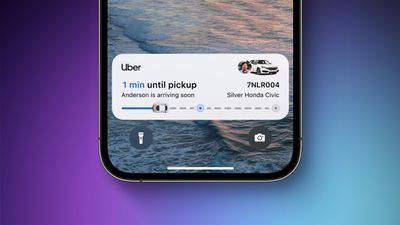
Live Activities are lingering interactive notifications that stay up to date, allowing you to keep an eye on things happening in real time right from the Lock Screen. If you're following a sports game, for example, you can see the updated score on the Lock Screen, or if you're waiting for a Uber ride, you can watch for your driver to approach.
On the iPhone 14 Pro and Pro Max, Live Activities also integrate with the Dynamic Island. During a Premier League match, for example, the Dynamic Island shows a live-updating scoreboard with the number of goals scored by each club on either side of the True Depth camera pill. When long pressed, the Dynamic Island expands to show the time elapsed and play-by-play action.
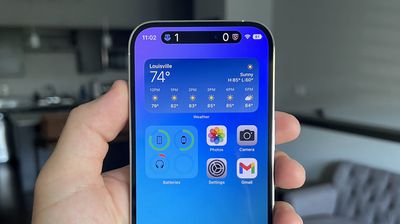
When an iPhone 14 Pro is locked, the score is shown in a widget on the Lock Screen instead. On the iPhone 14 and iPhone 14 Plus, and on all other iPhone models without the Dynamic Island, Live Activities are limited to the Lock Screen.
How to Enable Live Activities
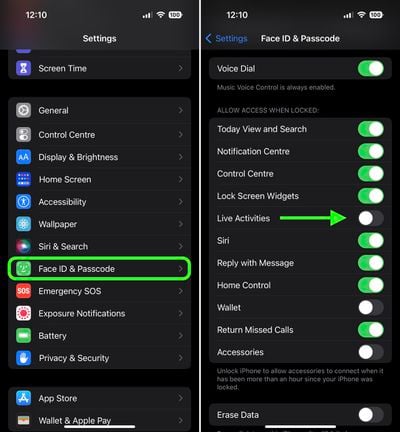
You can enable Live Activities for the Lock Screen on an iPhone running iOS 16.1 or later by following these steps.
- Launch the Settings app.
- Scroll down and tap Face ID & Passcode.
- Enter your passcode to continue.
- Scroll down and under "Allow Access When Locked," toggle the switch next to Live Activities to the green ON position.
Apps That Support Live Activities
Apple has made a Live Activities API available for developers, and there are already several third-party apps in the App Store that make use of the feature.
How to Use Live Activities With the TV App
With the release of iOS 16.2, users in the U.S. and Canada can also check out Apple's TV app support by opening the TV app and tapping on the Follow button on a supported sports game. Live Activity scores should then appear on your Lock Screen and/or Dynamic Island accordingly.
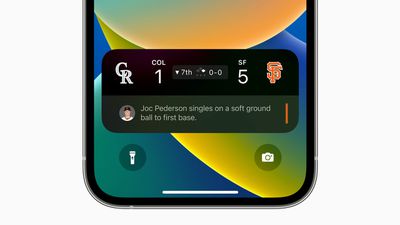
If you don't see a Follow button on any sports games featured in the TV app, either the game doesn't support Live Activities, or the feature hasn't been enabled. You check if it's turned on by opening the Settings app and tapping through to TV -> Live Activities and toggling on the switch next to Enable Live Activities. If you'd like more frequent updates of events via Live Activities, you can also enable More Frequent Updates from this screen, although be aware that this feature may drain your iPhone's battery faster.
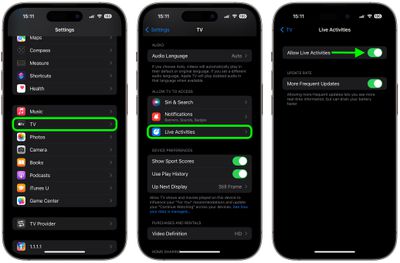
Live Activities in the TV app are available for MLB games for users in the U.S., Canada, Australia, U.K., Brazil, Mexico, Japan, and South Korea, in addition to NBA and Premier League games for users in the U.S. and Canada only. The feature will likely be expanded to other sports leagues in the future.

















