

 Since the release of iOS 13, Apple has included a system-wide Dark Mode option for iPhones and iPads, similar to the one it brought to the Mac in 2018 with the release of macOS Mojave.
Many third-party app developers have since added support for Dark mode to their apps, although it has to be said that some popular apps have been quicker than others.
On September 24, 2019, Google announced a new dark mode for its Gmail app, but rollout of the feature has been glacially slow. Fast forward to December, and the option still isn't showing up for all its users. You can follow the steps below to find out if it's available for you.
Okay, But Why Should I Use Dark Mode in Gmail?
The Dark theme in Gmail is designed to be easier on the eyes by providing less harsh display brightness in situations where ambient lighting is lower, while maintaining contrast and vibrancy.
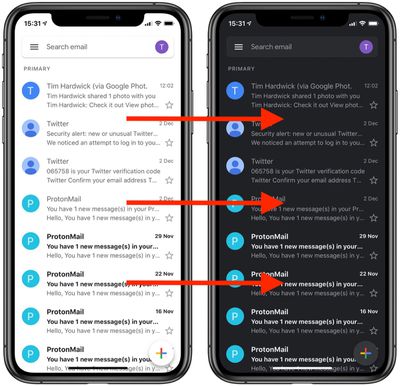
If you have an OLED iPhone, such as an iPhone X, iPhone XS, or iPhone 11 Pro, enabling Dark Mode can also conserve battery life, since black pixels in an OLED panel basically switch off and consume far less power.
How to Enable Dark Mode in Gmail for iOS
- Launch the Gmail app on your iPhone or iPad.
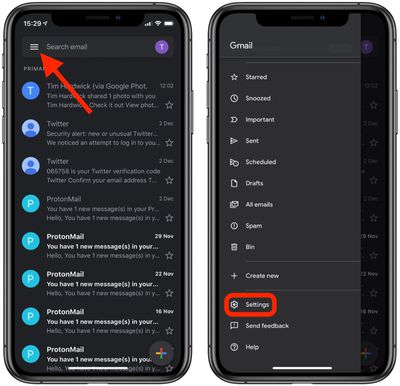
- Tap the Menu icon (the three lines) in the top-left corner of the screen.
- Scroll down and tap Settings.

- Tap Theme. (If you don't see the option, try force-quitting and then relaunching the app.)
- Select Light, Dark, or System default. The latter option makes Gmail's theme default to your device's system settings, which is a useful option if you've set the appearance of iOS to change automatically depending on the time of day.
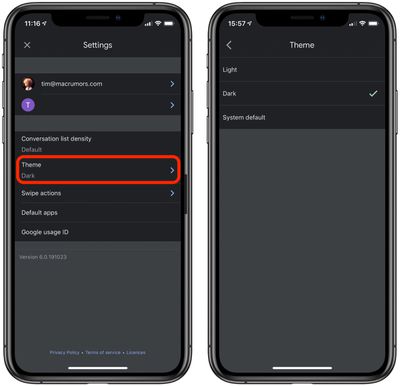
Note that if your device is running iOS 11 or iOS 12, you'll see a Dark theme toggle instead of a Theme submenu in the Settings screen.

















































