

In iOS 17, Apple has added the ability to download Maps for use offline, providing access to turn-by-turn directions and information for a chosen area even if you do not have a cellular or Wi-Fi connection. Keep reading to learn how it's done.
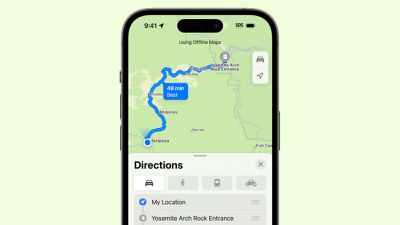
Apple Maps is catching up with Google Maps in iOS 17 by finally letting iPhone users download maps for offline use. Thanks to the new feature, you can download a specific area of Apple Maps to your iPhone and view it while offline, complete with turn-by-turn directions for driving, walking, cycling, and public transit.
While offline, you can also see your estimated time of arrival, view information like hours and ratings on place cards, and more. You can even use downloaded Apple Maps on an Apple Watch when a paired iPhone is turned on and in range of the smartwatch.
Downloading a map for a specific geographical location in Apple Maps is easy in iOS 17. The following steps show you how.
- Enter the name of a specific area in Maps' search field.
- Tap the Download button in the area's information card.
- Choose the area of the map you want to download by centering the frame. You can adjust its size by dragging the sides and corners, and the app will show you how much storage space you'll need to save the download.
- Tap Download.
While the map is downloading, a screen will show you its progress, and the map will be listed in a column containing any other maps you have downloaded, with an option to Update All or Download New Map.
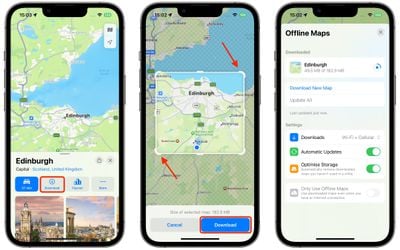
You can tap the progress circle to pause a downloading map at any time, or swipe across the map to reveal a Delete button. You'll also see the following additional offline map settings:
- Download maps over Wi-Fi and Cellular, or Wi-Fi Only.
- Automatic Updates.
- Optimize Storage (automatically remove unused maps).
- Only Use Offline Maps (use downloaded maps even when you have an internet connection).
Once downloaded, Apple Maps will use the downloaded map if you are currently in that location with no data connection. With the last option disabled, the next time the internet is available, Maps will load real-time data like traffic to ensure you have the most up-to-date information.

















































