How to Install the New Free Mac Fonts in macOS Catalina - MacRumorsOpen MenuShow RoundupsShow Forums menuVisit ForumsOpen Sidebar
Skip to Content

How to Install the New Free Mac Fonts in macOS Catalina

by

iconApple recently bought licenses for several new fonts in macOS Catalina. But given they're an optional download, you might not even be aware that you can access them for free.

Reported by Typography.Guru, the new system fonts were licensed from type foundries including Commercial Type, Klim Type Foundry and Mark Simonson Studio. To view and install the optional fonts, follow these steps.

Installing Fonts in Catalina

  1. Launch the Font Book app on your Mac.
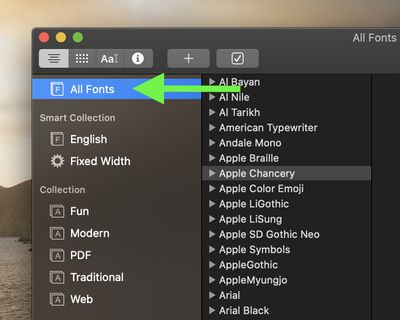
    how to install new catalina fonts 4

  2. Select All Fonts in the sidebar.
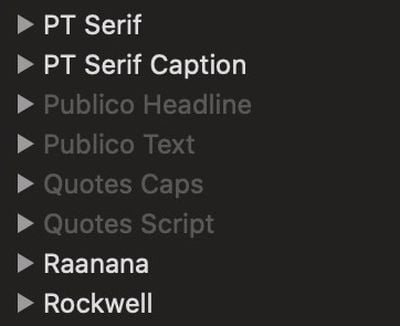
    how to install new catalina fonts 3

  3. Browse the font list and select any greyed out fonts you like the look of. The grey indicates they're either deactivated or haven't been downloaded yet.
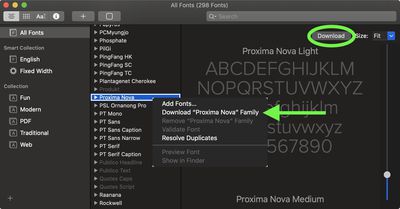
    how to install new catalina fonts 2

  4. Right-click (or Ctrl-click) the selected font and choose Download [Font name] from the contextual menu. Alternately, click the Download button in the font preview window.
    font book

The new font options include Canela (16 styles), Domaine (6 styles), Founders Grotesk (17 styles), Graphik (18 styles), Produkt (8 styles), Proxima Nova (12 styles), Publico, Sauber Script, and Quotes Caps.

Top Rated Comments

jayducharme Avatar
81 months ago
Nice tip, thanks! I never realized that Apple occasionally updated their fonts.

Score: 14 Votes (Like | Disagree)
Xenobius Avatar
81 months ago
Nice. These few fonts are worth more than the Windows 10 license.

Score: 8 Votes (Like | Disagree)
81 months ago

I use the iCloud versions of Pages, Keynote, and Numbers a lot - can I use the fonts in the desktop version and have them show up fine in the web version? What about the iOS version?
I created a Keynote presentation with each of the new fonts and their variants (16 different text boxes). Then, I opened that presentation on my iPad. The first time I opened it, it said fonts were missing. But as it was displaying that message, the fonts were downloading in the background, replacing the default font with the new ones. When I opened the presentation the second time, no error, so now they're installed on my iPad :)
Score: 7 Votes (Like | Disagree)
SurferPup Avatar
81 months ago
Thank you MacRumours.
Score: 7 Votes (Like | Disagree)
flottenheimer Avatar
81 months ago
Nice collection. Glad we're not in Camp-Arial. : )
Score: 7 Votes (Like | Disagree)
macdos Avatar
81 months ago
Then the document will say that there are missing fonts. That's why you include fonts when submitting to a print office, and that is why you use PDF for sharing information.

Once you share editable documents, you absolutely have to use the same software base, the same fonts and so on.


And what happens if I were to share such documents?
They are universally accessable in apps in Catalina, as long as there is support for them. For instance, emoji fonts may not work in Adobe Indesign.

However, when you upgrade from Catalina to Macos Death Valley 10.16, you will have to reinstall all these fonts, and also all additional voices, dictionaries and so on. Bummer.


Question: Will these fonts display in Catalina only, or do they become system fonts and can be accessed for instance in Pages?
Score: 6 Votes (Like | Disagree)

Popular Stories

Apple Event Logo

Apple Working on All-New Operating System

Wednesday July 29, 2026 11:39 am PDT by
Apple is developing an all-new operating system that is essentially a mix of tvOS, watchOS, and iOS, according to Bloomberg's Mark Gurman. In a report this week, he said the operating system will feature a grid of icons, widgets, and apps, along with customizable clock faces. The new software platform is intended for Apple's long-rumored smart home hub. With built-in facial recognition,...
Four iPhone 18 Pro Colors Mock Feature

iPhone 18 Pro and iPhone Ultra: Pre-Orders and Release Date

Thursday July 30, 2026 6:12 am PDT by
Apple has yet to reveal when the iPhone 18 Pro and iPhone Ultra will be announced and released, but the dates usually follow a familiar pattern. Labor Day is September 7 this year. The last time the holiday fell on that day was in 2020, but the iPhone event that year was delayed until October due to the COVID-19 pandemic. So, the last time Labor Day was on September 7 in a normal year was in ...
Dynamic Island iPhone 18 Pro Feature

iPhone 18 Pro: Twelve Changes Coming to Apple's Next Flagship

Thursday July 30, 2026 3:43 am PDT by
We're less than two months out from the launch of Apple's premium next-generation smartphone lineup, and while we're not expecting a dramatic change in terms of functionality, there are still several enhancements rumored to be coming to the iPhone 18 Pro and iPhone 18 Pro Max. One thing worth noting is that Apple is reportedly planning a major change to its iPhone release cycle this year,...

🔗 Related Apple News & Rumors

Stay updated with the latest Apple ecosystem news and verified rumors