How to Download an Apple Fitness+ Workout for Offline Viewing - MacRumorsOpen MenuShow RoundupsShow Forums menuVisit ForumsOpen Sidebar
Skip to Content

How to Download an Apple Fitness+ Workout for Offline Viewing

by

One of the perks of Fitness+ is the option to download Fitness+ videos to your library for offline viewing, a handy option if you're planning to travel somewhere that doesn't have an internet connection but you don't want to miss a workout.

First, you need to save the video that you want to download to your favorites by following the instructions in our how to on saving videos to a list. After that, downloading a video is simple.

  1. Open up the Fitness app on iPhone or iPad. On iPhone, tap on the Fitness+ tab.
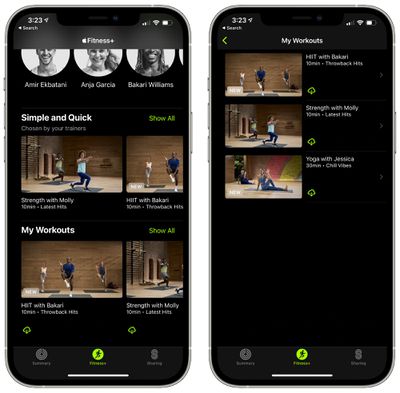
  2. From the main interface, scroll all the way down to "My Workouts" to access your saved workouts.
  3. Tap on "Show All." fitness plus download offline
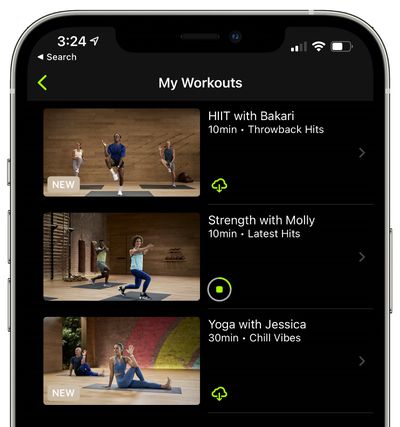
  4. Tap on the iCloud button next to the video that you want to download. fitness plus downloaded

After that, the video that you downloaded will be available to watch even when there's no cellular or WiFi connection available. Videos that you've downloaded for offline viewing will have "Downloaded" listed next to them.

To delete a video, tap on the three dots in the top right corner of a video that you've downloaded and then choose the "Remove Download" option.
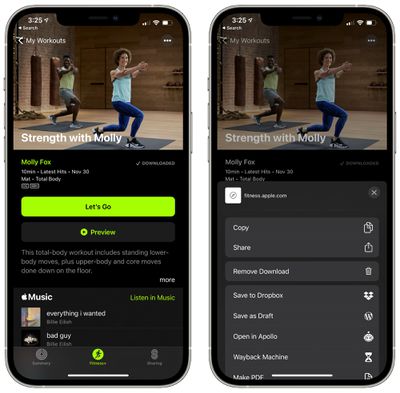
fitness plus remove downloaded video
For more on Fitness+, make sure to check out our full Fitness+ guide.

Popular Stories

apple fitness plus feature magenta

Job Listing Suggests Apple Fitness+ Could Get Live Content

Monday August 17, 2026 1:01 am PDT by
Apple is hiring a Studio Producer for its Fitness+ service with a background in live production, in what could be a hint at the future of the service. The job listing was posted last month, detailing an in-person role at Apple's Santa Monica studio. It calls for someone with a "strong foundation in live or live-to-tape multi-camera production and a genuine curiosity about where live content...


iOS 27 Next to iPhone

Here's When iOS 27 Rolls Out Today in Every Time Zone [Update: It's Out]

Sunday September 13, 2026 3:00 am PDT by
Update 10:04 a.m.: iOS 27 is rolling out now, though it may take a bit for all users to see it, so keep checking! Apple is about to release iOS 27, which will finally deliver more advanced Siri AI capabilities as well as a variety of other refinements, improvements, and new features to iPhones. It's Apple's biggest software update of the year, and Apple announced at Wednesday's iPhone event...
iOS 27 Icon iPhone

iOS 27 Available Now With These 8 New Features

Monday September 14, 2026 9:00 am PDT by
Update — 10 a.m. Pacific Time: Apple has released iOS 27. During its iPhone 18 Pro and iPhone Duo event last week, Apple announced that iOS 27 will be released widely on Monday, September 14. iOS 27 should be available around 10 a.m. Pacific Time / 1 p.m. Eastern Time today via the Settings app, under General → Software Update. Below, we have highlighted eight new features and...

🔗 Related Apple News & Rumors

Stay updated with the latest Apple ecosystem news and verified rumors