

If you've installed iOS 15 or iPadOS 15 through Apple's developer program or the public beta now it's been released, you may decide you want to downgrade because of usability or stability issues. Keep reading to learn how it's done.
iOS 15 banner public beta red
Apple usually only releases the public betas of ‌iOS and ‌iPadOS‌ once the developer versions are relatively stable. That said, Apple's beta versions of its major software updates can be notoriously buggy, especially the early releases.

You may find apps not working properly, poor battery life, device crashes, and features that don't do what they're supposed to. Fortunately, you can restore your iPhone or iPad to the previous version of iOS.

If you made an archived backup before you installed the beta, you can remove the ‌iOS 15 beta and restore the backup. If you didn't make a backup, you can still downgrade, but you won't be able to restore your device to its original state before you upgraded.

Also, if you've installed watchOS 8 on your Apple Watch, it's important to note that you won't be able to use it with your ‌‌iPhone‌‌ once you've gone back to iOS 14. And downgrading an Apple Watch to a previous version of watchOS can't be done manually either – if you want to remove ‌watchOS 8‌, you'll have to send your watch in to Apple.

How to Downgrade from iOS 15 or iPadOS 15

  1. Launch Finder on your Mac.
  2. Connect your ‌iPhone‌ or ‌iPad‌ to your Mac using a Lightning cable.
  3. Put your device into recovery mode. The method of doing this depends on your device, so check the list below these steps to find your model. Apple also provides more information on Recovery mode in this support article.
    restore

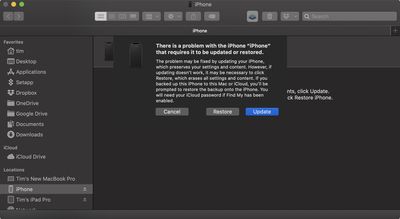
  4. A dialog will pop up asking if you want to restore your device. Click Restore to wipe your device and install the latest public release of iOS or iPadOS.
  5. Wait while the restore process completes.
How to Enter Recovery Mode on Your iOS Device

  • iPad models with Face ID: Press and quickly release the Volume Up button. Press and quickly release the Volume Down button. Press and hold the Top button until your device begins to restart. Continue holding the Top button until your device goes into recovery mode.

  • iPhone 8 or later: Press and quickly release the Volume Up button. Press and quickly release the Volume Down button. Then, press and hold the Side button until you see the recovery mode screen.

  • iPhone 7, iPhone 7 Plus, and iPod touch (7th generation): Press and hold the Top (or Side) and Volume Down buttons at the same time. Keep holding them until you see the recovery mode screen.

  • iPad with Home button, iPhone 6s or earlier, and iPod touch (6th generation) or earlier: Press and hold both the Home and the Top (or Side) buttons at the same time. Keep holding them until you see the recovery mode screen.

One you've followed the above steps, you can restore a backup of your device from iOS 14 or iPadOS 14 using your Mac or iCloud.


Related Forum: iOS 15

Top Rated Comments

Agit21 Avatar
60 months ago
We’ll you guys are smarter now. Don’t install beta updates. It’s just not worth it (for normal users).
Score: 6 Votes (Like | Disagree)
Mystakill Avatar
60 months ago
I just wish I could download the previous version of Safari. The new version is an absolute steaming pile o' crap. "Look! We put in all kind of new, useless gee whizzes & what's-its because our designer & developer wonks wanted to. Who cares if these (essentially) massive changes slow you down and make you less productive? It looks great, right? Right?"

I guess I'll be re-exploring Chrome, Firefox, et. al., for a new default browser.
Score: 5 Votes (Like | Disagree)
mystery hill Avatar
60 months ago

Can you do this for Watch OS ?
No.
Score: 4 Votes (Like | Disagree)
randyhudson Avatar
60 months ago

I would strongly advise against this if you were previously on the iOS 14.7 public beta.

I lost a good 4 hours of my life yesterday trying to do this.

Once you sign up for the iOS 15 public beta, the 14.7 will not be available again. The downgrade to iOS 14 will work but will put you on 14.6 but your backup will be from the 14.7 beta and is incompatible so can’t be used.

Complete **** show.

After getting back on iOS 14.6 and not being able to restore it. I had to set it up as a new phone, then get back onto the iOS 15 public beta, then reset the device and then restore it from the latest backup.
No sympathy for fools willing to be apple’s guinea pigs
Score: 3 Votes (Like | Disagree)
Marzzz Avatar
60 months ago

We’ll you guys are smarter now. Don’t install beta updates. It’s just not worth it (for normal users).
Not only do I not install beta updates, but I usually wait at least 6 months before installing a MacOS major update.
Score: 3 Votes (Like | Disagree)
Saturnine Avatar
60 months ago

Only reason I want to downgrade is HSBC's app doesn't work under iOS15 public beta.
Is there a way to downgrade the Watch to watchOS 7? I don;t want to downgrade my phone to iOS 14 and lose connectivity to my watchOS 8 watch.
Same.

First Direct (same underlying app, different branding) doesn’t work on iOS 15. I didn’t want to downgrade back to iOS 14 so I’ve had to put the app on my iPad for the time being, and call them to deactivate/deactivate the stupid digital secure key.

Par for the course running betas though.

The only other iOS 15 issue I’ve had is my phone occasionally running really hot and depleting the battery very quickly for no apparent reason. No clues in the Battery settings page either. A reboot sorts it out and it hasn’t happened since I upgraded to the revised version of Beta 2. They must have encountered a serious bug to release a revised build and I wonder if that’s what I was hitting.
Score: 2 Votes (Like | Disagree)

Popular Stories

Aston Martin CarPlay Ultra Screen

Apple's CarPlay Ultra to Expand to These Vehicle Brands Later This Year

Sunday February 1, 2026 10:08 am PST by
Last year, Apple launched CarPlay Ultra, the long-awaited next-generation version of its CarPlay software system for vehicles. Nearly nine months later, CarPlay Ultra is still limited to Aston Martin's latest luxury vehicles, but that should change fairly soon. In May 2025, Apple said many other vehicle brands planned to offer CarPlay Ultra, including Hyundai, Kia, and Genesis. In his Powe...
Apple Logo Black

Apple Just Made Its Second-Biggest Acquisition Ever After Beats

Thursday January 29, 2026 10:07 am PST by
Apple today confirmed to Reuters that it has acquired Q.ai, an Israeli startup that is working on artificial intelligence technology for audio. Apple paid close to $2 billion for Q.ai, according to sources cited by the Financial Times. That would make this Apple's second-biggest acquisition ever, after it paid $3 billion for the popular headphone and audio brand Beats in 2014. Q.ai has...
Apple Logo Black

Apple's Next Launch is 'Imminent'

Sunday February 1, 2026 12:31 pm PST by
The calendar has turned to February, and a new report indicates that Apple's next product launch is "imminent," in the form of new MacBook Pro models. "All signs point to an imminent launch of next-generation MacBook Pros that retain the current form factor but deliver faster chips," Bloomberg's Mark Gurman said on Sunday. "I'm told the new models — code-named J714 and J716 — are slated...
14 inch MacBook Pro Keyboard

Apple Changes How You Order a Mac

Saturday January 31, 2026 10:51 am PST by
Apple recently updated its online store with a new ordering process for Macs, including the MacBook Air, MacBook Pro, iMac, Mac mini, Mac Studio, and Mac Pro. There used to be a handful of standard configurations available for each Mac, but now you must configure a Mac entirely from scratch on a feature-by-feature basis. In other words, ordering a new Mac now works much like ordering an...
Apple MacBook Pro M4 hero

New MacBook Pros Reportedly Launching Alongside macOS 26.3

Sunday February 1, 2026 5:42 am PST by
Apple is planning to launch new MacBook Pro models with M5 Pro and M5 Max chips alongside macOS 26.3, according to Bloomberg's Mark Gurman. "Apple's faster MacBook Pros are planned for the macOS 26.3 release cycle," wrote Gurman, in his Power On newsletter today. "I'm told the new models — code-named J714 and J716 — are slated for the macOS 26.3 software cycle, which runs from...













