How to Discreetly Disable Touch ID and Face ID on an iPhone - MacRumorsOpen MenuShow RoundupsShow Forums menuVisit ForumsOpen Sidebar
Skip to Content

How to Discreetly Disable Touch ID and Face ID on an iPhone

by

There's an Emergency SOS feature built into iOS 11 that has hidden functionality -- it automatically disables Touch ID and makes it so your passcode has to be entered to unlock your iPhone.

Because it essentially shuts down the biometrics on your device, you can't be compelled by a police officer or malicious person to unlock your iPhone with a fingerprint, nor can your fingerprint be used to get into your device should you be unconscious after an emergency. On iPhone X, this also applies to Face ID.

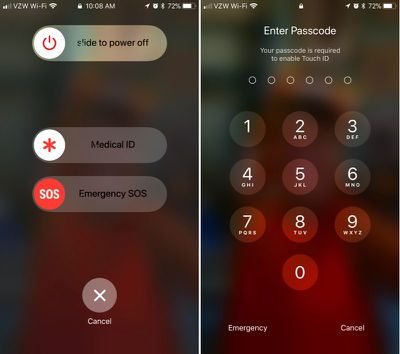
Emergency SOS is enabled by default, and there's only one step to activate it: Press on the sleep/wake (Side) button of your iPhone five times in rapid succession. On the iPhone X, iPhone 8, and iPhone 8 Plus, instead of pressing the Side button five times rapidly, you hold down the Side button and one of the volume buttons at the same time. It's essentially a quick squeeze on either side of the device.
disabletouchidios11
These gestures initiates a screen that gives you the option to power the iPhone off, make a call to emergency services, or access your Medical ID.

Though not expressly stated, once your iPhone is in this emergency state, Touch ID is disabled. You will, however, have to press the cancel button to get back to the Home screen, so it's not an entirely secretive process.

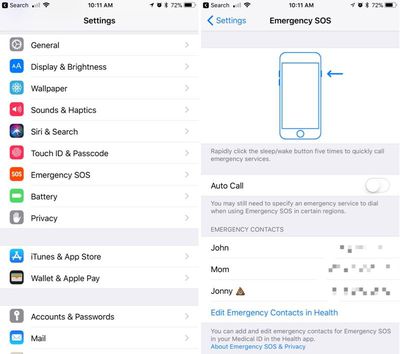
If you're using Emergency SOS to disable the lock screen and don't want to set the feature up to automatically call 911 when the sleep/wake button is pressed, make sure to disable Auto Call in the Settings app. Here's how:

  1. Open the Settings app.
  2. Scroll down to Emergency SOS.emergencysossettings
  3. Disable Auto Call.

With Auto Call disabled, pressing sleep/wake will bring up the aforementioned screen with the option to slide to make the emergency call. With Auto Call enabled, emergency services are called automatically when the sleep/wake button is pressed five times, following a five second countdown timer.

It's best to leave Auto Call on if you want to be able to get in touch with emergency services immediately should you be in danger.

While this feature was likely built to keep your iPhone secure in a situation where you might be incapacitated, it can also prevent authority figures from forcing you to unlock your device.

This is notable because there have been legal rulings where a defendant has been compelled to provide a fingerprint, but not a passcode. Most people will never need to disable Touch ID, but it's worth knowing the option is there should there be a situation where it is necessary.
Related Forum: iOS 11

Top Rated Comments

116 months ago
Useful feature. Hopefully I'll never have to use it, but good to know it's there.
Score: 6 Votes (Like | Disagree)
116 months ago
And to turn it back on, hold it over your head tilted at a 47 degree angle, hop 3 times, and say "Hey Siri, who is John Galt?", then boom, you're back in business.
Score: 4 Votes (Like | Disagree)
116 months ago
And to turn it back on, hold it over your head tilted at a 47 degree angle, hop 3 times, and say "Hey Siri, who is John Galt?", then boom, you're back in business.
You just need to enter your pass code to unlock and biometrics is automatically back on. No need to sarcastically scroll through settings to enable it.
Score: 3 Votes (Like | Disagree)
116 months ago
nor can your fingerprint be used to get into your device should you be unconscious after an emergency.

If you are unconscious, how do you hit the button five times.

People... enough of this crazy paranoid stuff. Unless you are a murderer, kiddie molester or big time drug dealer the police don’t really care about your phone. If a cop gets in your phone illegally, it is thrown out in court.

And for Gods sake, if you are being robbed, give them the damn phone. Disable it later or track it with the police. They can’t do anything without your icloud passcode.
Score: 2 Votes (Like | Disagree)
JRoDDz Avatar
116 months ago
Yes, a nice feature hope to never have to use. Maybe a small detail, but I noticed that the message shown is "Touch ID does not recognize your fingerprint", which also provides a little more protection since it doesn't indicate that you disabled Touch ID or even own the phone necessarily.
Plausible deniability.
Score: 2 Votes (Like | Disagree)
116 months ago
Useful feature. Hopefully I'll never have to use it, but good to know it's there.
Yes, a nice feature hope to never have to use. Maybe a small detail, but I noticed that the message shown is "Touch ID does not recognize your fingerprint", which also provides a little more protection since it doesn't indicate that you disabled Touch ID or even own the phone necessarily.
Score: 2 Votes (Like | Disagree)

Popular Stories

Apple Event Logo

Apple Working on All-New Operating System

Wednesday July 29, 2026 11:39 am PDT by
Apple is developing an all-new operating system that is essentially a mix of tvOS, watchOS, and iOS, according to Bloomberg's Mark Gurman. In a report this week, he said the operating system will feature a grid of icons, widgets, and apps, along with customizable clock faces. The new software platform is intended for Apple's long-rumored smart home hub. With built-in facial recognition,...
imac video apple feature

Apple Made Its Second-Biggest Acquisition Ever This Year

Wednesday July 29, 2026 12:03 pm PDT by
Apple this year acquired Israeli startup Q.ai for close to $2 billion, according to the Financial Times. That would make this Apple's second-biggest acquisition ever, after it paid $3 billion for the popular headphone maker Beats in 2014. This is also the largest known Apple acquisition since the company purchased Intel's smartphone modem business and patents for $1 billion in 2019. Q.ai...
Dynamic Island iPhone 18 Pro Feature

iPhone 18 Pro: Twelve Changes Coming to Apple's Next Flagship

Thursday July 30, 2026 3:43 am PDT by
We're less than two months out from the launch of Apple's premium next-generation smartphone lineup, and while we're not expecting a dramatic change in terms of functionality, there are still several enhancements rumored to be coming to the iPhone 18 Pro and iPhone 18 Pro Max. One thing worth noting is that Apple is reportedly planning a major change to its iPhone release cycle this year,...

🔗 Related Apple News & Rumors

Stay updated with the latest Apple ecosystem news and verified rumors