

iOS 17.2: How to Disable iPhone Inline Predictive Text - MacRumorsOpen MenuShow RoundupsShow Forums menuVisit ForumsOpen Sidebar
Skip to Content

iOS 17.2: How to Disable iPhone Inline Predictive Text

by

Apple in iOS 17 added inline predictive text for iPhones, but did not include a way to turn it off independently of predictive suggestions above the keyboard. In the latest iOS 17.2 update, that's changed.
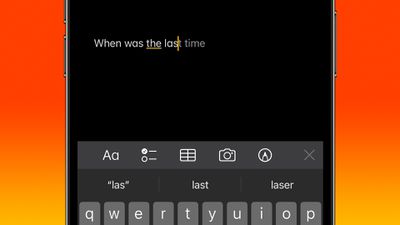
inline predictive text
Apple has improved its machine learning technology on iPhones in an effort to make iOS a lot more helpful, and one of the features in which this tech has been deployed is inline predictive text.

Predictive text does just what it says - it predicts what you're going to type next, and offers to autocomplete it. As you type, the predicted text appears ahead of the cursor. If it has accurately predicted what you intend to type, all you need to do is tap the spacebar and iOS fills it in for you.

In previous versions of iOS 17, you could only disable inline predictive text by turning off predictive text wholesale – which meant you would also lose the predicted words that appear above the keyboard as you type. Fortunately, in iOS 17.2 you can now toggle off inline predictive text separately without disabling the predictive suggestions.

Turning Off Inline Predictive Text

  1. Open Settings on your iPhone.
  2. Tap General.
  3. Under "All Keyboards," toggle off the switch next to Show Predictions Inline.
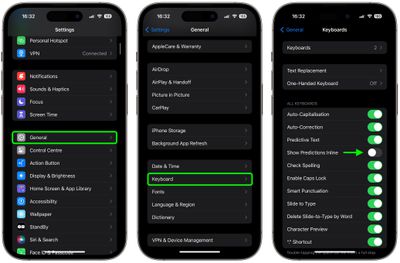
settings

That's all there is to it. The new option is likely to be welcomed by those who prefer a more manual typing experience or find inline predictive text suggestions distracting. Of course, if you find yourself missing the help that inline predictive text can provide, simply use the above steps to re-instate the feature.


Top Rated Comments

34 months ago
I find predictive text very interruptive to thought flow.
Score: 10 Votes (Like | Disagree)
eicca Avatar
34 months ago
“Predictive” text and “autocorrect” have gotten even worse despite all the hype. Autocorrect is barely even worth having turned on anymore.

I guess that’s to be expected with Apple these days.
Score: 9 Votes (Like | Disagree)
Mockletoy Avatar
34 months ago

I find predictive text very interruptive to thought flow.
Yeah, it was super distracting to me. You can turn it off on the Mac, too.


System Settings -> Keyboard -> Input Sources -> Edit -> All Input Sources -> Show inline predictive text

I don't know how anyone can stand it. It's like a bunch of flies buzzing around my cursor while I'm trying to write.
Score: 8 Votes (Like | Disagree)
34 months ago
Works great for me - it's a real time saver. The prediction aspect works well, especially anticipating likely multi-word phrases, and is usually what I would be needing to type one character at a time.

I realize I'll not be earning any forum cred stating the above. So, how about... Apple likes profits! Ooooooh...
Score: 7 Votes (Like | Disagree)
carlsson Avatar
34 months ago
I think it works quite well.
Score: 5 Votes (Like | Disagree)
34 months ago

I can see utility in text prediction when texting and other situations in which you're communicating in short spurts. But it is not useable, to me, for writing anything long. The mechanics of it interrupting thought is like this: every time a prediction comes up, you have to switch brain activity to evaluating whether what it is that it is indicating is accurate. This interrupts one's flow of thought for long things.

Even then, many of my texts with friends are long because we're engaged in long conversations. In that situation I don't find text prediction helpful.
Sorry it's not for you. It's very fluid and natural for me.

If I'm going to write something long, I generally use a device with a standard full-size mechanical QWERTY keyboard; a laptop or desktop computer.
Score: 3 Votes (Like | Disagree)

Popular Stories

Apple Event Logo

Apple Working on All-New Operating System

Wednesday July 29, 2026 11:39 am PDT by
Apple is developing an all-new operating system that is essentially a mix of tvOS, watchOS, and iOS, according to Bloomberg's Mark Gurman. In a report this week, he said the operating system will feature a grid of icons, widgets, and apps, along with customizable clock faces. The new software platform is intended for Apple's long-rumored smart home hub. With built-in facial recognition,...
imac video apple feature

Apple Made Its Second-Biggest Acquisition Ever This Year

Wednesday July 29, 2026 12:03 pm PDT by
Apple this year acquired Israeli startup Q.ai for close to $2 billion, according to the Financial Times. That would make this Apple's second-biggest acquisition ever, after it paid $3 billion for the popular headphone maker Beats in 2014. This is also the largest known Apple acquisition since the company purchased Intel's smartphone modem business and patents for $1 billion in 2019. Q.ai...
Dynamic Island iPhone 18 Pro Feature

iPhone 18 Pro: Twelve Changes Coming to Apple's Next Flagship

Thursday July 30, 2026 3:43 am PDT by
We're less than two months out from the launch of Apple's premium next-generation smartphone lineup, and while we're not expecting a dramatic change in terms of functionality, there are still several enhancements rumored to be coming to the iPhone 18 Pro and iPhone 18 Pro Max. One thing worth noting is that Apple is reportedly planning a major change to its iPhone release cycle this year,...

🔗 Related Apple News & Rumors

Stay updated with the latest Apple ecosystem news and verified rumors








































