

How to Disable Auto-Playing Video Previews on Apple TV - MacRumorsOpen MenuShow RoundupsShow Forums menuVisit ForumsOpen Sidebar
Skip to Content

How to Disable Auto-Playing Video Previews on Apple TV

by

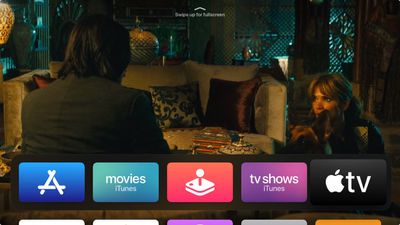
With the release of tvOS 13, Apple brought new features like Apple Arcade to Apple TV as well as a number of changes to the set-top box's interface. One of those changes includes autoplaying trailers on the Home screen.
tv app
The new content previews on the Home screen make interacting with your ‌Apple TV‌ a little different. For example, in previous tvOS versions, using the Siri Remote to highlight Apple's TV app would make your Up Next queue appear in the Top Shelf of the Home screen. Now, it plays video trailers advertising content available on the iTunes Store.

This is similar to what you'd expect to see on Netflix, which routinely auto-plays trailers in the hope that it will help you discover content more easily. Not everyone wants to see the same behavior on their ‌Apple TV‌ though, and the good news is that you can turn it off with an option buried in the device's settings.

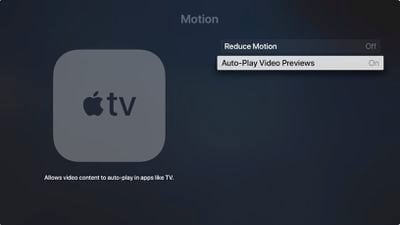
  1. Launch the Settings app on your ‌Apple TV‌.
  2. Select General -> Accessibility -> Motion.
  3. Toggle off the switch for Auto-Play Video Previews.
Apple TV
You can also move the TV app from the top row of the your ‌Apple TV‌'s Home screen and the videos should stop autoplaying. To do so, hover the selector over the TV app, then click and hold down on the Remote's touch surface for a couple of seconds.

The app icon will start jiggling, at which point you can swipe to place it where you want. Simply click the touch surface again once you have moved the TV app from the top row to another location.


Related Roundup: Apple TV
Tag: tvOS 13
Buyer's Guide: Apple TV (Don't Buy)

Top Rated Comments

macduke Avatar
91 months ago
This never should have been a default setting.

Score: 15 Votes (Like | Disagree)
DDustiNN Avatar
91 months ago
Good. I hate this. So incredibly annoying. I wish I could also turn it off in Netflix.
Score: 13 Votes (Like | Disagree)
NickName99 Avatar
91 months ago
I sometimes browse Netflix on my iPhone rather than my TV, because of how annoying the auto play is.
Score: 8 Votes (Like | Disagree)
DNichter Avatar
91 months ago
I just want MY stuff to show. Pisses me off.
Score: 7 Votes (Like | Disagree)
Porco Avatar
91 months ago
Without the option to turn this off I simply would not have ever updated my AppleTV. That is how much I loathe it. Good for Apple for providing a better choice on the matter than Netflix (i.e. providing a choice at all!).
Score: 7 Votes (Like | Disagree)
clcnyc Avatar
91 months ago
Can we get the UP Next back on the home screen instead of having to click into TV?
Score: 7 Votes (Like | Disagree)

Popular Stories

Where is the New Apple TV Feature

Next Apple TV's Chip Revealed in Latest Leak

Tuesday September 8, 2026 10:19 am PDT by
The next Apple TV 4K will be equipped with an A19 or A19 Pro chip, according to evidence in Apple's code uncovered by MacRumors contributor Aaron Perris. In particular, the device's model identifier points towards the A19 generation of chips. Accordingly, the next Apple TV would have 8GB or 12GB of RAM, up from 4GB in the current 2022 model with the A15 Bionic chip. Other rumored upgrades for...
iOS 27 Feature Cool

Apple Releases New iOS 27, iPadOS 27, macOS 27, and tvOS 27 Public Betas

Monday August 31, 2026 2:13 pm PDT by
Apple today released the sixth public betas of iOS 27, iPadOS 27, tvOS 27, and macOS Golden Gate, allowing anyone with a compatible device to download and test the new software. The sixth betas come a week after Apple seeded the fifth betas and a few hours after the eighth developer betas. You can get started by signing up on Apple's beta website and then opting in to the public beta by...
Apple TV Remote Icon

iOS 27 to Upgrade Apple TV Remote App in Two Ways

Thursday September 10, 2026 2:33 am PDT by
Apple has updated the design of the virtual Apple TV Remote for the iOS 27 Release Candidate, which was released yesterday, and there are two new features that have been added to the iPhone app's interface. First up, Apple has added a new button to the top-right corner of the Remote UI with a glyph showing four squares. Pressing the button pops out an app menu similar to the Apple TV home...

🔗 Related Apple News & Rumors

Stay updated with the latest Apple ecosystem news and verified rumors











































