

iPhone 14 Pro: How to Disable the Always-on Display - MacRumorsOpen MenuShow RoundupsShow Forums menuVisit ForumsOpen Sidebar
Skip to Content

iPhone 14 Pro: How to Disable the Always-on Display

by

The newly launched iPhone 14 Pro and iPhone 14 Pro Max come with some advanced features not included in the rest of the iPhone 14 series, including an always-on display.
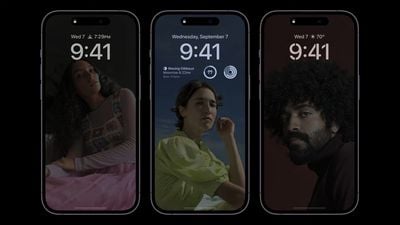
iphone 14 pro always on display
The always-on display is essentially a non-customizable, tinted version of your iPhone's Lock Screen wallpaper, widgets, and any Live Activities that are running.

Apple has been able to bring the always-on display to the iPhone 14 Pro models without having a major impact on battery life thanks to a more power-efficient OLED panel, which has a variable refresh rate as low as 1Hz. In addition to this, the always-on display also pre-renders individual frames for content elements that predictably change, such as the time, and only updates them when appropriate.

Apple has outlined some scenarios where the always-on display will intelligently turn itself off, such as if your iPhone is lying face down, the handset is in your pocket or bag, the Sleep Focus mode is on, or if you're wearing an Apple Watch and leave the room where your iPhone is. Apple says the always-on display uses multiple coprocessors in the A16 Bionic chip to refresh the display using "minimal power," making the display "incredibly power efficient."

But despite Apple implementing the above solutions, some iPhone 14 Pro reviewers have reported the always-on display having a marginal but noticeable impact on battery life. Quite how much of an impact the feature has on battery is still hard to quantify, but if you're concerned about maximizing battery life on your iPhone, or if you just find an always-on display distracting, here's how to disable the feature.

How to Disable the iPhone 14 Pro Always-on Display

  1. Launch the Settings app.
  2. Scroll down and tap through to Display & Brightness.
  3. Scroll down and toggle off the switch next to Always On.
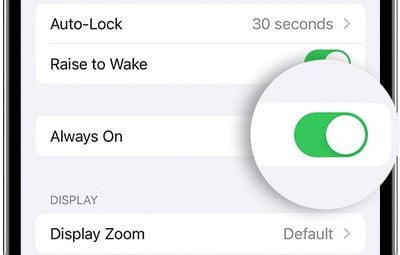
settings

That's all there is to it. Your iPhone will now turn off when you press the Side button and remain off until you press it again or pick up the device.


Related Forum: iPhone

Top Rated Comments

52 months ago
iPhone 14 Pro, how phone calls work and how to turn them off
Score: 11 Votes (Like | Disagree)
52 months ago
How about an always-off display? An iPhone Shuffle, it calls a random person in your contact list when you press the only button on it.
Score: 9 Votes (Like | Disagree)
52 months ago
Why is this not implemented like how Samsung does it? Just turn off the rest of the display and just show me notification badges, date and time in a dimmed view. That way the phone does not look distracting when on the desk. What use do I have for looking at my wallpaper in AOD?

On iPhone, it constantly looks like the screen is turned on which is irritating. It seems like Apple did not want to look like they were ripping off Samsung so they came up with this dimmed lockscreen view as their AOD.
Score: 5 Votes (Like | Disagree)
52 months ago
Tentpole feature unique to the most expensive iPhone model sucks too much battery life, so here's how turn it off. Priceless. Vintage post-jobs Apple.

Score: 5 Votes (Like | Disagree)
52 months ago
Just spent a ton of money on 14Pro, but how do I turn off the AOD, crash detection, satellite calls, dynamic island, and the new camera system? All that stuff will drain my battery!!
Score: 4 Votes (Like | Disagree)
52 months ago
I said it before and I'll say it again. I think a lot of people are underestimated how useful the AOD can be.

Score: 4 Votes (Like | Disagree)

Popular Stories

iOS 27 Next to iPhone

Here's When iOS 27 Rolls Out Today in Every Time Zone

Sunday September 13, 2026 3:00 am PDT by
Apple is about to release iOS 27, which will finally deliver more advanced Siri AI capabilities as well as a variety of other refinements, improvements, and new features to iPhones. It's Apple's biggest software update of the year, and Apple announced at Wednesday's iPhone event that it will be releasing iOS 27 sometime today – Monday, September 14. iOS 27 won't be the only release today,...
deep black iphone 18 pro

Apple Says iPhone 18 Pro Max Sold in U.S. Differs in One Way

Saturday September 12, 2026 3:27 pm PDT by
As noted by Nicolas Lellouche, who writes for the French tech website Numerama, Apple has updated its tech specs pages for the iPhone 18 Pro and iPhone 18 Pro Max to clarify which models are equipped with its new C2 cellular modem and where. Apple now says the iPhone 18 Pro has a C2 modem worldwide, while the iPhone 18 Pro Max uses the chip in every country except for the U.S. According...
iphone duo

IMAX Reacts to iPhone Duo's 1:1.4 Aspect Ratio Displays

Friday September 11, 2026 4:42 am PDT by
Production theater company IMAX has responded in a mixed way to Apple's embrace of a 1:1.4 aspect ratio on the iPhone Duo's inner and outer displays. The boxier ratio happens to be very close to the classic "full-frame" IMAX 1.43:1 aspect ratio, which comes from the geometry of the company's original 15-perforation/70mm film system. In response to an X post from someone wondering if we'll see...

🔗 Related Apple News & Rumors

Stay updated with the latest Apple ecosystem news and verified rumors










































