How to Deauthorize Your iTunes Account on a Computer You Can No Longer Access - MacRumorsOpen MenuShow RoundupsShow Forums menuVisit ForumsOpen Sidebar
Skip to Content

How to Deauthorize Your iTunes Account on a Computer You Can No Longer Access

by

newitunes122logoIf you plan to give away, sell or trade in your Mac, you should de-authorize your iTunes account on the computer first, as this removes its access to content that you bought from the iTunes Store, iBooks Store, or App Store, including things like music, movies, TV shows, apps, and books.

Apple puts a five-computer limit on an account for accessing iTunes protected content, so it's worth remembering to deauthorize before you part ways with a computer, but of course that might not always be possible. Say your Mac stops working or gets stolen, for example. What then?

Fortunately, if you no longer have access to the device you want to deauthorize, you can still do so by following the steps below on another computer. The process deauthorizes all computers associated with your account, but also lets you re-authorize the devices you still own.

Note that Apple lets you deauthorize all computers once per year, and the procedure on a Windows computer is the same as on a Mac. Keep reading to learn how it's done.

  1. Launch iTunes on your Mac.
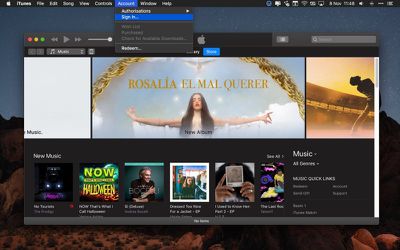
  2. If you aren't signed in already, select Account -> Sign in... from iTunes' menu bar.
    how to deuthorize itunes 0 1

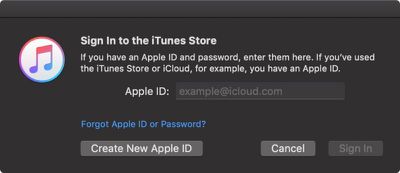
  3. Enter your Apple ID and password, and click Sign In.
    how to deauthorize itunes 1

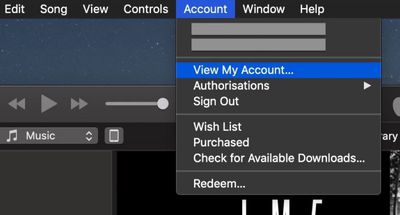
  4. Select Account -> View My Account... from the menu bar.
    how to deauthorize itunes 2

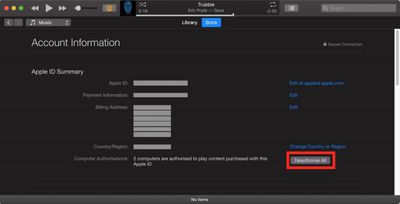
  5. On the Account Information page, click the Deauthorize All button at the lower right of the Apple ID summary section. This button will only appear if you have more than one computer authorized.
    how to deauthorise itunes accounts

  6. In the pop-up dialog window, click Deauthorize All.
    deauthorize itunes account

  7. Click OK in the Deauthorization Complete dialog window.
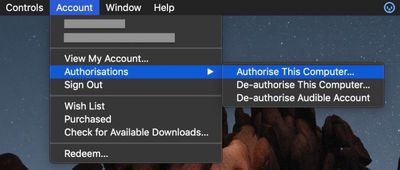
  8. To re-authorize the current computer, select Account -> Authorizations -> Authorize This Computer... from the menu bar.
    how to deauthorize itunes

  9. Enter your Apple ID and password in the dialog window, and click Authorize.
  10. Click OK at the dialog confirming successful authorization.
Tag: iTunes
Related Forum: Mac Apps

Top Rated Comments

99 months ago
I wish they would change the once a year "deauthorize all" restriction. What's the purpose of such a limitation?

Score: 5 Votes (Like | Disagree)
99 months ago
Yes I deauthorize all the time, and it's habit already. I log onto a computer, authorize it, and when I'm done, I deauthorize it. It's a habit now.

But the point is why do I need to even authorize a computer at all when you can log into an iOS or Apple TV device without any limitations.
i assume this is a throwback to the first days of label-supplied music/movies on macs, before iOS or AppleTV existed. the music/TV industry was probably convinced by apple that iOS and the AppleTV are locked down well enough that no one can decrypt content that is stored in an iOS device or AppleTV - TBH it's pretty difficult to even access the files on one of those devices let alone decrypt them. they probably never removed the 5 computer limit since the content providers probably still think that content can be decrypted on computers.

not that the 5 computer limit stops people, but the whole thing is part of a bill of goods that apple sold the content providers in order to get access to the content.
Score: 2 Votes (Like | Disagree)
LV426 Avatar
99 months ago
Honestly in this day and age, I don't understand why Apple allows me to only authorize five computers, when I can connect as many Apple TV and iOS devices as I want.
At least it does show you how many computers out of the five are authorised. I hadn't appreciated until I looked at this that I had 3 active authorisations when I only need one. Thanks, MacRumours!
Score: 1 Votes (Like | Disagree)
99 months ago
I feel like I'm always up against the 1 year limit, just from experimenting and reinstalls of machines and junk. So it's really obnoxious.

But once or twice or the years I've contacted support and they reset it for me.
Score: 1 Votes (Like | Disagree)

Popular Stories

HomePod mini and Apple TV Sage

New Apple TV and HomePod Mini Are 'Nearly Ready' to Launch, New Siri Remote Also Rumored

Sunday May 31, 2026 8:47 am PDT by
New models of the Apple TV 4K and HomePod mini are "nearly ready to go," according to the latest word from Bloomberg's Mark Gurman. Subscribe to the MacRumors YouTube channel for more videos. Both devices have been ready "for months," but Apple is holding off on launching them until the more personalized version of Siri is available, he said. "I am told the hardware for the next Apple TV...


iphone 17 pro black feature

iPhone 18 Pro's Camera Upgrade Will Cost Apple 50% More

Friday May 29, 2026 3:44 am PDT by
The iPhone 18 Pro and iPhone 18 Pro Max's all-new variable aperture lens will cost Apple 50% more than the camera unit used in current models, according to supply chain analyst Ming-Chi Kuo. Variable aperture has been one of the most persistent iPhone camera rumors of the past few years. Kuo first flagged the feature in late 2024, and it has since been corroborated by multiple reports and...
iphone 18 pro color dummies

First Look at iPhone 18 Pro Color Options Revealed by Dummy Models

Friday May 29, 2026 4:50 am PDT by
Leaker Sonny Dickson today shared images of iPhone 18 Pro dummy models in the device's four rumored colors, offering the first real-world look at what to expect from the lineup visually. Corroborating previous rumors, the dummies show the iPhone 18 Pro Max in Light Blue, Black, Silver, and Dark Cherry. Dickson said "Cherry will probably be the next hit, orange did very well." Cosmic Orange...

🔗 Related Apple News & Rumors

Stay updated with the latest Apple ecosystem news and verified rumors