How to Customize Your iPhone's Status Bar With an Emoji - MacRumorsOpen MenuShow RoundupsShow Forums menuVisit ForumsOpen Sidebar
Skip to Content

How to Customize Your iPhone's Status Bar With an Emoji

by

Apple in iOS 15 introduced a Focus feature that's designed to let you set up your device to help you be in the moment and zone in on a single thing. When a Focus mode is active, it displays a little customizable emoji/icon in the status bar of your iPhone, next to the time. Setting up a Focus mode can be complicated, but if all you want is to see a symbol in the status bar, it's easy to do once you know how.

iphone status bar emoji
There are over 25 emoji/icons that you can use, including a smiley face, a flame, and a paw print, but to use Focus, your iPhone needs to be running iOS 15. (If you have an iPad, it needs to be running iPadOS 15.) You can check what iOS version you have and update if necessary by going to Settings -> General -> Software Update.

Here are the steps to follow to get a customized emoji/icon in your iPhone's status bar.

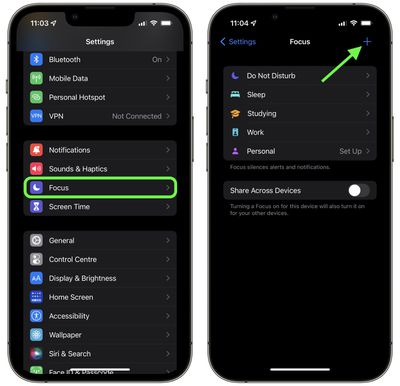
  1. Launch the Settings app.
  2. Scroll down and tap Focus.
  3. Tap the + button in the top-right corner of the screen.
    settings

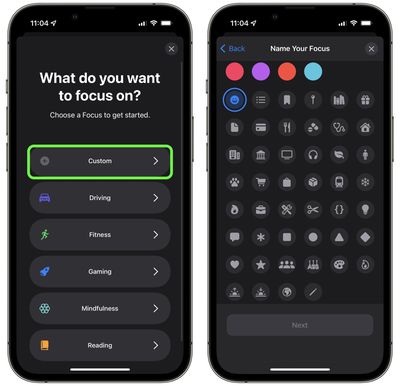
  4. Tap Custom.
  5. Give your Focus a name.
  6. Select the emoji/icon you want to use, then tap Next.
    focus

  7. Select who can send you notifications (you can choose all of your contacts), then tap Allow.
  8. Select all the apps that can show you notifications, then tap Allow.
  9. Tap Done.
  10. Now toggle the switch to enable your Focus mode.
The emoji/icon you selected should now be visible next to the clock in your iPhone's status bar. If you want to change the emoji at any time, simply go into your Focus mode's options and select a different one.

iphone status bar emoji
Note that if you have Location Services on and an app uses your current location, your icon/emoji will temporarily disappear as there won't be room for it in the status bar. If something is using your location all the time (a weather widget, for example) then it won't appear at all, in which case you'll have to go into Settings -> Privacy and toggle off Location Services.


Related Forum: iOS 15

Popular Stories

Apple Acquires Award Winning App Play Feature

Apple Acquires Award-Winning App 'Play'

Monday June 29, 2026 7:39 am PDT by
In February, Apple notified the European Commission that it would be acquiring certain assets from and have the right to hire certain employees from Rabbit 3 Times, the company behind the award-winning app design tool Play. The notification was published on the European Commission's website this week, following a four-month waiting period. Play was a Mac and iPhone app that allowed designers ...
iPhone 18 Pro Deep Red Feature

Apple 'Concerned' Over iPhone 18 Pro Data Leak From Supplier Tata

Monday June 29, 2026 11:46 am PDT by
Apple is "concerned" about a recent data leak from Tata Electronics, one of its manufacturing partners in India, reports Reuters. Tata Electronics was the target of a cyberattack, with confidential Apple documents stolen and shared on the dark web. Hackers were able to steal information about the iPhone 18 Pro and iPhone 18 Pro Max, including a list of suppliers, parts, and images of the...


series 10 apple watch titanium digital crown

Report: Apple Watch Redesign Coming Next Year With New Band System

Tuesday June 30, 2026 8:45 am PDT by
A "major overhaul" of the Apple Watch's design is due to arrive next year with a new system for connecting bands, according to a known Weibo leaker. In a set of recent posts, the leaker known as "Instant Digital" linked the new claim to older rumors about an "Apple Watch X" model, which was said to introduce a fresh design and break compatibility with the existing watch band system. Citing...

🔗 Related Apple News & Rumors

Stay updated with the latest Apple ecosystem news and verified rumors